Approval workflow
The workflow feature automates tasks when an employee submits a request for approval via ESS  .
ESS = Employee Self Service
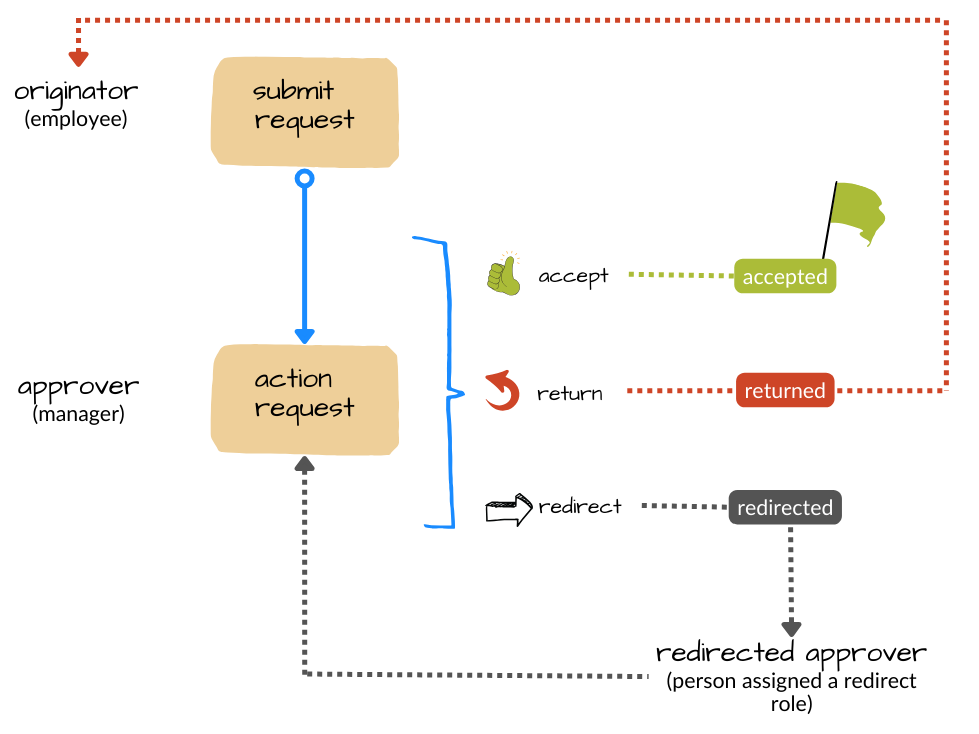
When a workflow task is assigned to someone, it appears in their Actions To Do list in Self Service. The person (approver) actioning the request can choose to redirect it to another approver. Also, EmpowerHR offers a timeout function where workflow automatically redirects the request when a set timeout period is reached.
Depending on your organisation’s needs, you can have multiple approval points (tasks) in a workflow.
Alternatively, you can keep the workflow very simple like the one shown below.
What do I need to do to set up an approval workflow?
These are the first three steps when setting up any type of workflow:

For instructions, see:
What else do I need to do?
Once you've completed the first three setup steps, apply workflow elements to tell EmpowerHR which workflow stream to use. Because workflow elements are very specific, we show how to apply them in the relevant topic:
Workflow streams are designed to allow multiple approval chains within a workflow. For example, you could have a leave request workflow with two workflow streams where:
Stream 1 is for types of leave requiring approval by several managers
Stream 2 is for other types of leave requiring approval by only one manage
ESS = Employee Self Service
- define workflow elements (flexi time workflow)
- assign workflow to compliance certificates (compliance registration workflow)
- define workflow elements (relief and payments workflow)
:
© 2023 Fusion5. All rights reserved.