When setting up an approval workflow, you first define the types of workflow roles you need and then add people to them. It’s simply determining who does what.
For example, you might set up a role of Manager and then assign all the relevant people who are managers.
To define the workflow roles:
- Go to Administration > Workflow > Role Codes.
- At the Role Codes summary screen, click Find Now to see a list of existing role codes.
- Click New to create a new role.
- At the Role Codes detail screen, complete the fields using the following table as a guide.
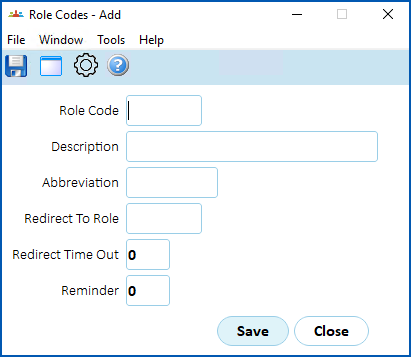
| At this field... | Do this... |
|---|---|
| Role Code | Enter a code for the role (up to 8 characters) |
| Description | Enter a description for the role (up to 30 characters) |
| Abbreviation | Enter a meaningful abbreviation of the role description(up to 10 characters) |
Redirect To Role Redirect Time Out Reminder | These fields are only required if you're using time out functionality. |
- Click Save.
- Repeat this procedure, starting at step 3, until you've created all the workflow roles you need.

|
To view the history of role codes, at the Roles Codes summary screen, go to Window > History and then do a search. |
© 2023 Fusion5. All rights reserved.