Set up an additional data screen
Set up an additional data (reference) screen to record the number and expiry date of the following registrations:
- RWVP (Registration to Work with Vulnerable People)
- TRB (Teacher Registration Board)
Here are the fields to include:
| Field | Name | Format | Validation |
|---|---|---|---|
| Field 1 | RWVP No. | Text/character | Must not be blank |
| Field 2 | RWVP Exp. | Date | |
| Field 3 | TRB No. | Text/character | |
| Field 4 | TRB Exp | Date |
To learn how to set up the additional data screen, see create additional reference screens.
Update the installation setting, rps1
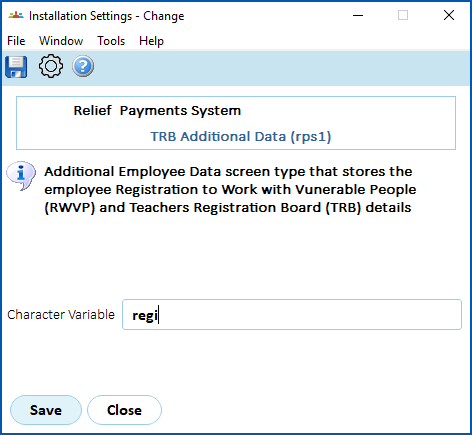
EmpowerHR uses the installation setting called TRB Additional Data (rps1) to identify the additional reference screen and determine if the RWVP and TRB are valid.
Update the rps1 installation setting to add the Screen Type code for the additional data screen, as shown in the following example: 
Add registration data to employees
Now, add the registration data to the relevant employees. There may be multiple ways to do this depending on how you set up the additional data screen (see accessing additional reference screens for more information). The following instructions show one method.
To add the registration data to employees:
- Go to Task > Employees > Employee Information > Additional Employee Data.
- At the Additional Employee Data summary screen, click New.
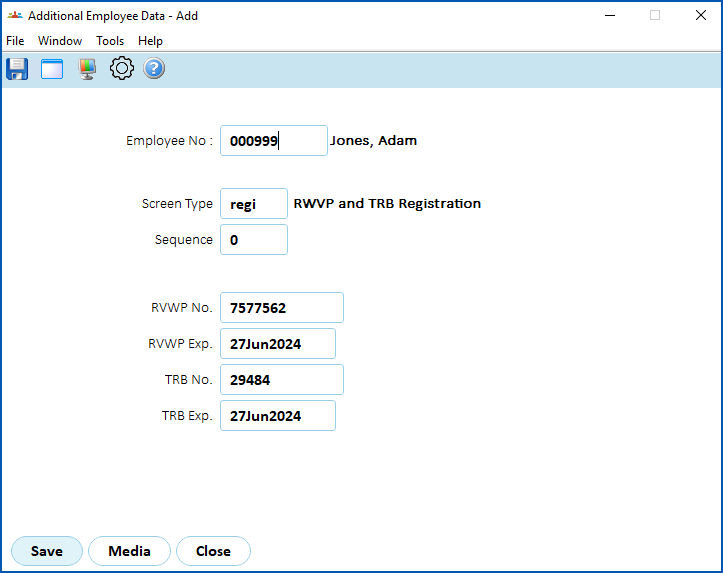
- Complete the fields. Here's an example:
- Click Save.

|
Now, a new payment request cannot be created if the:
|
© 2023 Fusion5. All rights reserved.