EmpowerHR's Leave Loading Payout screen allows calculation and payout of Annual Leave Loading accruals to a nominated payroll date and leave type/code.
Calculate payout
To calculate annual leave loading accruals payout:
- Go to Tasks > Leave > Leave Accruals and Rules > Leave Loading Payout.
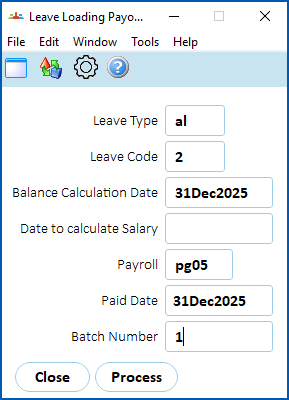
- At the Leave Loading Payout screen, complete the fields, using the following table as a guide.
| Field | Description | ||
|---|---|---|---|
Leave Type Leave Code | Click Window, find and double-click the leave type to add it to the field. EmpowerHR populates the Leave Code based on your selection. | ||
Balance Calculation Date | This field defaults to 31 December of the current year. | ||
Date to calculate Salary | If this field is:
| ||
Payroll | Enter the payroll code | ||
Paid Date | This field defaults to 1 December. You can change this date, if required.
| ||
Batch Number | This field must contain a valid, standard batch number (for example, 1, 2, 3, or 4), and must not be left blank. |


- Click Process. After the process runs, EmpowerHR creates a PDE record for the loading payment and a negating leave record for each employee allocated to the leave type/code.
Include regular allowances in leave loading payout
You can include specific regular allowances in the leave loading payout value EmpowerHR calculates when the Date to calculate Salary field contains a date.
To include regular allowances:
- Set the installation option called include allowance in the provisioning / payout of leave loading (llal) to y (yes).
- Go to Control Tables > Payment > Pay Element Codes and create a new pay element for any allowances you want to include in the calculation of leave loading payouts. Attach the appropriate allowances to the pay element.
- Go to Administration > Agency Management > Installation Constants - Leave/Super tab. In the Leave provisions pay element field, enter the pay element code (for allowances) you created in step 2.
Leave loading capping
The leave loading amount employees are entitled to is often determined by an industrial agreement, with some agreements defining a maximum rate at which the loading is paid out.
This leave loading cap is applied to the loading when paid at the time, or if the loading is paid out at the end of the year, it’s applied then.
Pay leave loading at the HDA rate
When an employee is on a Higher Duties Assignment (HDA), they usually receive a higher rate of pay for that assignment.
If leave loading is:
- paid at the time the employee takes the leave, the loading is paid at the employee’s higher HDA rate
- paid out at the end of the year, EmpowerHR allows the employer to pay portions of the leave loading at the HDA rate where appropriate
Rules are:
- The highest rate an employee can be paid is the leave loading capped amount.
- If the employee’s base pay rate is higher at the end of the year than it was at any other time, then this rate is applied to all the leave loading.
- Any leave loading paid at the HDA rate only applies to the first 20 days of leave taken while on HDA.
- Any allowances are included in calculations before the cap is applied.
How to set up the feature
Once you set the maximum leave loading hourly rate, the leave loading cap applies.
If you want the HDA rules to apply, set the installation option called do we want to pay out leave loading at the HDA rate (lhda) to y (yes).
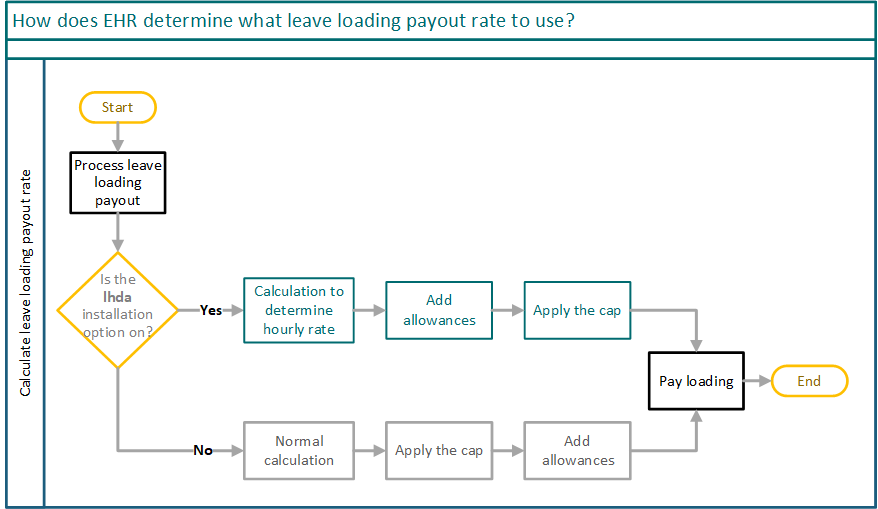
The following diagram shows how EmpowerHR:
- determines the rate at which to pay leave loading when the lhda installation option is on (set to y (yes))
- follows standard payout rules and capping when the lhda installation option is off (set to n (no))
Leave loading capping and HDA payout rate case studies
Case study: Applying the capLinda’s:
Linda’s leave loading of 160 hours is:
160 x 63.94 x 17.5/100 = $1,790.32 |
Case study: Current rate is higherKaitlynn is an ambitious employee.
Kaitlynn’s leave loading of 160 hours is:
160 x 40.24 x 17.5/100 = $1,126.72 |
Case study: HDA and leave loadingLionel’s current position pays him a rate of $25.00.
Lionel’s leave loading of 160 hours is paid out at the end of the end of the year, and:
120 x 25 x 17.5/100 = $525 40 x 27.28 x 17.5/100 = $190.96 Total payout is $190.96 + $525 = $715.96 |
Case study: First 20 days on HDACraig has accrued 8 weeks of annual leave.
Craig’s 4 weeks of leave loading (160 hours) is paid out at the end of the end of the year, and because we only consider the first 20 days of any leave taken while on HDA, then:
We’ve determined:
120 x 35.65 x 17.5/100 = $748.65 40 x 48.46 x 17.5/100 = $339.22 Total payout is $748.65 + $339.22 = $1,087.87 |
© 2023 Fusion5. All rights reserved.