You can set an upper limit for the rate of leave loading payment via a rate attached to a classification. You can vary the rate by date.
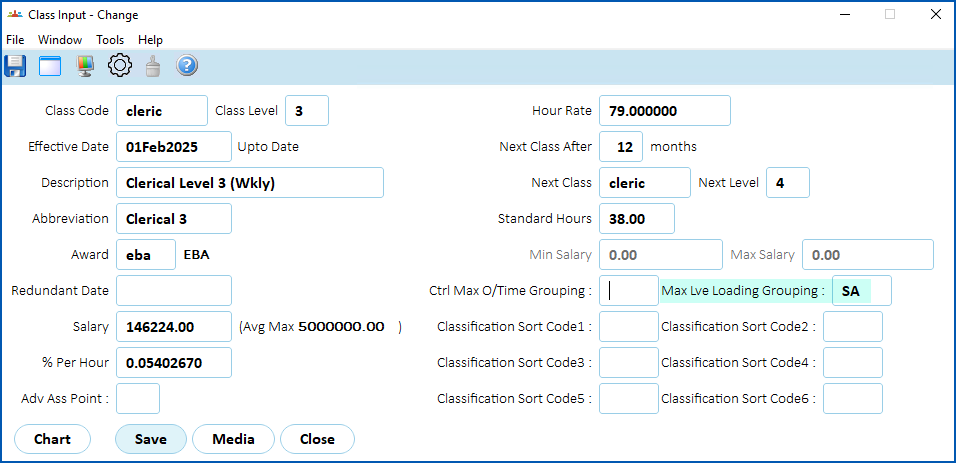
The Grouping field allows you to set different rates for different groups of employees. For example, different values may be required for different states. To do this, make sure the classification attached to the employee has the same grouping code entered in the Maximum Lve Loading Grouping field on the Class Input screen.
Here is an example of using a maximum leave loading hourly rate:
At Control Tables > Leave > Max Leave Loading Hrly Rate, we've added a rate with a grouping called SA for the classification, Clerical Level 3 (Weekly).
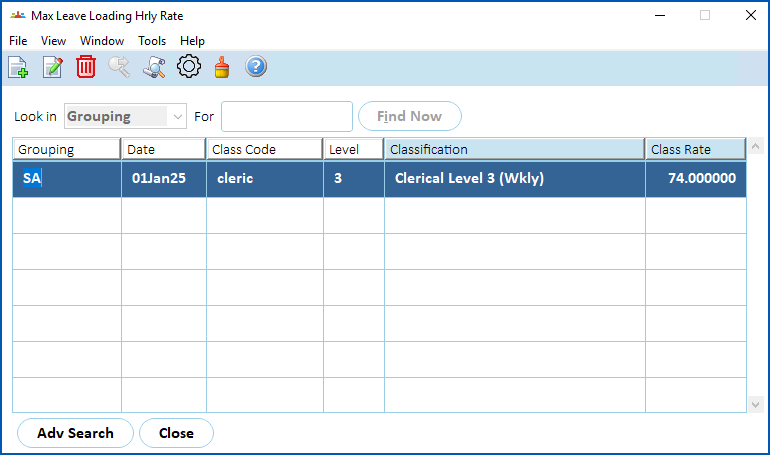
- The maximum hourly pay rate applies to all leave loading requests for employees in the SA grouping.
- The pay date in which a leave loading request is made is the date EmpowerHR uses to extract the maximum leave loading hourly rate.
At Tasks > Classifications > Class Input, we show employees on the classification, Clerical Level 3 (Weekly), are paid their leave loading at a rate of $74.00 instead of their normal rate of $79.00.
 | See manage awards & classifications if you need more information about the Class Input screen. |
© 2023 Fusion5. All rights reserved.