When the installation option called treat employee as a whole when determining formula pay (falp) is set to y (yes), running a formula process check during the Christmas pay calculation period  determines whether a formula calculation applies and, if so, which formula type to use.
Christmas pay calculation period = the pay period directly after the Christmas Pay Period up to the last pay period that contains the last day of the school holidays.
Also includes the pay period with the start of Term 1 - if there are school holidays in that pay period.
A formula check looks at all employments together to determine which formula type, if any, applies for the employee. EmpowerHR then applies the same formula type across all the employments. When the formula check process finishes, EmpowerHR stores the Formula type data in a table and uses it when running the pay calculation for the Christmas pay calculation period.
During the year, the pay calculation process automatically runs a formula check for any employees with a Set Up Termination record in the current pay period.
In this topic, we show how you can run a formula check either as a:
| Tips about formula checks |
|
Run a formula check (foreground job)

|
You can also use the foreground job to re-run a check for an individual employee, if required. We show you how in the following procedure. |
To run a formula check (foreground job):
- Go to Tasks > School > Formula Check.
- At the Formula Check screen:
- click All Employees to run a full formula check
- enter the current School Year
- enter the Payroll Code
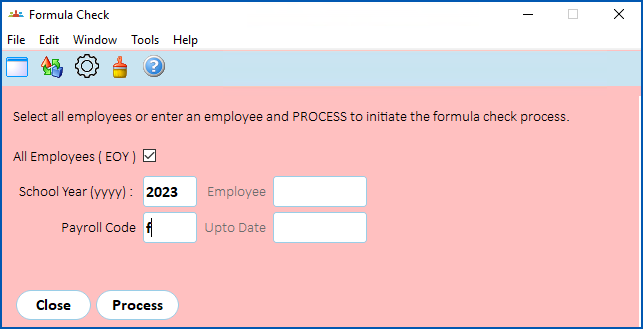
- Click Process.
- Once EmpowerHR finishes the check, you can re-run the process for an individual employee if required. At step 2 of this procedure:
- enter the Employee code
- enter the last day of Term 4 in Upto Date

- Click Process.
Run a formula check (background job)
To run a formula check (background job):
- Go to Background Jobs > School > Formula Check.
- At the Formula Check screen:
- enter the current School Year
- enter the Payroll Code
- Click Save. EmpowerHR sends the formula check job to the Requested Jobs queue and runs it as a background job.
- Once EmpowerHR finishes the check, go to Background Jobs > Requested Jobs > Requested Jobs.
- Find and double-click the job to view the log file. The log file lists the employees who are not considered for a Formula type, for example, non-averaged employees.
|
|
To view the employees due to receive either a Formula 1 or Formula 2 payment, see view formula type employee details. |
© 2023 Fusion5. All rights reserved.