EmpowerHR allows you to modify settings and the cascading style sheet (.css) to fine-tune the feature for your organisation.
Configuration settings
See organisation chart configuration for how to make changes. like adding your own logo to the banner, etc.
Screen painting
See self service screen painting for how to hide/display fields, change field labels, etc on the Organisation Chart screen.
Modifications via .css file
You can change the .css file to modify elements of the self service Organisation Chart.
Use the following instructions to change the custom-orgchart.css file, located at:
<SelfService>\css\orgchart\custom-orgchart.css
You must add any new images you use to the images/custom directory before making the change. This also ensures your images are not lost during upgrades.
Modify banner background and text colour
Modify the banner background colour as shown in the following example (where we change the colour to red).
Code |
|
Modify the banner text colour as shown in the following example (where we change the colour to blue).
Code |
|
Modify card position type icon
Modify the Reports To card's position type icon as shown in the following example (where we change the position type icon colour to red).
Code |
|
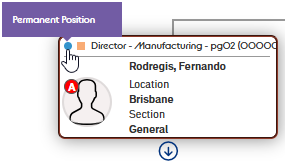
You can apply different colours to different position icon types. Say, your permanent position type code is perm and your part-time position type code is part, changes shown in the following example would set the permanent position icons to blue and part-time position icons to green.
Code |
|
Here's a permanent position icon in blue...
Modify card employee type icon
Modify the Reports To card's employee type icon as shown in the following example (where we change the employee type icon colour to red).
Code |
|
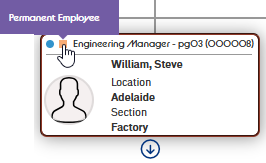
You can apply different colours to different employee icon types. Say, your permanent position type code is perm and your part-time position type code is part, changes shown in the following example would set the permanent position icons to orange and part-time position icons to black.
Code |
|
Here's a permanent employee icon in orange...
Modify card dummy occupant photo
Modify the Reports To occupant card dummy photo as shown in the following example (where we change the dummy photo to a specific photo).
Code |
|
Modify card vacant occupant indicator icon
Modify the Reports To occupant card's vacant indictor icon as shown in the following example (where we change the vacant indicator image to a specific one)..
Code |
|
Modify card acting occupant icon
Modify the Reports To acting occupant identifier background colour and text colour as shown in the following example (where we change the background colour to green and the text colour to red).
Code |
|
Modify card contractor occupant icon
Modify the Reports To contractor occupant identifier background colour and text colour as shown in the following example (where we change the background colour to purple and the text colour to yellow).
Code |
|
© 2023 Fusion5. All rights reserved.