The cost centre section is the one part of the approval form you can edit. It defaults to the employee's current cost centre allocation, but you can change it if the new working arrangement needs different costing.
Single cost centre
If the employee has a single cost centre, you'll see a dropdown where you can select a different one. The percentage stays at 100%.
Split cost centres
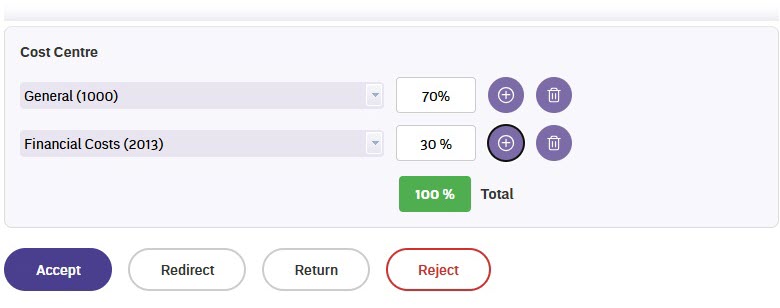
If the employee's salary is split across multiple cost centres, you'll see each one listed with its percentage. You can:
- Change any of the cost centre codes
- Adjust the percentages
- Add a new cost centre row using the Add icon
- Remove a row using the Trash icon
The total percentage displays at the bottom. It shows in green when the splits add up to 100%, and red if they don't – you'll need to correct this before you can approve.
When to update cost centres
Not every request needs a cost centre change. If the employee's existing allocation is still correct for their new arrangement, you can leave it as is. Any approver can update cost centre allocations during their approval step, but they're typically finalised by payroll during Desktop processing.
Next topic |
|---|
© 2023 Fusion5. All rights reserved.