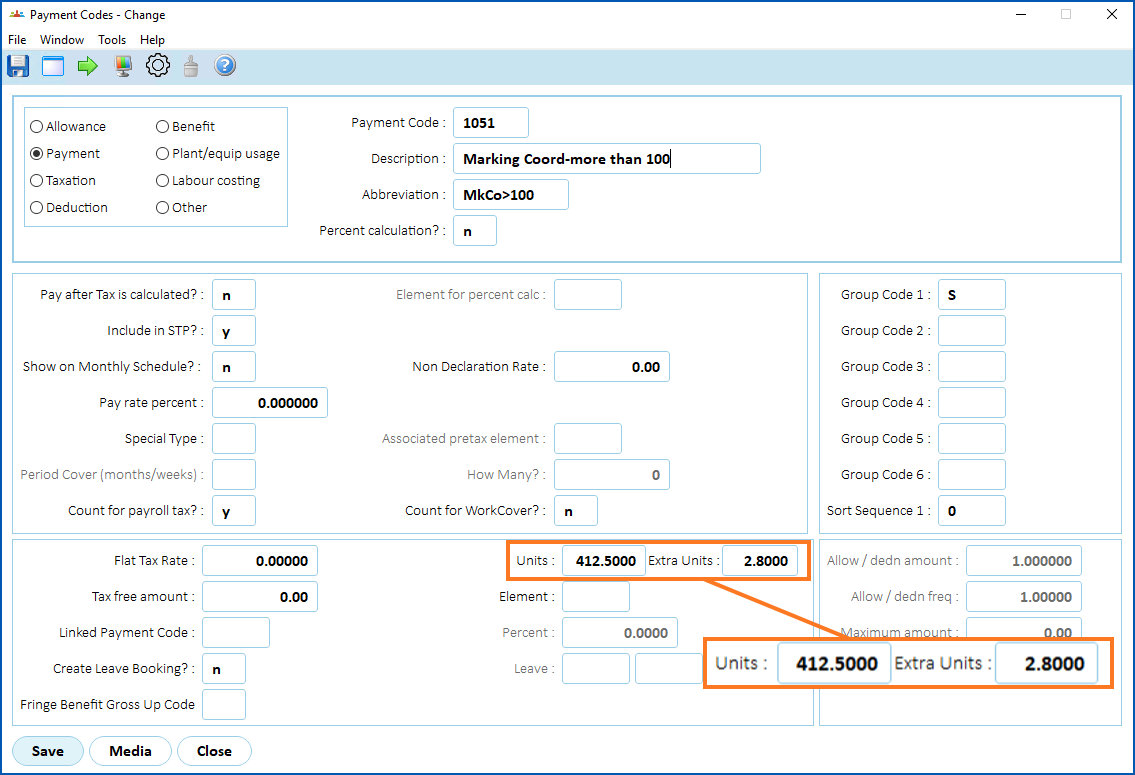
There are two fields on the Payment Code screen called:
- Units
- Extra Units
EmpowerHR uses the values from these fields when calculating the amount to pay for TASC  payment requests.
TASC = Tasmanian Assessment, Standards and Certification
To change the field display settings to allow users to enter values in these two fields: 
- Go to Tasks > Payroll > Payment Codes.
- At the Payment Codes summary screen, click Find Now to list all existing payment codes.
- Select a payment code.
- Click View, and then click Retrieve Detail.
- At the Payment Code detail screen, click Screen Painting.
- The Painting Payment Codes screen displays a list of fields.
- Select the payment code field called Units, and then click Open.
- At the Painting Payment Codes detail screen, select Enterable to allow users to enter data in the field.
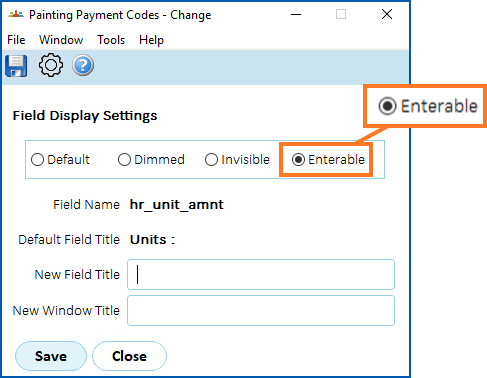
- Click Save.
- The Painting Payment Codes screen displays a list of fields.
- Select the payment code field called Extra Units, and then click Open.
- At the Painting Payment Codes detail screen, select Enterable to allow users to enter data in the field.
- Click Save, and then click Preview so you can view the effect on the screen before committing to the changes.
- Click Accept, and then click Close. The changes take effect.

|
If you want to know more about painting fields, see screen painting. |
© 2023 Fusion5. All rights reserved.