Set notification times on relief/absence booking event
When an employee creates a request for relief payment, they select an official relief reason.
Some official relief reasons are set up to require a leave request/booking. In such cases, EmpowerHR sends a notification when the relief payment request is finalised but the leave request/booking hasn't been created. Here's how to set notification times on the event code, zrpl (relief/absence booking) to remind the relevant people to create the leave request/booking.
To set notification times on event code, zrpl: 
- Go to Administration > Automatic Event Management > Auto Event Definition.
- At the Auto Event Definition summary screen, select the zrpl event.
- Click Open.
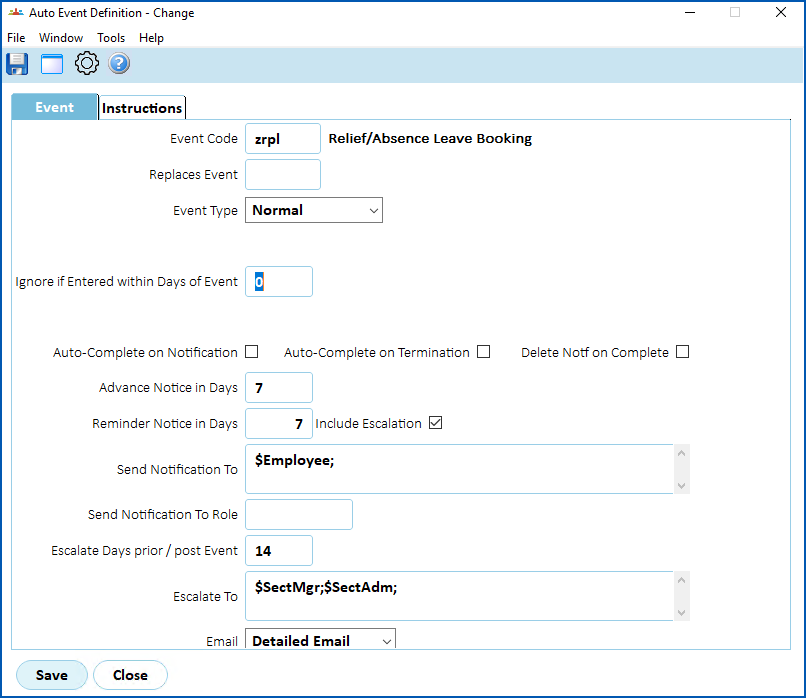
- At the Auto Event Definition (zrpl) detail screen, in:
- Advance Notice in Days, enter the number of days' advanced notice to give the employee once the relief payment request is finalised
- Reminder Notice in Days, enter 7 to send a reminder notice to the employee after 7 days
- Escalate Days prior / post Event, enter 14 to send a reminder notice to the employee, section manager, and principal after 14 days
- Click Save.

|
Once the leave request/booking is created, EmpowerHR marks the event as complete. |
© 2023 Fusion5. All rights reserved.