EmpowerHR's installation option, terminate non-employee on save? (tnon), determines when the status of a non-employee changes to terminated. If the option is set to:
- n (no), when you enter the non-employee's termination date, their status changes once Process Termination is run
- y (yes), when you enter the non-employee's termination date, their status changes as soon as you save the record

|
Terminations do not apply to external trainee non-employees. |
Terminate a paid/unpaid non-employee 
|
|
For the following procedure, we have set the tnon installation option to y (yes). |
To terminate a paid/unpaid non-employee:
- Go to the relevant non-employee screen:
- Tasks > Non Employees > Non Employee, or
- Tasks > Non Employees > Non Employee Unpaid
- Find and select the non-employee, and then click Open.
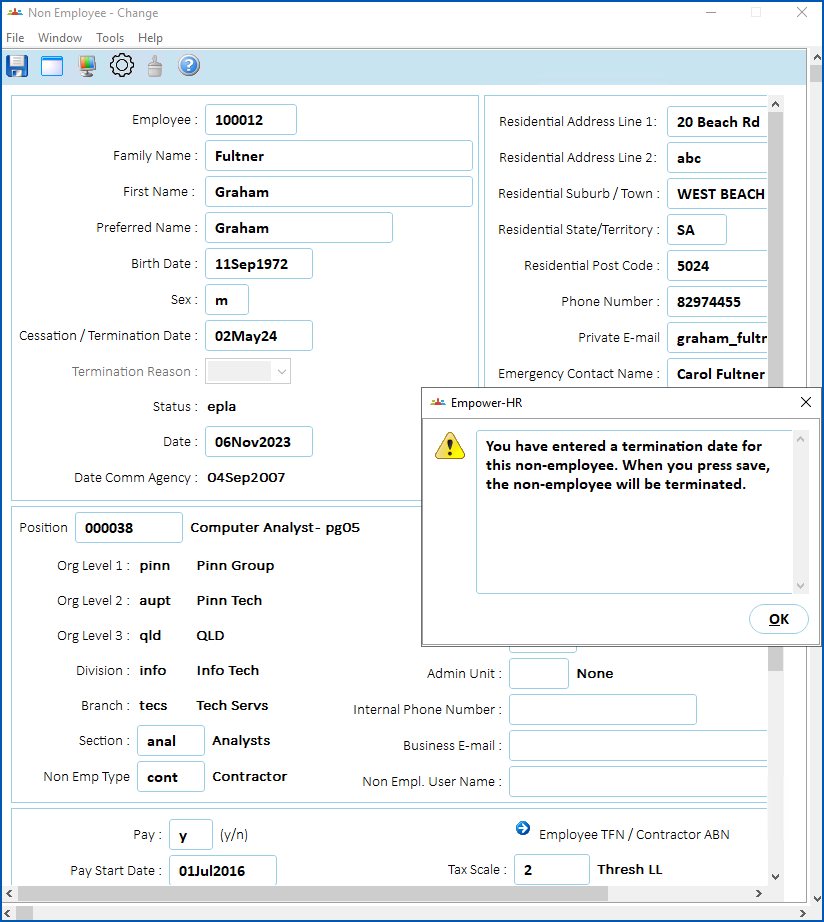
- At the Non Employee details screen, in the Cessation/Termination field, enter the termination date, and then press Tab.
- EmpowerHR displays a warning pop-up. Click OK to proceed.
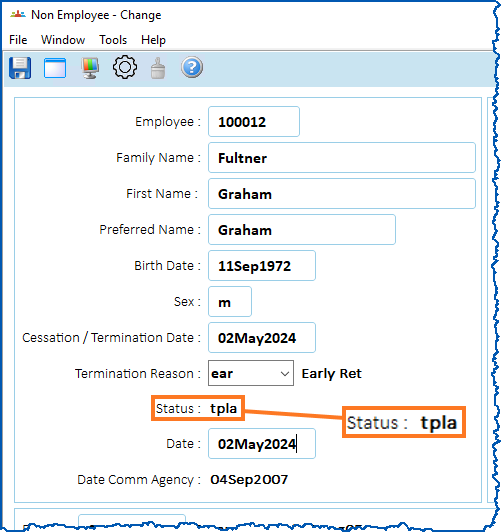
- Select a reason code from the Termination Reason dropdown list, and then press Tab.
- Note the change in status. In this example, the status changes from epla to tpla.
- Click Save.
© 2023 Fusion5. All rights reserved.