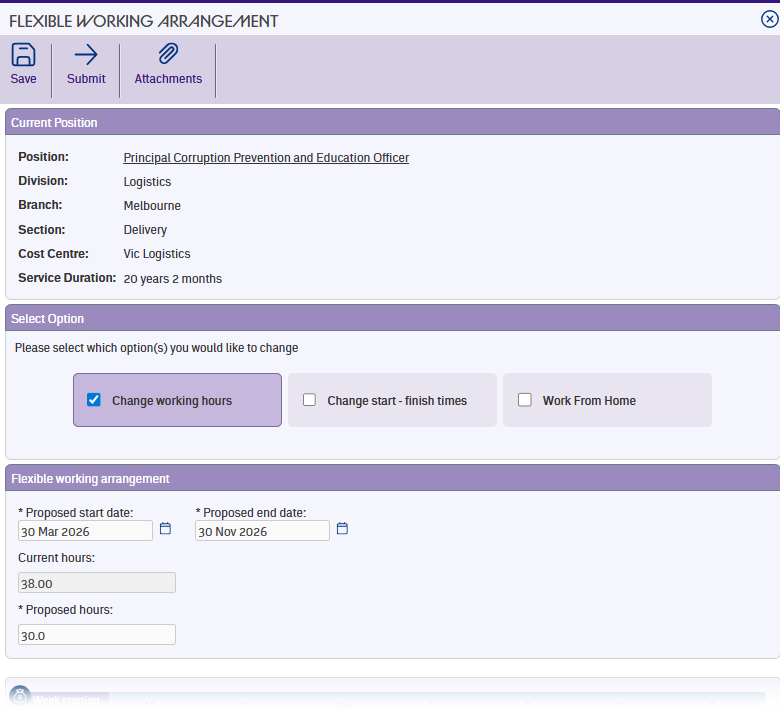
Every flexible working arrangement needs a start and end date. These tell your organisation when the new arrangement begins and when it's scheduled to finish.
Proposed start date
Enter the date you'd like your new arrangement to take effect. Once you enter a start date, the rest of the form opens up to show the sections that match your selected options.
Proposed end date
The end date defaults to 12 months after your start date. You can change this to an earlier date if you need a shorter arrangement. The end date can't go past your current employment end date or exceed 12 months from the start date.
Current and proposed hours
If your request includes a change to your working hours or start and finish times, a Current hours field shows your existing contracted hours for the position (read-only).
If you've selected the hours change option, you'll also see a Proposed hours field – this is where you enter the new total you'd like to work per pay cycle.
These fields doesn't appear if you're only changing your working from home days.
What appears next
After you enter your proposed start date, the form displays the detailed sections for whichever options you selected – your weekly schedule with daily hours, start and finish times, work from home days, or a combination. The following articles walk through each one.
Next topic |
|---|
© 2023 Fusion5. All rights reserved.