When a manager approves a sick or carer's leave request in Self Service, it comes to Payroll for processing in the desktop.
The request comes to you already approved
By the time a request reaches you, the employee's manager (and any other approvers in the workflow) has reviewed and approved it. You can see who approved it in the Authorising Manager field on the request.
Find approved requests
Approved leave requests appear in the desktop alerter when you log in. Click the alerter to open the Tasks summary screen, then go to the Leave Requests tab (or use All Requests to see everything). Each row shows the employee, leave type, dates, section, location, and status.
Open the request and choose an action
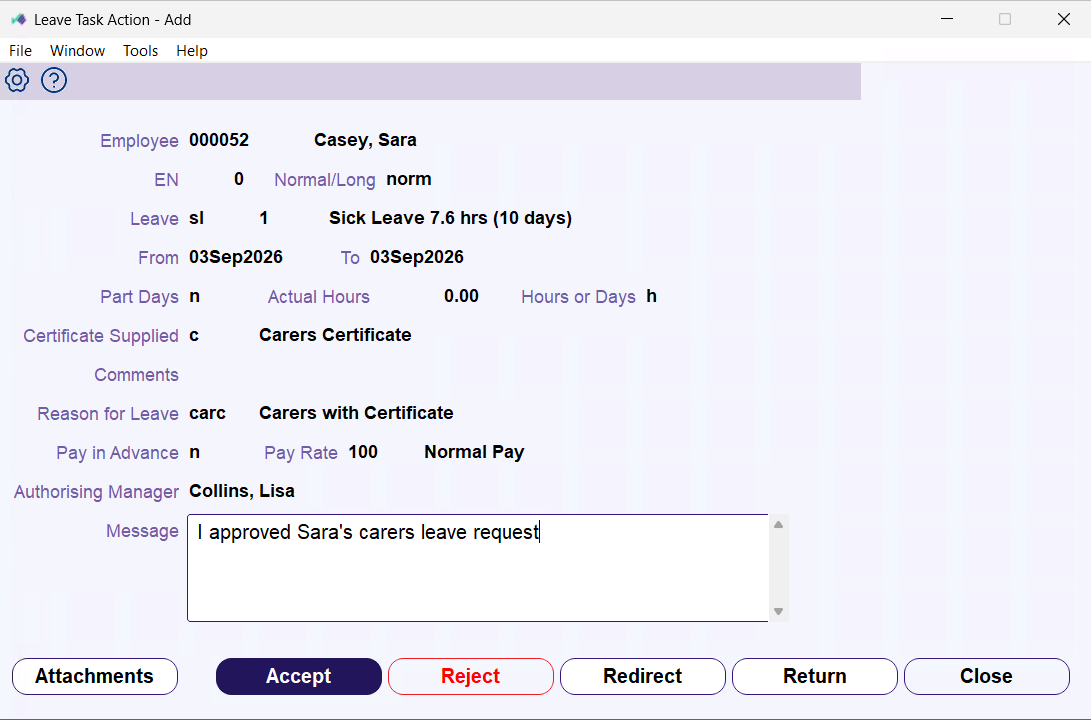
Double-click the request to open the Leave Task Action screen. You'll see the full details in read-only form – employee, leave type, dates, hours, certificate supplied, reason, pay rate, and the manager who approved it.
Click Attachments to view any certificate the employee provided.
Add a comment in the Message field if you want to explain your decision. Then choose an action:
- Accept: opens the Employee Leave Bookings - Add screen with the request details pre-populated. Review the fields and click Save to record the leave booking. For details on the fields, see Make a leave booking.
- Redirect: hand the request to another Payroll user. The Tasks Redirect popup opens – enter the person's employee code and click Save.
- Reject: decline the request. The employee is notified with your comments and the request closes.
- Return: send the request back for a change, for example when the dates or certificate need fixing.
What to check for sick and carer's leave
If the employee attached a certificate, review the file to check it matches what they claimed.
The Certificate the employee picked decides which check ran on their request:
- Medical: checked against the employee's leave balance.
- Paramedical, Carer's, or None: checked against the yearly cap for that certificate type.
© 2023 Fusion5. All rights reserved.