Here’s an example of the Installation Constants - Pay tab.
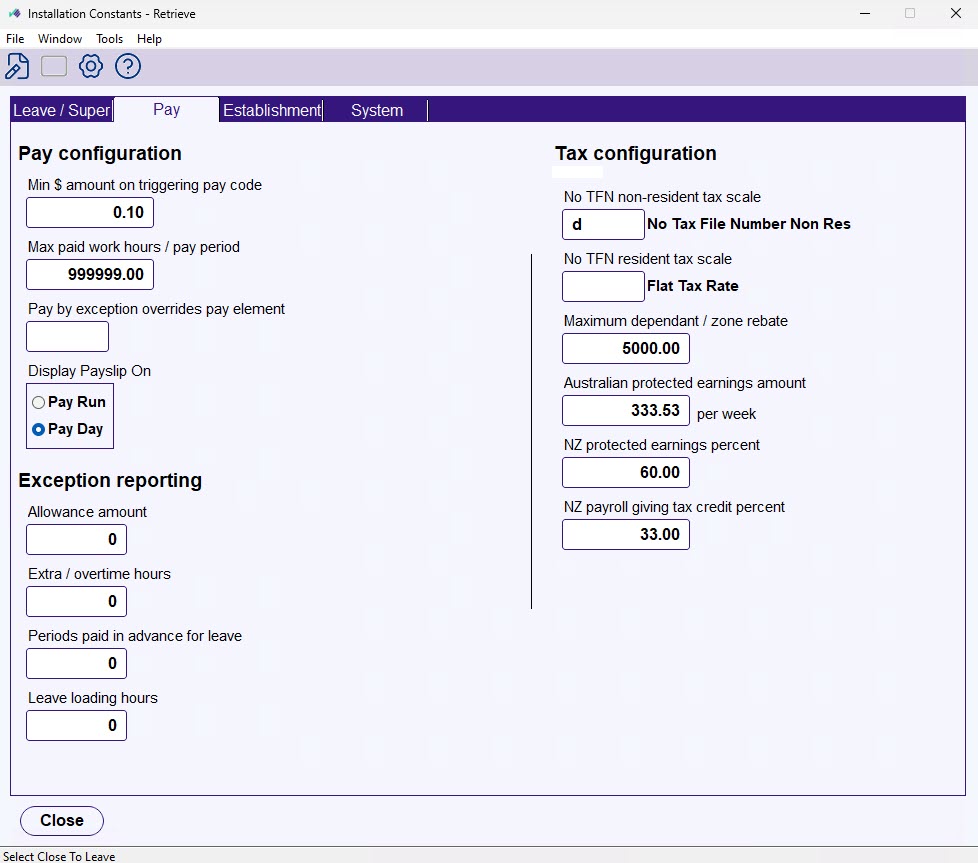
Here’s a description of each field on the Pay tab.
| Field | Description | ||||
|---|---|---|---|---|---|
| Pay Configuration | |||||
| Min $ amount on triggering pay code | This amount is used for:
| ||||
| Max paid work hours / pay periods | This is the maximum number of hours that can be input for a pay period. | ||||
| Pay by exception overrides pay element | The pay element code that holds the payment codes to use (with the installation option, Normal hours pay element usage (nheu)), for normal hours validation or PBE  override in pay data entry. PBE = Pay by Exception | ||||
| Display payslip on | Controls when a payslip becomes visible in Employee Self Service after a pay run is finalised.
Default is Pay run.
| ||||
| Exception reporting | |||||
| Allowance amount | The maximum $ amount of allowances payable to an employee in one pay period without producing a warning on the exceptional hours report. | ||||
| Extra / overtime hours | The maximum number of extra/overtime hours payable to an employee in one pay period without producing a warning on the exceptional hours report. | ||||
| Periods paid in advance for leave | The maximum number of pay periods payable in advance to an employee in one pay period without producing a warning on the exceptional hours report. | ||||
| Tax configuration | |||||
| No TFN non-resident tax scale | Tax changes in July 2000 varied the rounding of tax paid for payees with and without TFNs . Codes in these two fields identify the tax scale codes used for no-TFN Tax Scales, so different rounding calculations can be applied only to these scales. TFN = Tax File Number | ||||
| No TFN resident tax scale | |||||
| Maximum dependant / zone rebate | The maximum tax rebate that can be recorded against an employee.
| ||||
| Australian protected earnings amount | The weekly APE (Australian Protected Earnings) amount relevant to employees who pay child support. In the pay calc stage, this amount is calculated up to a per period amount. The Protected Earnings Amount (PEA) is the part of an employee or contractor’s pay exempt from child support deductions (source: Services Australia). | ||||
| NZ protected earnings percent | Not used for Australian payroll. | ||||
| NZ payroll giving tax credit percent | Not used for Australian payroll. | ||||

© 2023 Fusion5. All rights reserved.