What are multiple employments?
Multiple employments are where an employee substantively  occupies more than one position at the same time.
substantive position = a position to which an employee is permanently appointed
An employee with multiple employments is different to an employee acting in other positions, such as temporary movements, higher duties (HDA), etc. See position movements to find out more.
In the case of employees:
- on HDA, they receive the higher pay and leave, while other aspects of their employment conditions usually remain static
- with multiple employments, they can occupy each position under completely different and independent employment conditions, such as pay rates, base hours, leave conditions. For example, they can book leave for one employment (position) and continue to work in the other employments.
How does tax apply for multiple employments?
While employers are free to negotiate the conditions of employment for their employees (allowing different conditions to apply when occupying different positions), under Australian taxation legislation, tax must be applied at the employee/personal level. For example, only one tax free threshold can apply to a person.
EmpowerHR separates calculations for gross pay for each employment, but accumulates the total pay for tax calculations.
 |
Each employment must be within the same payroll. |
Which functions and details apply to multiple employments?
The following functions and details apply to multiple employments:
- employee position movements
- employee temporary movements
- regular allowances
- regular transactions
- pay data entry
- normal leave
- time and attendance
The following functions and details do not apply to multiple employments:
- tax details and calculations
- payment instructions
- additional reference information
- long service leave
What do employment numbers mean? 
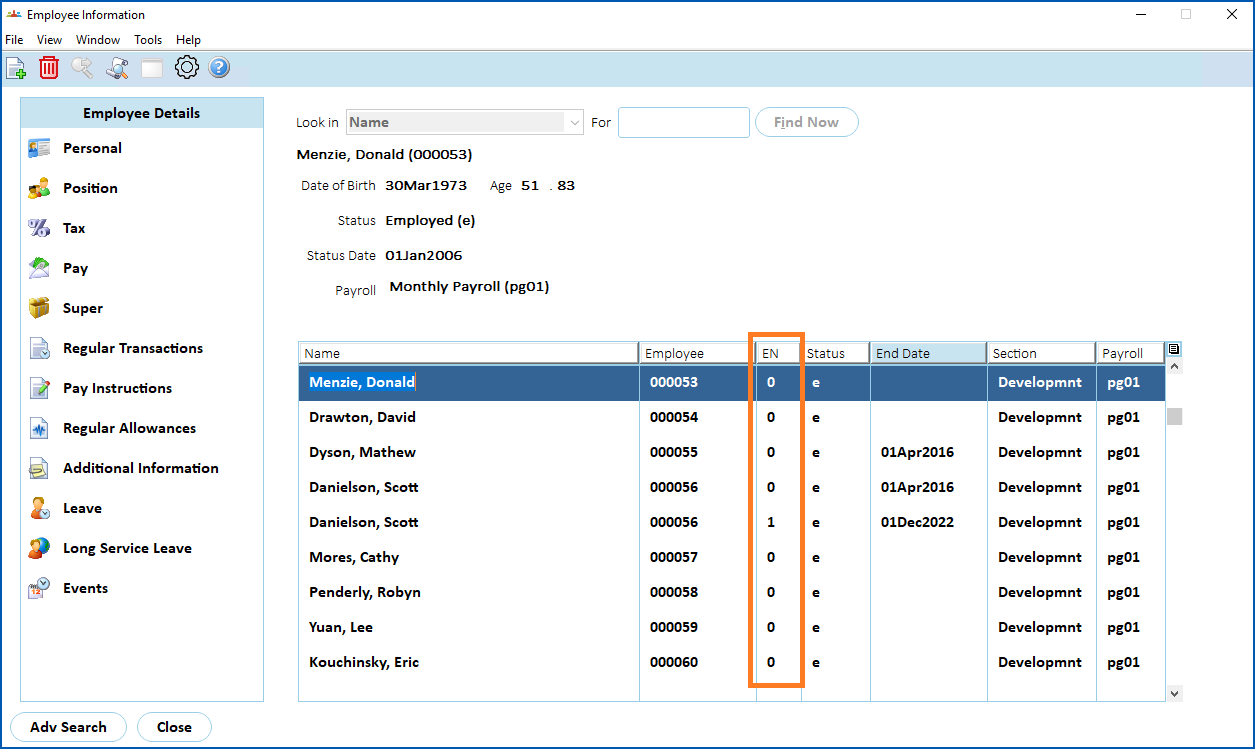
When an employee is first added to EmpowerHR, the system gives them a default Employment Number of 0 (zero). Each time a new employment is added, the employment number (EN) increments by one.
Employment numbers display in the EN column on the Employee Information screen.
© 2023 Fusion5. All rights reserved.