Pay out all formula pay before start of next school year
At the beginning of the school year, the pay period processes non term as well as term days paid to employees.
When you set the pay all formula pay before start of term (fall) installation option to y (yes), EmpowerHR pays any remaining formula pay normally due for payment in that first pay period in the previous pay period instead.
Pay all leave in advance
An employee who qualifies for a formula payment can elect to have all their end of year payments paid up front.
To pay all the employee's leave in advance:
- Go to Tasks > Employees > Employee Information > Employee Information.
- Find the employee whose record you want to work on.
- Go to the Tax Information screen on the employee record.
- Click the Payroll tab.
- In the School Christmas Leave in Advance field, enter a
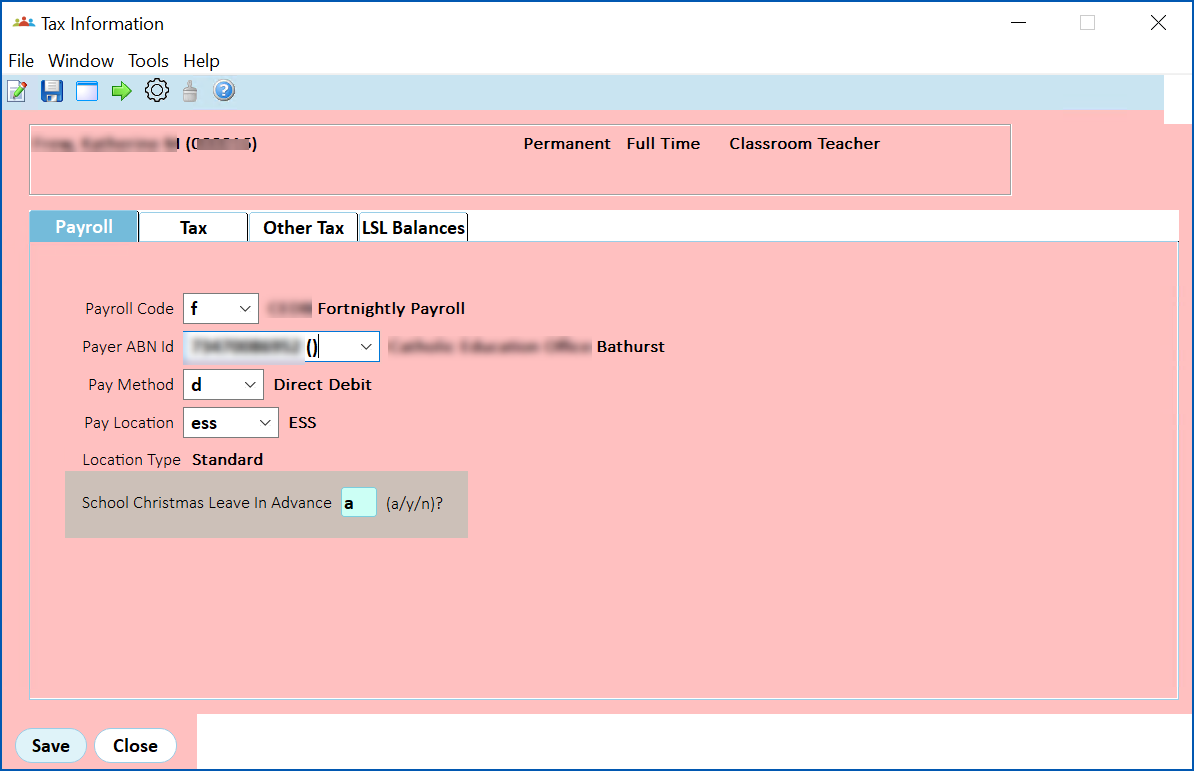
- Click Save.

|
To view calculation results after the Christmas calculation pay period is finalised, see view formula pay calculations. |
See also: set pay in advance (Christmas pay)
|
|
When you set:
...any portion of Formula relating to the final school holiday pay period that includes the start of Term 1 is not paid in advance. |
Set up end of school year formula disbursement
You can instruct EmpowerHR to disburse the employee’s total formula payment across the school vacation period, based on the employee’s normal Pay By Exception (PBE) amount for the Christmas Leave/Pay/Loading pay period. The PBE amount includes the value of current regular (triggered) allowances.
Simply set the disburse formula based on employee’s normal pay by exception (schd) installation option to y.
© 2023 Fusion5. All rights reserved.