Use the organisation restructure option when there is a structural change in the organisation, for example, when a division is abolished and you need to relocate that division to somewhere else. EmpowerHR automatically moves all positions and employees within the moving component, as a global change.
You can:
- move a section to another branch, move a branch (and all sections in the branch) to another division, and so on T
- use the cost centre code and location to move selected positions
- change a cost centre code across the whole organisation
In all cases, EmpowerHR maintains the integrity of the organisational structure as at an effective date.
A restructure can be a complex procedure, so we recommend careful planning. You may find the following screens useful to first identify the positions and employees the change will affect:
- Establishment > Position Count - Position
- Employee > Head Count, Organisation
 |
If you're undertaking a major restructure, we strongly recommend you take a copy/backup of your production system and simulate the restructure in a test environment before committing the movements to the live production system. |
To maintain (change) the organisation structure:
- Go to Tasks > Organisation > Org Restructure.
- At the Org Restructure - Add screen, in:
- Effective Date, enter the date for the restructure. The date you enter can be a future date, backdated date, or today's date.
- Section, enter the section code you want to restructure, or click Window, find and double-click the code to add it to the field
- Press Tab. EmpowerHR populates the other current organisational level fields.
- On the right-hand side of the screen, enter the New Details for the restructure - including section, branch, division, etc, and other relevant details such as cost centre.
- Click Process.
- EmpowerHR:
- searches for the positions/employees that match the New Details you entered
- counts the number of positions and people (employees) this change will affect, and then asks if you want to proceed with the update
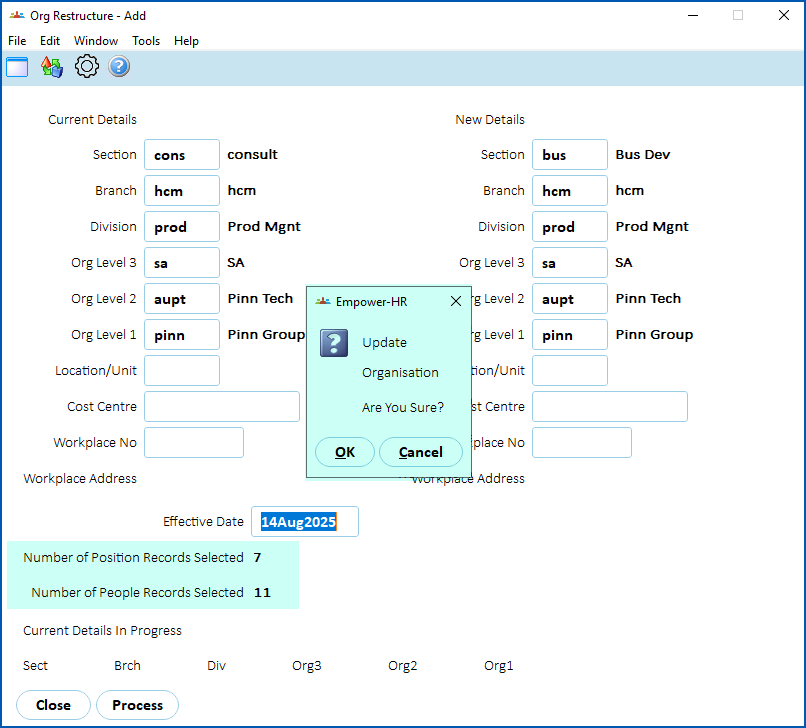
- Check all information and, once you're confident the changes are correct, click on Yes.
|
|
If any errors occur during the restructure, it may be because the sections you are dealing with has future movements pending. |
See also:
- view organisation structure to see how to carry out an org structure enquiry
© 2023 Fusion5. All rights reserved.