Run LSL accruals
You can run (calculate) LSL accruals:
- at any date
- for one employee
- for all employees
- by specific leave type
- by all leave types
- by specific leave code
- by all leave codes
While similar to timesheet accrual of normal leave, accruals by actual hours worked operate a little differently. EmpowerHR requires a pay element to define the kinds of pay on which hours worked generate an accrual. You set the pay element in the LSL accrue by hours worked pay element field on the Installation Constants screen.
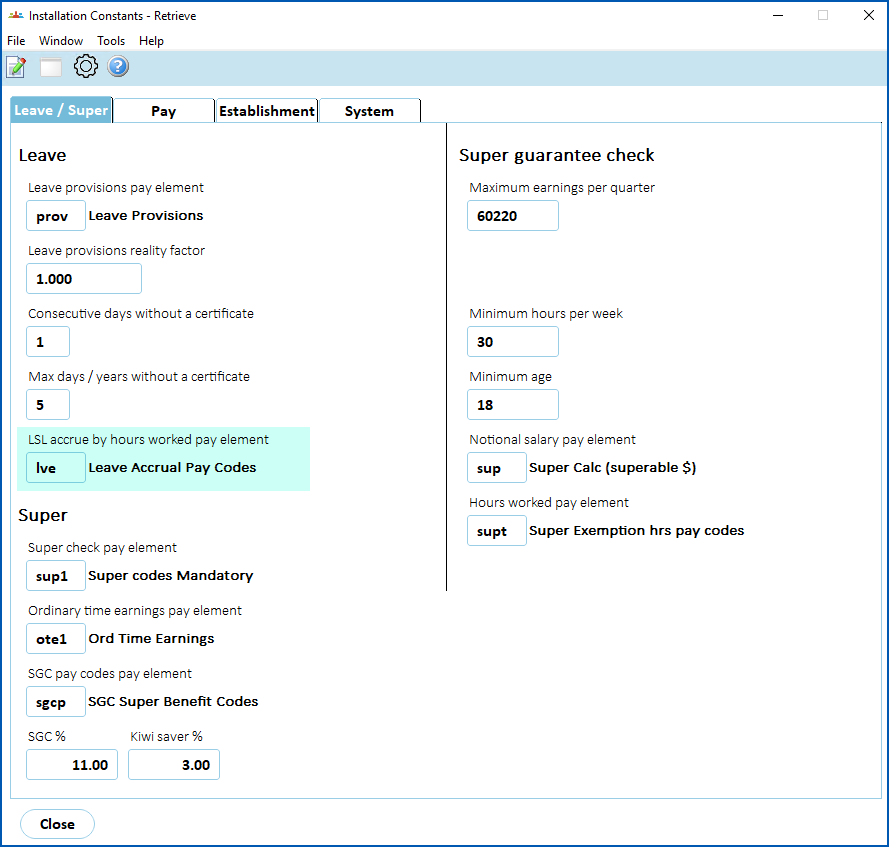
EmpowerHR:
- counts the total hours paid in a period and compares them with the standard hours on the classification
- calculates an average % full time for the accrual period
- adjusts the paid leave credit accordingly
 |
For casual employees' LSL, you can use the installation option called apply hours multiplier to LSL accruals (lslm) to apply a multiplying factor to particular payment codes. |
To run (calculate) LSL accruals:
Go to Tasks > Leave > Leave Accruals and Rules > Long Service Accruals.
At Long Service Accruals, enter a date in the Accrue Upto Date field, and complete any other fields.
 |
We recommend you:
|
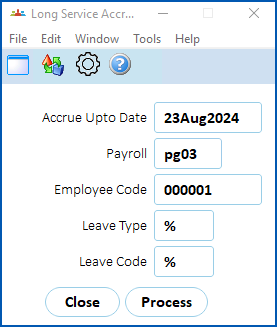
- Click Process.
- When EmpowerHR finishes, Processing Successful displays at the bottom of the Long Service Accruals screen.
- Click Close.
Reset LSL accruals
You use the same procedure to reset normal leave and long service leave. See leave accrual processes - reset leave accruals - for instructions how.
© 2023 Fusion5. All rights reserved.