Will you allow leave booking requests in self service?
If so, what is your leave approval process?
With the convenience of Self Service, employees can create leave requests and submit them for approval. Workflow is available for approving requests.
At its most basic, request and approval workflow directs a leave request to the correct approver, typically based on their role. The approver checks the request and takes action to accept, reject, or redirect the request to another approver.
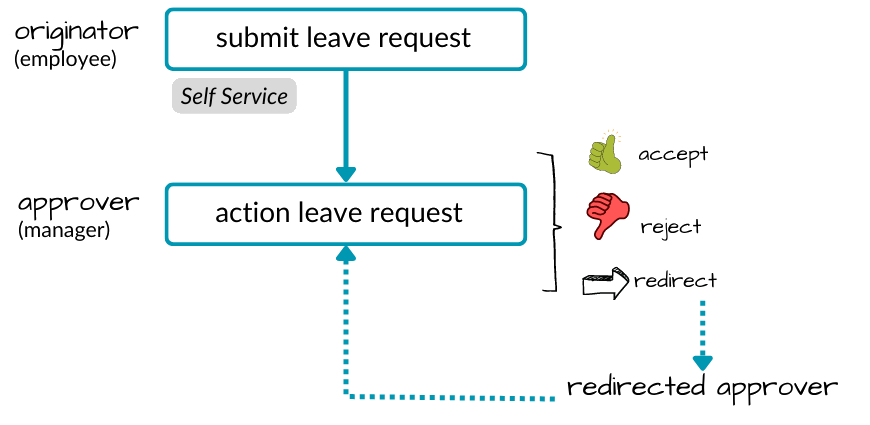
However, you can make workflow as sophisticated as you want to suit your leave approval process, such as applying:
different workflow streams
 for processing different leave rules
Workflow streams are used together with workflow elements and workflow tasks. They allow more than one approval chain in a workflow. For example, some types of leave may need two managers to approve them, while others need only one.
different workflow action
streams for the same leave ruleWorkflow actions are options available for leave request workflows. For example, a (add), c (change), d (delete).
a suitable number of approval steps (tasks) in workflow, in the order you want (workflow task
configuration)Workflow tasks are the steps in a leave request workflow. For example, you set who needs to perform each step in the approval process.
Workflow elements determine which leave types are available in Self Service, letting you control the exact types of leave requests you want to allow employees to create.
Workflow elements define what the system processes in each workflow stream. For example, different approvals depending on where the employee sits in the organisation, or different approvals for different types of employees.
Will employees upload attachments when they book leave in self service?
Do you require Self Service leave requests to include supporting documents, for example, medical certificates?
Setting the installation option called Upload Attachments in Self Service (attc) to y (yes) allows employees to upload leave request attachments.
© 2023 Fusion5. All rights reserved.