Run GESB SAFF interface file
To run the GESB SAFF interface file (criogess):
- Go to Background Jobs > Payroll Processing > Interfaces > GESB SAFF File.
- The GESB SAFF File (criogess) screen displays.
- On the Parameters tab, in:
- Payroll Code, click Window, find and double-click the payroll code you want to report on, or enter % for all payrolls.
- Interface Date, enter the interface date. The report includes data for the fortnight ending at the date you enter here.
- Click Save. EmpowerHR generates the file.
- Go to Background Jobs > Requested Jobs > Requested Jobs to see the output file.

|
The report includes data for both current and terminated employees with contributions paid within the date range entered in a standard pay. Employee funds are selected where, in the super fund code, the fund is flagged as GESB in User Field 6. |
GESB SAFF reports generated
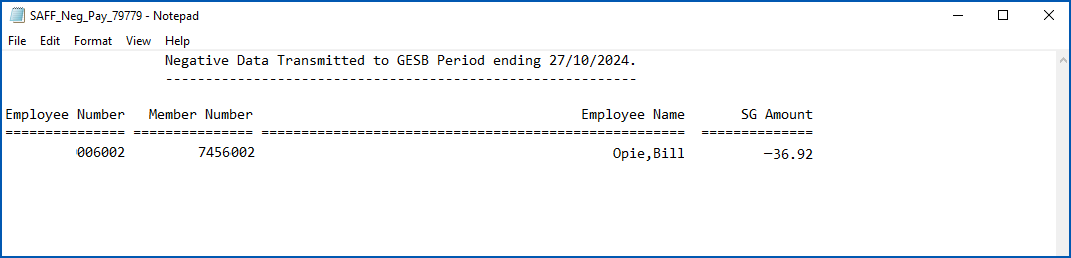
In addition to generating the SAFF extract file, EmpowerHR generates a SAFF Negative Payments Report.
Here is a negative payments report sample:
Run GESB DES interface file
To run the GESB DES interface file (criogesb):
- Go to Background Jobs > Payroll Processing > Interfaces > GESB DES File.
- The GESB DES File (criogesb) screen displays.
- On the Parameters tab, in:
- Payroll Code, click Window, find and double-click the payroll code you want to report on, or enter % for all payrolls.
- Interface Date, enter the interface date. The report includes data for the fortnight ending at the date you enter here.
- Click Save. EmpowerHR generates the file.
- Go to Background Jobs > Requested Jobs > Requested Jobs to see the output file.
|
|
If an employee has both ME (after tax) and PA (pre-tax) contributions, the employee is output twice. |
GESB DES reports generated
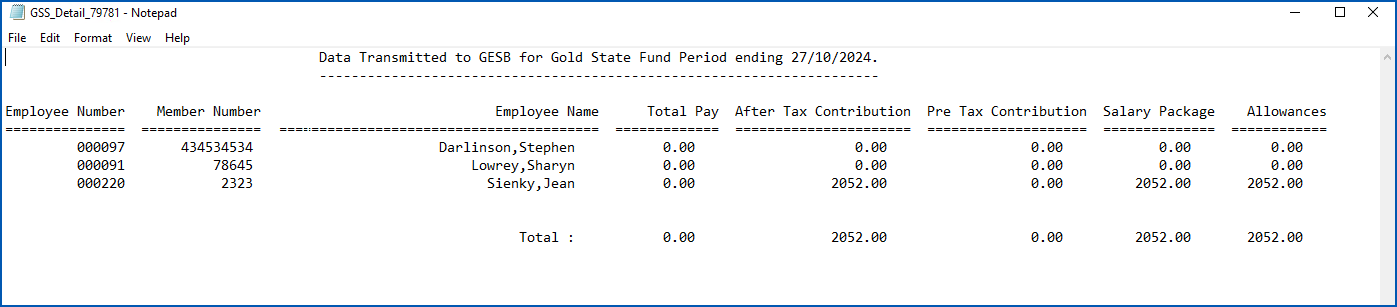
In addition to generating the DES extract file, EmpowerHR generates a GSS Detail Report and GSS Negative Payments Report.
Here is a detail report sample:
Here is a negative payments report sample. It shows there were no negative payments in the reporting period:

© 2023 Fusion5. All rights reserved.