Funding source codes are used to identify cost centres that are centrally managed funds. They are used in managing expenditure on casual relief staff.
Create a funding source code
To create a funding source code:
- Go to Control Tables > Casual Relief > Funding Source.
- The Funding Source summary screen displays.
- Click New.
- At the Funding Source (add) detail screen, make your entries using the following table as a guide.
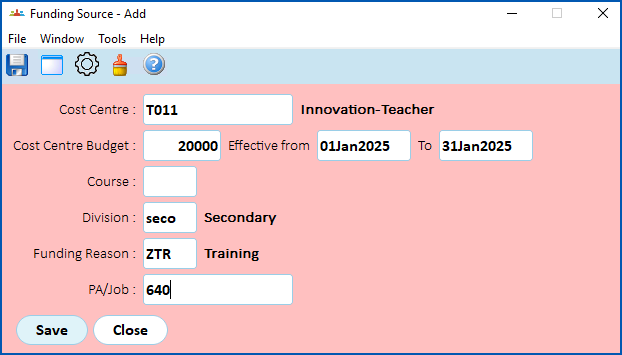
| At this field... | Do this... |
|---|---|
Cost Centre | Enter a valid cost centre code if you know it, or Click Window, find and double-click the code to add it to the field. |
Cost Centre Budget | Enter a valid cost centre budget code if you know it, or Click Window, find and double-click the code to add it to the field. |
Course | Enter a valid course code if you know it, or Click Window, find and double-click the code to add it to the field. |
Division | If you want to associate the funding source with:
|
Funding Reason | Enter a valid funding reason code if you know it, or Click Window, find and double-click the code to add it to the field. |
PA/Job | Enter a valid program activity/job code if you know it, or Click Window, find and double-click the code to add it to the field. |
- Click Save.
- Repeat this procedure, starting at step 3, until you have created all the funding source codes you need.
© 2023 Fusion5. All rights reserved.