If you want to use probability factors and discount rates to reduce non-current long service leave liability, set up the GL leave probability factors.
Set up GL leave probability factors
To set up GL leave probability factors: 
Go to Control Tables > General Ledger > GL Leave Probability Factors.
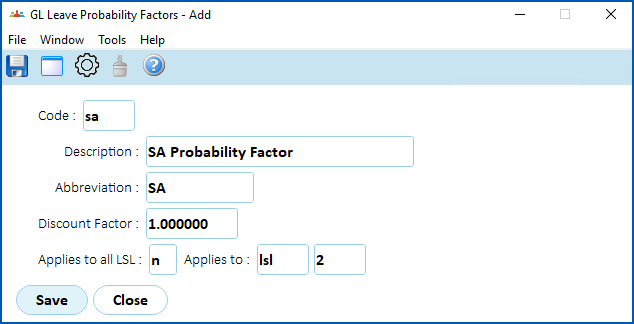
- At the GL Leave Probability Factors summary screen, click New.
- At the GL Leave Probability Factors detail screen, make your selections and entries in the GL probability factor fields.
- Click Save.
- The system displays the following message:
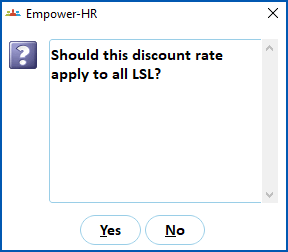
- If you:
- want to apply the discount rate company-wide, then click Yes. The discount rate you entered is applied to all the probability factors.
- want different discount rates, for example, for each state, then click No.
- The Probability Factor Detail screen displays.
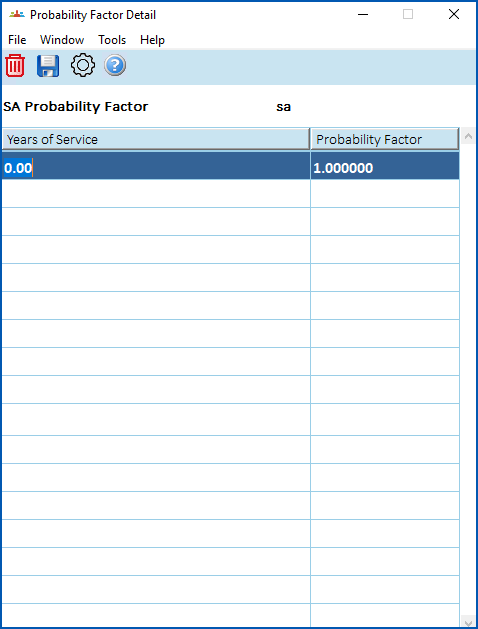
- To vary the reduction according to the employee's length of service:
- change an existing row, or
- click a blank row,
- and then make your selections and entries in the probability factor detail fields.
- Click Save.
© 2023 Fusion5. All rights reserved.