You use EmpowerHR's Take-on Empl Additional Data screen to load employee additional data in bulk
What file do I need to prepare?
You need to create a spreadsheet file (saved in .xml format) containing the required data.

|
Remember to exclude column headings from the files. |
Here's the format to use. An asterisk (*) shows which data is mandatory. Remaining fields should reflect those your organisation has defined.
| Column > | A* | B* | C* | D | E | F | G |
|---|---|---|---|---|---|---|---|
| Employee Code | Sequence Number | Data Type Code | Data Field 1 | Data Field 2 | Data Field 3 | Data Field 4 | |
| Characters > | 10 | 4 | 4 | 30 | 30 | 30 | 30 |
| Blank if not required. | Blank if not required. | Blank if not required. | Blank if not required. |
| Column > | H | I | J | K | L | M | N |
|---|---|---|---|---|---|---|---|
| Data Field 5 | Data Field 6 | Data Field 7 | Data Field 8 | Data Field 9 | Data Field 10 | Highlight Flag | |
| Characters > | 30 | 30 | 30 | 30 | 255 | 255 | 1 |
| Blank if not required | Blank if not required | Blank if not required | Blank if not required | Blank if not required | Blank if not required |
Upload employee additional data in bulk
To upload employee additional data in bulk:
- Go to Tasks > Employees > Bulk Updates > Take-on Empl Additional Data.
- At Take-on Empl Additional Data, click Window, navigate to, and select the additional date .xml file to add the pathname to the File Name field.
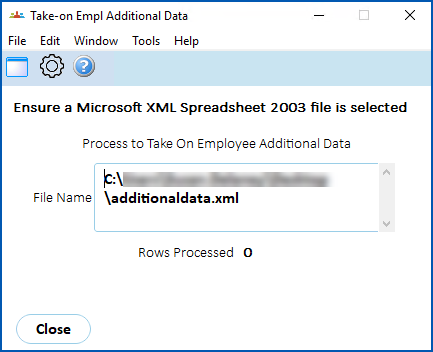
- Click Edit, and then click Process.
- When the upload is finished, EmpowerHR displays the Additional Empl Take-on Errors screen if any errors occurred during processing.
© 2023 Fusion5. All rights reserved.