While Query Manager's standard filters satisfy most day-to-day query requirements, there may be times when you need to supplement, or replace, standard filters with advanced filters.
Standard filters using system parameters are typically defined as positive filters, that is, the filter applies an inclusive condition. For example, where an Employee Code or Position Number is equal to a value you enter. So, the most common reason for using an advanced filter is to apply a negative condition.
To use an advanced filter:
- At the Filter tab in Query Manager, click Advanced Filter.
- EmpowerHR displays the User Filter Definition screen where you can define up to five advanced filters. (See the following examples of filter options).
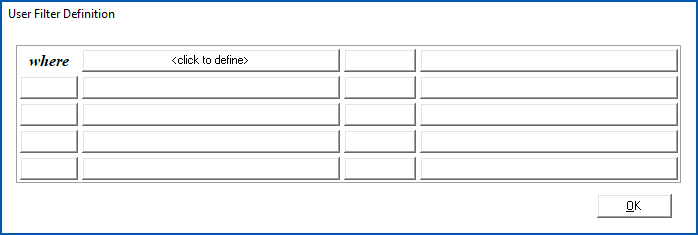
- Because it's necessary to isolate the impact of advanced filters from the components of the SQL
 where clause, EmpowerHR groups advanced filters in a pair of parentheses, and uses sub-groups for each or condition.
SQL = Structured Query Language is a programming language used to talk to databases. With SQL, you can store, manipulate, and retrieve data from relational databases.
 | We recommend you avoid or conditions wherever possible. You should also view the SQL output to make sure the SQL query is formulated as expected. |
Filter options
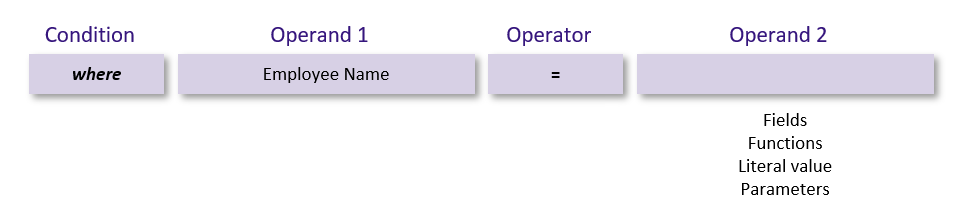
The list of available:
- Operators depends on the data type you select in Operand 1
- Operand 2 options depend on your selected options in Operand 1 and Operator
Examples
Select not applicable in Operand 1 and EmpowerHR restricts the Operator options to exists / not exists

Select a field with character (text) data in Operand 1, EmpowerHR offers a list of Operator options including in / not in and like / not like

Select a field with numeric data in Operand 1, EmpowerHR offers a list of Operator options including in / not in but eliminates the options like / not like as they only apply to character (text) data

Select a field with character (text) data in Operand 1, select an Operator option, and EmpowerHR offers a list of Operand 2 options - Fields, Function, Literal value and Parameters - for use with character data types. See use functions, literals & parameters for more information.
© 2023 Fusion5. All rights reserved.