You attach job descriptions to positions via the EmpowerHR desktop.
This results in a link to the position description appearing in the Organisation Chart in self service next time the system automatically rebuilds the chart (usually the following morning). Alternatively, you can sign into self service and do an organisation rebuild if you want the link to appear immediately.
Attach a job description to a position
Before you can attach a job description to a position, first make sure the installation option called store position documents in the database (pdoc) is set to y (yes). (See allow attachment of job descriptions to positions for how to set this option).
To attach a job description to a position:
- Go to Tasks > Establishment > Positions > Create Positions.
- At the Create Positions summary screen, find and select the position you want, and then click Next Level.
- EmpowerHR displays the Position Details screen.
- Click Media.
- EmpowerHR displays the Media summary screen.
- Click New.
- EmpowerHR displays the Media - Add details screen.
- At:
- Media Type, select word from the dropdown list
- Media Description, enter job description (this is not case-sensitive)
- Media Input, click Window, find and select the job description file, and then click Open to add the file location (pathname) to the field
- Click Save.
- EmpowerHR displays the Media summary screen, listing the job description you added.
- Click Close.
- Use the following instructions to include the job description link in the organisation chart in self service, or else wait for EmpowerHR's automatic rebuild (usually the next morning).
Rebuild organisation chart in self service
To immediately rebuild the organisation chart so job description links are included:
- Go to Administration > System.
- Click Rebuild Organisation Chart.
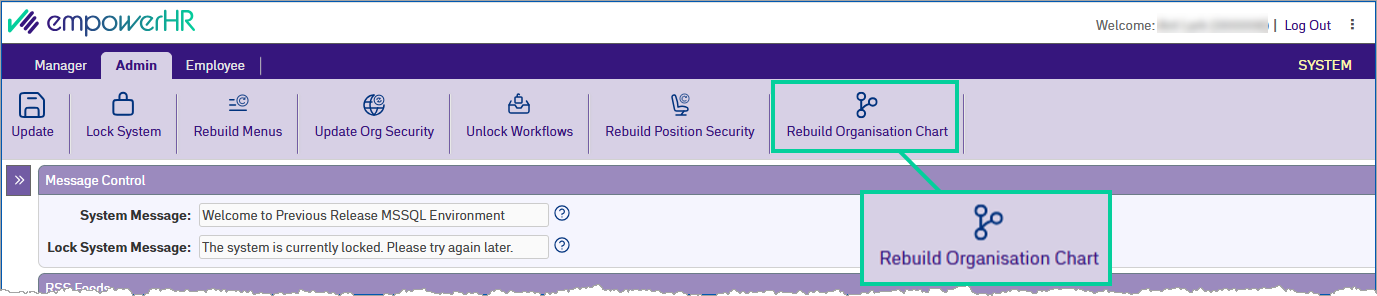
- Click Update.

|
If you cannot see Link to position description in the Organisation Chart, check screen painting to make sure the field is set to Display. |
© 2023 Fusion5. All rights reserved.