An employee can commence in one of several ways, as a:
- new starter
- recommencement (when re-employing a terminated employee)
- transfer
Your organisation may have its own conventions for employee positions, for example, movement codes, etc.
Add a position key 
To add a position key:
- At the Add Position Key screen, select a code from the Movement Code dropdown list.
- Press Tab. The New Movement/Change Date defaults to the employee start date.
- Leave the Old Position Number field blank.
- Click OK. The Employee Position Information screen displays.
Add employee position information
To add employee position information:
- At the Employee Position Information screen, in the Position field, click Window to display a list of codes to choose from, find and double-click a code to add it to the field.
- EmpowerHR displays the default details associated with the position.
- Make any changes you need to the remaining fields. See employee position fields explained for help.
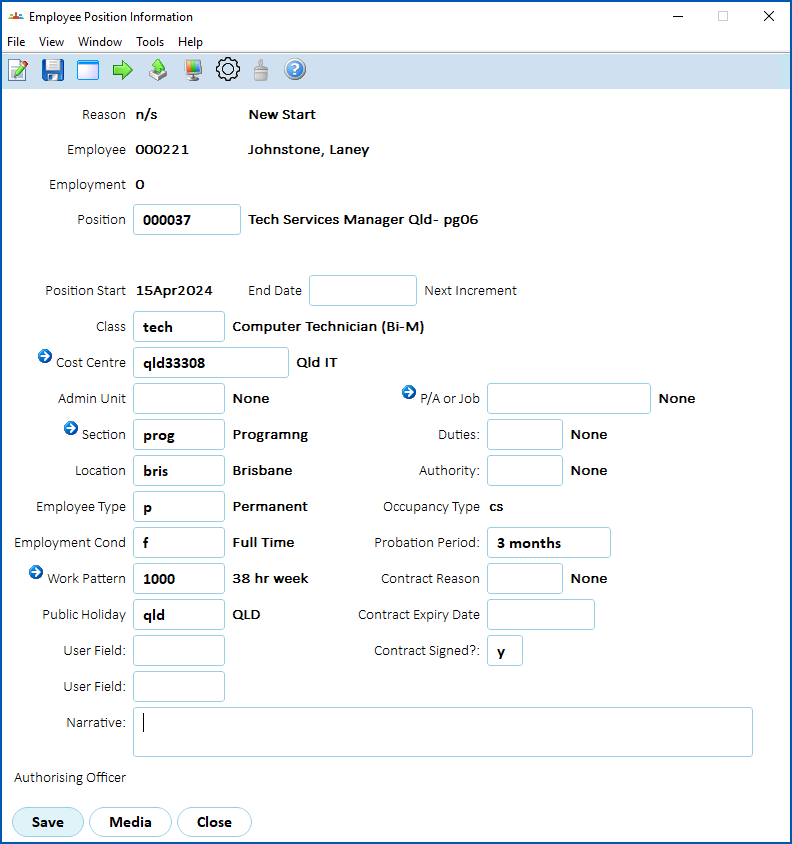
- Click Save. The Tax Information - Payroll tab displays. See add employee tax details for what to do next.
© 2023 Fusion5. All rights reserved.