- LSL half pay bookings not correctly reducing ordinary hours: ihelp 487696
- LSL bookings not correctly reducing ordinary hours - causing overpayment: ihelp 449216
- Conditions change screen – incorrect hours per period : ihelp 512326
- Pay calc creates pay record when no tax record exists: ihelp 369083
- Relief Absence Management System (RAMS) - annualised employees enhancement - checking for work weeks values: emp-9435
- Relief Absence Management System (RAMS) - annualised employees enhancement - adding 2025 additional weeks register - non-payment method not displaying: emp-9438
- BKI general ledger interface not producing complete data in output file: ihelp 535489
- Weekly net salary (instead of weekly gross amount) displays on set up termination screen: ihelp 522303
- Additional information ellipses (actions menus) always display first record: ihelp 534349
- Auto-increment report issue: ihelp 531607
- Unable to see previously unsaved employees selected for STP process: ihelp 534137
- Submitting a request from timesheet/payment catalogue does not work: ihelp 408455
- Field error validation on hours change request does not work: ihelp 405911 #13687
- Duplicated attachments when approving a form: ihelp 443393
- Schools using long service leave (hours) - provisions are undervalued
- DLCSL school - incorrect formula 1 type : ihelp 535402
- Paying public holiday after termination date : ihelp 522285
- Missing long service leave details in Query Manager : ihelp 472082
- Late leave bookings not adjusting ordinary hours after leave loading period : ihelp 487685
- Cannot change/delete unpaid leave bookings regardless of lvrp installation setting : ihelp 404312
- Crystal report view defaults to txt instead of pdf file format : ihelp 513216
LSL half pay bookings not correctly reducing ordinary hours: ihelp 487696 
iHelp: 487696
EMP-9081
Reported by: Catholic Schools Diocese of Lismore (CSO Lismore)
Issue
Located at:
Background Jobs > Payroll Processing > Pay Calculations
When a long service leave (LSL) half pay booking is entered before the Xmas Leave pay period is closed, EmpowerHR is not correctly reducing the Ordinary hours for the employee receiving a formula payment. The LSL application covers dates for the last weeks of Term 4, which are pre-processed as part of EOY Xmas School functionality.
Resolution
The LSL half pay booking now correctly reduces the Ordinary hours held on the scht batch. EmpowerHR reduces these Ordinary hours by 100% of the LSL days taken, and correctly pays the LSL hours at 50% specified in the Leave %.
LSL bookings not correctly reducing ordinary hours - causing overpayment: ihelp 449216
iHelp: 449216
EMP-7890
Reported by: Catholic Schools Office Diocese of Maitland-Newcastle (CSOMN)
Issue
Located at:
Background Jobs > Payroll Processing > Pay Calculations
This issue occurs when a long service leave (LSL) booking is entered before the Xmas Leave pay period is closed. The LSL dates fall into the Xmas leave pay processing period and cover the last pay period of Term 4. Ordinary hours that are pre-processed to scht batches as part of the school process are not reduced by the LSL booking, resulting in an overpayment.
Resolution
The LSL booking now correctly reduces the Ordinary hours held on the scht batch when processing the booking for payment in the last pay period of Term 4.
Conditions change screen – incorrect hours per period: ihelp 512326
iHelp: 512326
EMP-9110
Reported by: Department of Communities (DoC)
Issue
Located at:
Tasks > Employees > Position Movement > Conditions Change
When a part-time employee is assigned a temporary movement (such as Higher Class Duties, Internal Secondments, or Redeployment), the Hrs per Period column of the movement displayed on the Conditions Change screen shows an incorrect amount (that is, shows a full-time instead of part-time amount).
Resolution
We've fixed the issue so Hrs per Period reflects the part-time employee's substantive hours.
Pay calc creates pay record when no tax record exists: ihelp 369083
iHelp: 369083
EMP-6027
Reported by: AMES
Issue
Located at:
Background Jobs > Payroll Processing > Bank Direct Debit...
Where an employee commences after the paid date in a pay period, as there is no effective tax record as at the paid date, EmpowerHR calculates the pay but it doesn't appear on the bank file.
Resolution
Now, when an employee starts after the paid date in a pay period, we use their tax record as if it is effective at the paid date.
Relief Absence Management System (RAMS) - annualised employees enhancement - checking for work weeks values: emp-9435
EMP-9435 (and EMP-9436)
Requested by: Department of Education, Children and Young People (DECYP)
Issue
Located at:
Relief and Payments
When EmpowerHR checks for work weeks values on the additional weeks admin table, it only checks for the additional two weeks payment code.
Resolution
We have fixed the issue so EmpowerHR now checks for the current register's payment code as expected rather than the additional two weeks payment code.
Relief Absence Management System (RAMS) - annualised employees enhancement - adding 2025 additional weeks register - non-payment method not displaying: emp-9438
EMP-9438
Requested by: Department of Education, Children and Young People (DECYP)
Issue
Located at:
Relief and Payments
When adding to an additional weeks register for the year 2025, EmpowerHR does not display the non-payment option for annualised employees.
Resolution
We have fixed the issue so the option list for the year 2025 now displays the non-payment method as expected.
BKI general ledger interface not producing complete data in output file: ihelp 535489
iHelp: 535489
EMP-9446
Reported by: Bendigo Kangan Institute (BKI)
Issue
Located at:
Background Jobs > Payroll Processing > Interfaces > GL Interface (BKI)
Since adding employees with an 8-character employee code, the BKI general ledger (GL) interface program does not produce complete data in the output file. The issue appears to be a memory leak, the change in the field size then impacted assignment of job number details in the temporary table, causing an error.
Resolution
We have modified the program to force insertion of the job number into the temporary table so the error does not occur.
Weekly net salary (instead of weekly gross amount) displays on set up termination screen: ihelp 522303
iHelp: 522303
EMP-9224
Reported internally (Fusion5)
Issue
Located at:
Tasks > Terminations > Set Up Termination
On the Set Up Termination screen, the Termination Considers Weekly Pay To Be field displays Total nett amount when it should display Total gross.
Resolution
We have fixed the issue so EmpowerHR now displays Total gross amount.
Additional information ellipses (actions menus) always display first record: ihelp 534349
iHelp: 534349
EMP-9447
Requested by: City of Salisbury
Issue
In Volunteers instance of EmpowerHR, located at:
Administration > Additional Info > ...
When you click 
 (ellipsis) on a row and, at the Actions menu, select View or Edit or Delete from the actions menu, EmpowerHR displays a popup screen with the details of the top row (first record) and not the row you selected.
Resolution
We have fixed the issue so EmpowerHR now displays the details of the row you select.
Auto-increment report issue: ihelp 531607
iHelp: 531607
EMP-9434
Reported by: Catholic Schools Office Diocese of Maitland-Newcastle (CSOMN)
Issue
Located at:
Tasks > Payroll > Payroll Processing > Gather Generated Pay Data
Background Jobs > Payroll Processing > Pay Gather > Auto-Increment Process Report
The Auto-Increment Process Report displays information on employees who have auto-increment set to n on their active/current employment.
Resolution
We have modified the auto-increment process for Schools to exclude employees with auto-increment set to n on their active/current employment.
Unable to see previously unsaved employees selected for STP process: ihelp 534137
iHelp: 534137
EMP-9437
Reported by: MSC
Issue
Located at:
Background Jobs > STP > STP Files Generation > STP Update Event - Phase 2
(Click  (next level) button at STP Update Event - Phase 2 screen)
If a large number of employees are selected, an error occurs when EmpowerHR populates the table field on the screen. This is because the text size of the variable to hold the where clause is limited to 2000 chars.
Resolution
We fixed the program by using another way (flag indicator) when populating the table field on the screen.
Submitting a request from timesheet/payment catalogue does not work: ihelp 408455
iHelp: 408455
EMP-8244
Requested by: Department of Communities (DoC)
Issue
Located at:
Requests> Timesheet / Payment
When you create and save a timesheet/payment request, then return to the saved record later and try to submit it from the Timesheet/Payment catalogue, the request fails to submit. You can still successfully submit the request provided you edit it and submit it from the Enter Timesheet Information detail screen.
Resolution
We have fixed the issue so EmpowerHR now allows you to submit a request from the Timesheet/Payment catalogue, as expected.
Field error validation on hours change request does not work: ihelp 405911 #13687
iHelp: 405911 #13687
EMP-8237
Requested by: The Kids Research Institute
Issue
Located at:
Administration > Screen Management > Field Error Validation
Requests> Hours Change
Even though the field error severity for New Hours : Must equal fortnight hours in work pattern is set to Error, when you create a new Hours Change request and enter an invalid amount in the New Hours field, EmpowerHR still allows you to submit the request when the validation error should prevent this.
Resolution
We have fixed the issue so EmpowerHR now prevents you from submitting an Hours Change when an error occurs.
Duplicated attachments when approving a form: ihelp 443393
iHelp: 443393
EMP-7818
Requested by: University of South Australia (UniSA)
Issue
Located at:
Administration > Screen Management > Field Error Validation
Forms > Create New Form
When the field error severity for both Description and Title fields is set to Ignore, if an approver adds an attachment while approving a form, EmpowerHR duplicates the attachment.
Resolution
We have fixed the issue so attachments to forms no longer duplicate.
Schools using long service leave (hours) - provisions are undervalued
iHelp: Support
EMP-3201
Reported by: Catholic Schools Office Diocese of Maitland-Newcastle (CSOMN)
Issue
Located at:
Tasks > Terminations > Set Up Termination
The Set Up Termination screen displays an incorrect LSL Hourly rate.
Resolution
This issue was fixed in release 2019.3 as part of EMP-4545. The current change makes sure the fix applied in EMP-4545 is only for School's payroll and Long Service Leave in Hours.
DLCSL school - incorrect formula 1 type : ihelp 535402
iHelp: 535402
EMP- 9455
Reported by: Diocese of Lismore Catholic Schools Limited (DLCSL)
Issue
Located at:
Tasks > Schools > Formula Check
Background Jobs > Schools > Formula Check
Background Jobs > Extracts > Report Design > Calendar
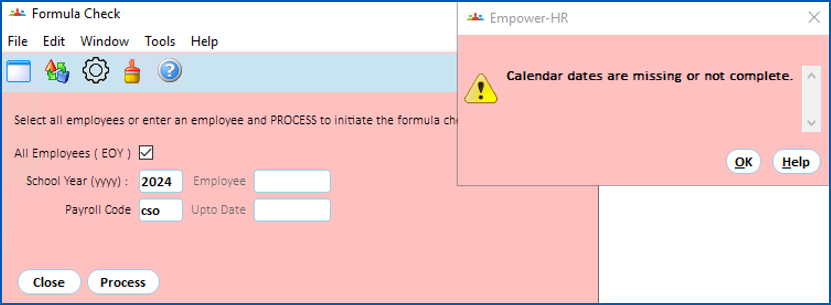
During the Formula Check process, a large number of employees are identified as Formula 1 type when no formula should have been determined.
Resolution
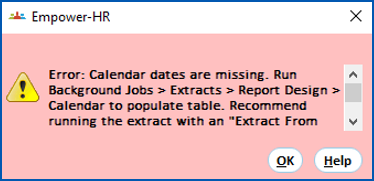
Now, when you run the formula check (Tasks > School > Formula Check), EmpowerHR checks that future dates exist on the calendar table. If dates don't exist up to the end of December one year in advance of today's date, EmpowerHR displays the following error message:
When you click Help, the system displays the following error details:
Paying public holiday after termination date: ihelp 522285
iHelp: 522285
EMP- 9474
Reported by: JWH
Issue
Located at:
Tasks > Payroll > Payroll Processing > Pay Calculations Control
Tasks > Payroll > Pay Data Entry > Individual Gather & Pay Calcs
Resolution
We have fixed the Pay Calculation process. Now, when terminating an employee with an auto generated timesheet, any public holiday that falls after the employee's termination date (up to the last employee's pay period end date) is not be paid.
Missing long service leave details in Query Manager: ihelp 472082
iHelp: 472082
EMP-9449
Reported by: The Kids Research Institute (prev. Telethon Kids Institute)
Issue
Located at:
Enquiries > Query Manager
At the Query Manager Data tab, expand Employees > Leave > Employee Long Service Leave
Resolution
We have modified the report view so it doesn't look only for active employment 0 (zero). Instead, it's now based on the lowest employment that is active/current.
Late leave bookings not adjusting ordinary hours after leave loading period: ihelp 487685
iHelp: 487685
EMP-9069
Reported by: Payroll Services (internal) on behalf of Catholic Education Diocese of Bathurst (CEDB)
Issue
Located at:
Background Jobs > Payroll Processing > Pay Calculations > Pay Calculations Control
Tasks > Payroll > Payroll Processing > Pay Calculations Control
Enquiries > Payroll > Employee/Pay Code Browse
- after the Xmas Leave/Loading Pay Period, are not adjusting the scht batch of ordinary hours
- before closing the Xmas Leave/Loading Pay Period, and later changed after closing that period, are also not adjusting the scht batch of ordinary hours
Resolution
Now, the scht batch, which relates to ordinary and leave hours, updates correctly in the pay calculation process.

|
The Employee/Pay Code Browse enquiry screen does not show the amended leave records processed in the pay run until after the pay run is closed.. This is where adjustments to leave or new leave bookings that affect leave dates processed in the current pay are entered. |
Cannot change/delete unpaid leave bookings regardless of lvrp installation setting: ihelp 404312
iHelp: 404312
EMP-7872
Reported by: Department of Fire and Emergency Services (DFES)
Issue
Located at:
Resolution
We've made changes so the lvrp installation setting no longer applies to unpaid leave bookings and users can now edit or delete them when required.
Crystal report view defaults to txt instead of pdf file format: ihelp 513216
iHelp: 513216
EMP-9161
Reported by: Payroll Services (internal) for Waymark Hotels
Issue
Resolution
We've fixed this issue so when viewing a Crystal report, it opens as a PDF file.
We've made changes so the lvrp installation setting no longer applies to unpaid leave bookings and users can now edit or delete them when required.
© 2023 Fusion5. All rights reserved.