- Compliance - unable to save nesa record (employee registration): ihelp 500676
- Casual relief staff - casual sections - sorting issue: ihelp 500667
- Staff management - all casuals display: ihelp 500895
- Servlet access security holes (pen testing): emp-3805
- Database definition attributes in config.xml - investigation and update: ihelp 490457
- Backpay produces errors: emp-8979
- Backpay produces correct hours but incorrect amounts: ihelp 505373
- Maunsell GL not disconnecting from database when finished: ihelp 500358
- Tax treatment code validation not working for paid non-employees: ihelp 511240
- Leave request - pay rate field (when set to hidden is still visible): ihelp 505703
- SAFFE file error: ihelp 483330
- STP checking report - income stream changes: ihelp 454155 #13722
- STP checking report with terminated employees - zeroes display in two columns: ihelp 515472
- Employee passwords screen - error occurs when searching: emp-8162
- Individual formula calculation screen - showing different formula type for closed employments: ihelp 397703 #13670
- Formula amount paid for closed employment (EOY) - not showing on view formula type screen: emp-6132
- Formula 2 not determined/calculated for some closed average employments: ihelp 398025 #13667
- Pay certification pre-process change - sending email text message stored in text file: emp-9162
- Null error occurs when changing dates in create leave request screen: emp-9182
- HDA allowance paid at incorrect rate: emp-9160
- GESB SAFF program (criogess) - multiple employments issue: ihelp 355630 #13658
- Schools auto increment days count not including closed employments : ihelp 393601 #13103
Compliance - unable to save nesa record (employee registration): ihelp 500676
iHelp: 500676
EMP-8822
Reported by: Catholic Education Archdiocese Canberra and Goulburn (CECG)
Issue
Located at:
Tasks > Compliance Management > Employee Registration
CECG is unable to save a new record created for a NSW Education Standards Authority Education (NESA) registration with the Accreditation Level set to Proficient (alpt).
Resolution
We've fixed the program and the record can now be saved.
Casual relief staff - casual sections - sorting issue: ihelp 500667
iHelp: 500667
EMP-8824
Reported by: Catholic Education Archdiocese Canberra and Goulburn (CECG)
Issue
Located at:
Tasks > Casual Relief > Casual Relief Staff  (next level) Casual Sections
From the Casual Relief Staff summary screen, when users navigate to the next level to the Casual Sections screen, they are unable to sort the data based on the column.
Resolution
We've now enabled sorting by clicking the column's title.
Staff management - all casuals display: ihelp 500895
iHelp: 500895
EMP-8831
Reported by: Catholic Education Archdiocese Canberra and Goulburn (CECG)
Issue
Located in self service at:
Staff Management
Located in desktop at:
Tasks > Casual Relief > Casual Relief Staff > Casual Sections
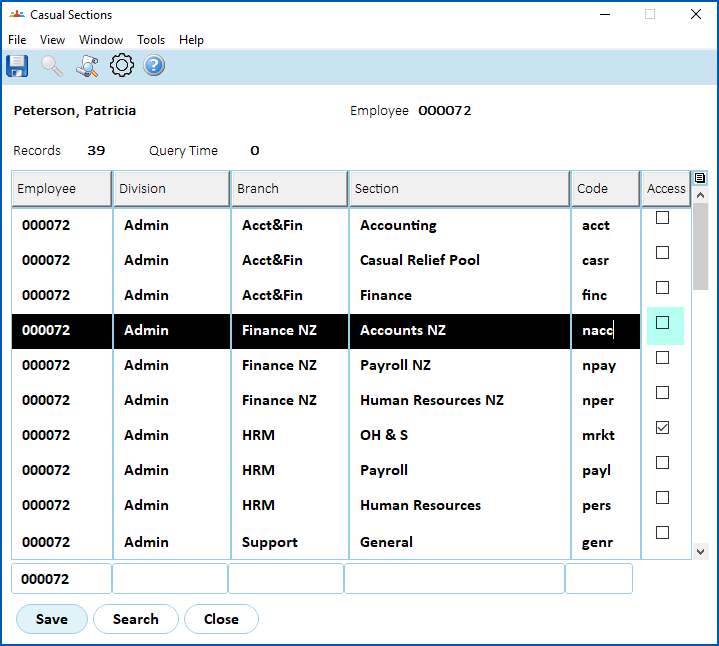
The MSS Staff Management screen displays casual staff even when their access to the section is removed via the desktop's Casual Sections screen.
In the desktop Casual Relief Staff > Casual Sections screen for an employee, when a section's Access checkbox is cleared (as shown in the following example), the employee should not appear in the MSS Staff Management screen for the manager of that section. Staff Management should only show casuals who have the Access checkbox selected for the school/section on the Casual Sections screen.
Resolution
We've applied the fixes required to not display restricted employees (those de-selected in the Casual Sections screen) in the MSS Staff Management screen.
Servlet access security holes (pen testing): emp-3805
EMP-3805
Reported internally (Fusion5)
Issue
A self service request containing an attachment and report in its URL  did not go through the security filter which, in some instances,
URL = uniform resource locator, colloquially known as an address on the web
let users fetch files without authorisation.
Resolution
We've updated self service to use the security filter for URL patterns containing attachments, reports, and FOP . This ensures users are logged in when they access the material, and stops unauthorised people from fetching files.
FOP = formatting objects processor. A library self service uses to convert XML to PDF
Database definition attributes in config.xml - investigation and update: ihelp 490457
ihelp: 490457
EMP-8673
Reported by: Department for Education, Children and Young People (DECYP)
Issue
For the updated XML definitions etc, see the EHR Self Service Administration Manual located in the Infusion Knowledge Base.
Backpay produces errors: emp-8979
EMP-8979
Reported by: Fusion5
Issue
Backpay hours are incorrectly calculated when LWOP is booked within a pay period.
LWOP = leave without pay
Resolution
We've fixed the backpay program to include leave hours.
Backpay produces correct hours but incorrect amounts: ihelp 505373
iHelp: 505373
EMP-8993
Reported by: Catholic Education Archdiocese of Canberra and Goulbourn (CECG)
Issue
Backpay hours are correctly calculated but amounts are incorrectly calculated.
Resolution
In fixing EMP-8979, this issue is also fixed so calculations are correct.
Maunsell GL not disconnecting from database when finished: ihelp 500358
iHelp: 500358
EMP-9019
Reported by: AECOM
Issue
Located at:
Background Jobs > Payroll Processing > Interfaces > Finance Interface (Maunsell)
The interface fails to disconnect from database on completion.
Resolution
We have fixed the issue so the interface now explicitly disconnects from database on completion.
Tax treatment code validation not working for paid non-employees: ihelp 511240
iHelp: 511240
EMP-9037
Reported by: University of South Australia (UniSA)
Issue
Located at:
Tasks > Non-Employees > Non Employee
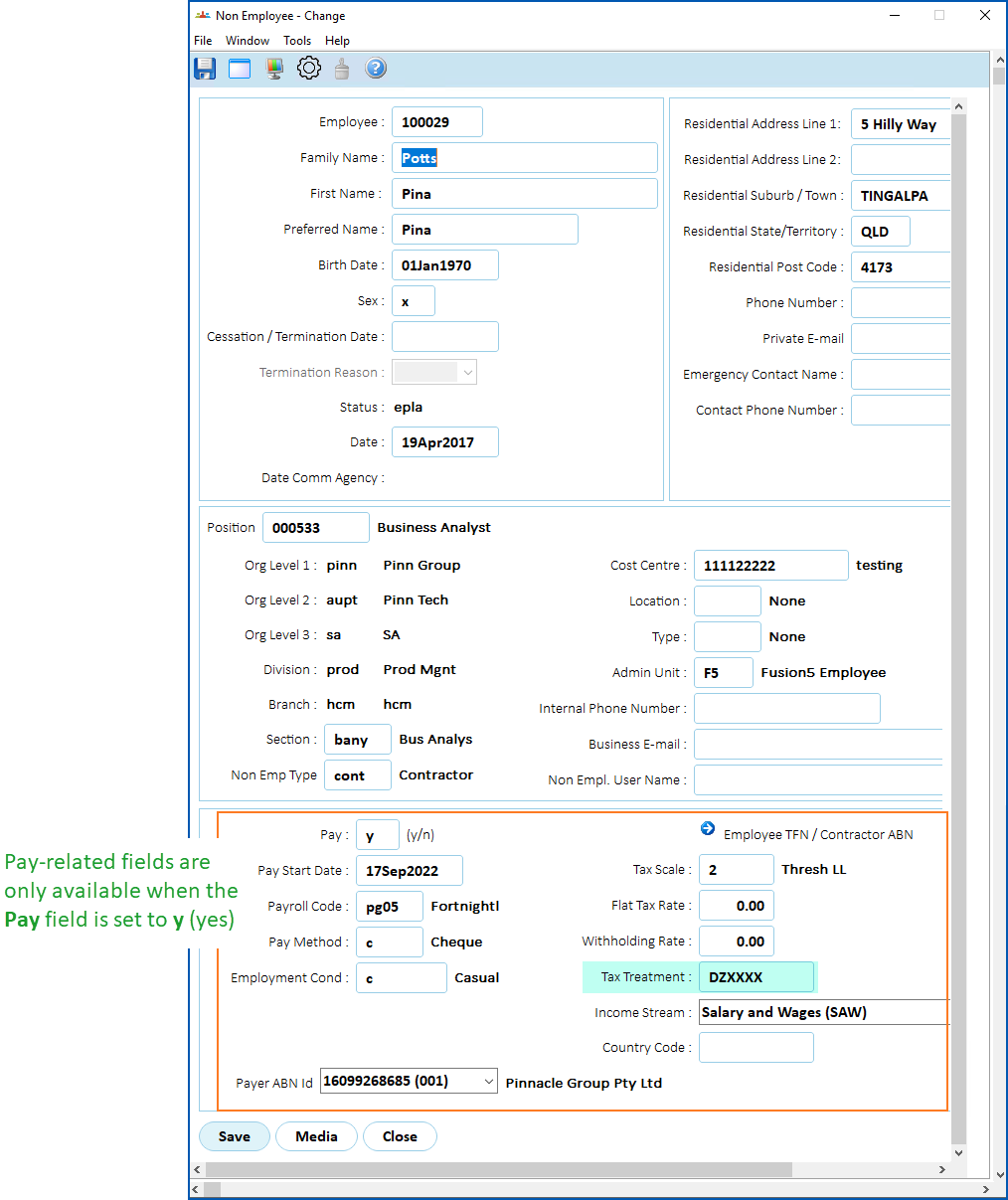
On the Non Employee screen, there is no validation of the Tax Treatment code when the field is initially blank, that is, the first time the code is entered and the screen is saved.
Resolution
We've fixed the issue so validation now occurs correctly.

|
Pay-related fields (like the Tax Treatment field, etc) are only available when the Pay field is set to y (yes). See the following example. |
Leave request - pay rate field (when set to hidden is still visible): ihelp 505703
iHelp: 505703
EMP-9063
Requested by: Department for Education, Children, and Young People (DECYP)
Issue
Located at:
Employee: Requests > Leave
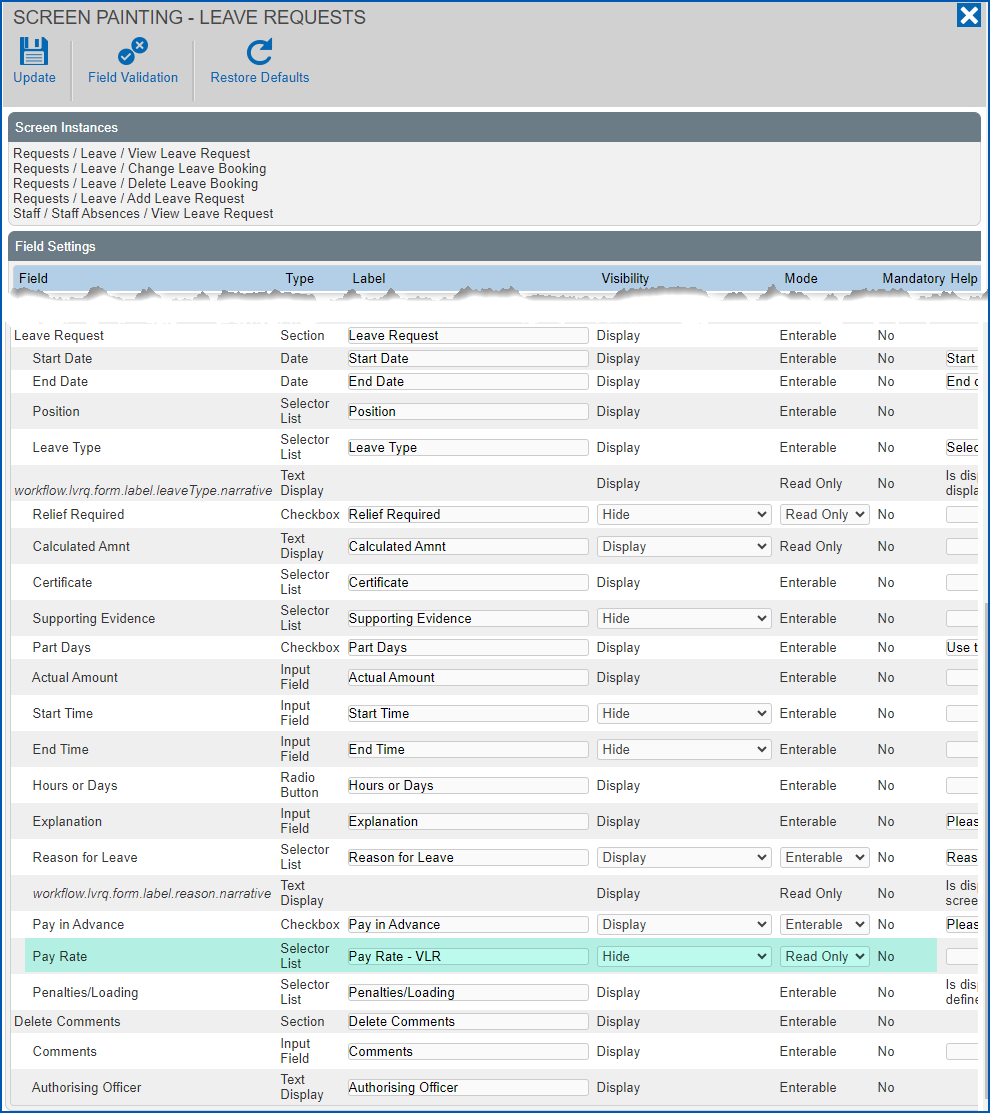
Admin: Administration > Screen Management > Screen Painting > Self Service > Requests > Leave > Add Leave Request
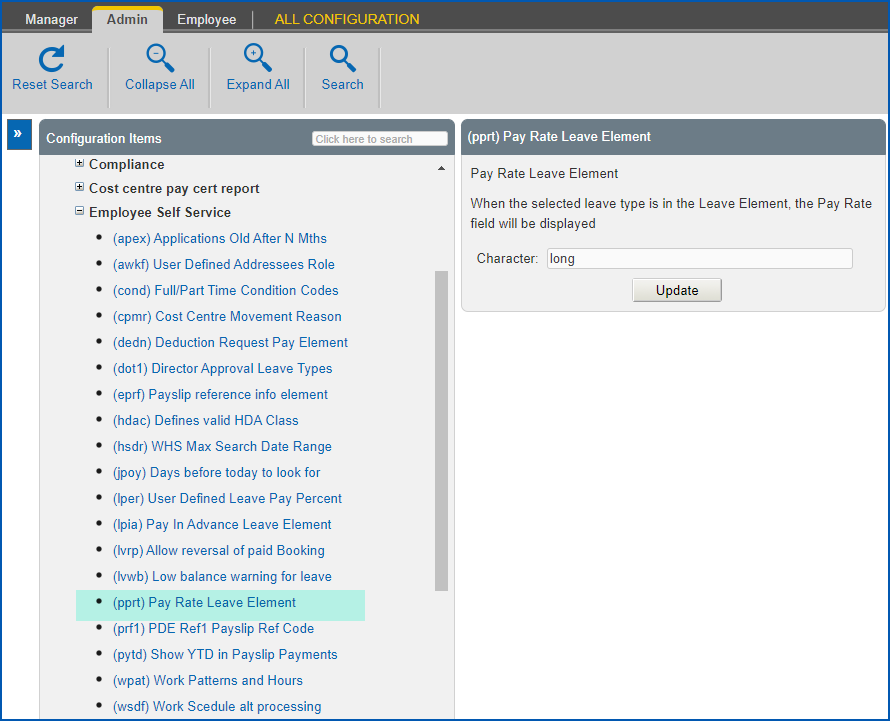
Admin: Configuration > Self Service > Employee Self Service > (pprt) Pay Rate Leave Element
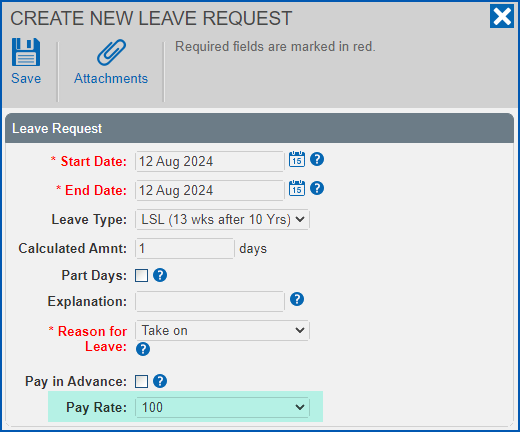
The Pay Rate field still displays when creating, viewing or updating a leave request, even though:
- the Pay Rate field is set to Hidden using screen painting, and
- the installation setting (pprt) Pay Rate Leave Element is left blank
Resolution
We've fixed the issue so the following occurs.
EmpowerHR shows the Pay Rate if:
- the field is set to Display in screen painting, and
- the leave element is provided in the (pprt) Pay Rate Leave Element installation setting for the leave type you want the Pay Rate field to display
EmpowerHR shows the Pay Rate if:
- the field is set to Display in screen painting, and
- the (pprt) Pay Rate Leave Element installation setting is blank
EmpowerHR does not show the Pay Rate if:
- the Pay Rate field is set to Hidden in screen painting
SAFFE file error: ihelp 483330
iHelp: 483330
EMP-8541
Requested by: ARTC
Issue
Located at:
Background Jobs > Payroll Processing > Interfaces > SAFFE Super File (criosafe)
Background Jobs > Payroll Processing > Interfaces > SAFFE Super File (TMD) (criosaft)
Background Jobs > Payroll Processing > Interfaces > SAFF Super File (criosaff)
Background Jobs > Payroll Processing > Interfaces > GESB SAFF File (criogess)
Background Jobs > Payroll Processing > Interfaces > MLC Super Interface (criofmlc)
When you move an employee to a different payroll, running SAFFE processes can cause an error (like the following example), and stop the process from running to completion.
>>> ERROR: Employee: nnnnnnnn has no row found in the Employee Position History for the effective date.
Resolution
We've modified the programs to fix the issue.
STP checking report - income stream changes: ihelp 454155 #13722
iHelp: 454155 #13722
EMP-8346
Reported by: Telethon
Issue
Located at:
Background Jobs > STP > STP Reconciliation Reports > STP Checking Report - Phase 2
Amounts for Leave and Salary Sacrifice are missing where an employee has multiple Income Stream entries. Super liability is also summed up, showing the total for each income stream instead of separating the amounts.
Resolution
Now, where an employee has multiple Income Stream entries, EmpowerHR correctly displays the amounts for Leave and Salary Sacrifice. Super liability also shows separate amounts instead of the total for each income stream.
STP checking report with terminated employees - zeroes display in two columns: ihelp 515472
iHelp: 515472
EMP-9087
Reported by: Telethon
Issue
Located at:
Background Jobs > STP > STP Reconciliation Reports > STP Checking Report - Phase 2
When the client runs the STP Checking Report with terminated employees included, the report totals show zeros for the following columns:
ETP Taxable
ETP PAYGW
Resolution
Now, the report shows the correct sums in both columns instead of zeros.
Employee passwords screen - error occurs when searching: emp-8162
EMP-8162
Requested internally (Fusion5)
Located at:
Administration > System Security > Employee Passwords
Issue
Resolution
Individual formula calculation screen - showing different formula type for closed employments: ihelp 397703 #13670
iHelp: 397703 #13670
EMP-6928
Requested by: Catholic Schools Office Diocese of Maitland-Newcastle (CSOMN)
Located at:
Enquiries > School > Individual Formula Calculation
Enquiries > School > View Formula Type
Issue
Resolution
Formula amount paid for closed employment (EOY) - not showing on view formula type screen: emp-6132
EMP-6312
Requested internally (Fusion5)
Located at:
Enquiries > School > View Formula Type
Background Jobs > Payroll Processing > Pay Calculations > Calcs Error Listing
Tasks > Payroll > Payroll Processing > View Calcs Incident Messages
Issue
Resolution
- Employee flagged not to be paid, formula pay not generated
Formula 2 not determined/calculated for some closed average employments: ihelp 398025 #13667
iHelp: 398025 #13667
EMP-6925
Requested by: Catholic Education Diocese of Bathurst
Located at:
Tasks > School > Formula Check
Issue
Resolution
Pay certification pre-process change - sending email text message stored in text file: emp-9162
EMP-9162
Requested internally (Fusion5)
Located at:
Pay Cert pre-process
Issue
Resolution
| |
No symbolic $paidDate can be used in the content of the file.. |
Null error occurs when changing dates in create leave request screen: emp-9182
EMP-9182
Requested by: Department of Communities (DoC)
Located at:
Requests > Leave > New Request
Issue
Resolution
HDA allowance paid at incorrect rate: emp-9160
EMP-9160
Requested by: Department of Communities (DoC)
Located at:
Tasks > Employees > Position Movement > Conditions Change
Tasks > Employees > Temporary Movements > Higher Class Duties
Issue
Resolution
GESB SAFF program (criogess) - multiple employments issue: ihelp 355630 #13658
iHelp: 355630 #13658
EMP-8205
Requested by: VenuesWest
Located at:
Background Jobs > Payroll Processing > Interfaces > GESB SAFF File
Issue
Where an employee has multiple employments, EmpowerHR is identifying the wrong employee condition code.
Resolution
Schools auto increment days count not including closed employments: ihelp 393601 #13103
iHelp: 393601 #13103
EMP-6742
Requested by: Catholic Education Diocese of Bathurst (CEDB)
Located at:
Tasks > Employees > Position Movement > Salary Change
Issue
EmpowerHR's schools functionality (teacher auto increments) is not counting the days for closed employments in the increment period.
Resolution
© 2023 Fusion5. All rights reserved.