We are pleased to present EmpowerHR 2024 Hotfix Build 0.01
Issues resolved in EmpowerHR 2024.0.01
Compliance - unable to save nesa record (employee registration): ihelp 500676
iHelp: 500676
EMP-8822
Reported by: Catholic Education Archdiocese Canberra and Goulburn (CECG)
Issue
Located at:
Tasks > Compliance Management > Employee Registration
CECG is unable to save a new record created for a NSW Education Standards Authority Education (NESA) registration with the Accreditation Level set to Proficient (alpt).
Resolution
We've fixed the program and the record can now be saved.
Casual relief staff - casual sections - sorting issue: ihelp 500667
iHelp: 500667
EMP-8824
Reported by: Catholic Education Archdiocese Canberra and Goulburn (CECG)
Issue
Located at:
Tasks > Casual Relief > Casual Relief Staff  (next level) Casual Sections
From the Casual Relief Staff summary screen, when users navigate to the next level to the Casual Sections screen, they are unable to sort the data based on the column.
Resolution
We've now enabled sorting by clicking the column's title.
Staff management - all casuals display: ihelp 500895
iHelp: 500895
EMP-8831
Reported by: Catholic Education Archdiocese Canberra and Goulburn (CECG)
Issue
Located in self service at:
Staff Management
Located in desktop at:
Tasks > Casual Relief > Casual Relief Staff > Casual Sections
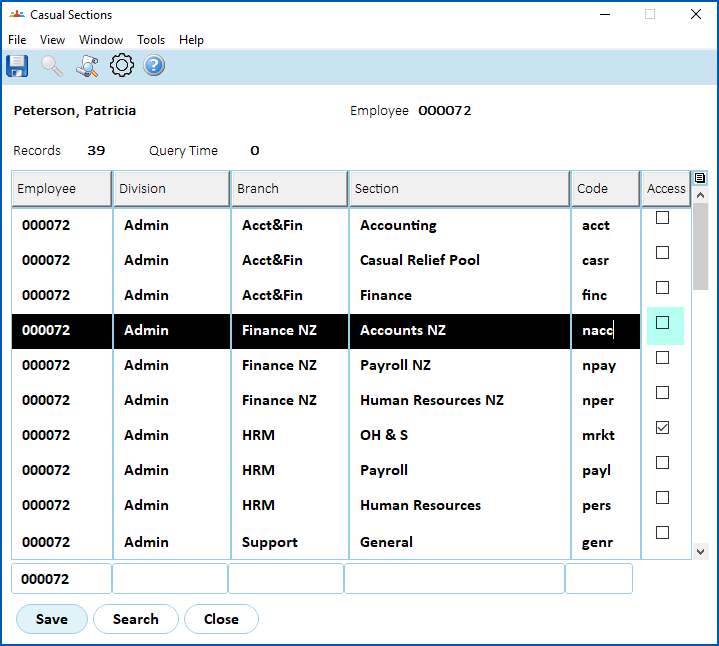
The MSS Staff Management screen displays casual staff even when their access to the section is removed via the desktop's Casual Sections screen.
In the desktop Casual Relief Staff > Casual Sections screen for an employee, when a section's Access checkbox is cleared (as shown in the following example), the employee should not appear in the MSS Staff Management screen for the manager of that section. Staff Management should only show casuals who have the Access checkbox selected for the school/section on the Casual Sections screen.
Resolution
We've applied the fixes required to not display restricted employees (those de-selected in the Casual Sections screen) in the MSS Staff Management screen.
Backpay produces errors: emp-8979
EMP-8979
Reported by: Fusion5
Issue
Backpay hours are incorrectly calculated when LWOP  is booked within a pay period.
LWOP = leave without pay
Resolution
We've fixed the backpay program to include leave hours.
Backpay produces correct hours but incorrect amounts: ihelp 505373
iHelp: 505373
EMP-8993
Reported by: Catholic Education Archdiocese of Canberra and Goulbourn (CECG)
Issue
Backpay hours are correctly calculated but amounts are incorrectly calculated.
Resolution
In fixing EMP-8979, this issue is also fixed so calculations are correct.
© 2023 Fusion5. All rights reserved.