We are pleased to present EmpowerHR 2024 Build 2
What's new
Flexi time changes (2, 7, 10, 12)
Project 40679
EMP-8842
Requested by: Department of Communities
Located at:
Control Tables > Calendars > Absence Reasons (desktop)
Flexi Time > Administration > Manage Flexi Time Balances (self service)
Administration > Screen Management > Field Error Validation (self service)
Requests > Flexi Timesheet (self service)
Flexi time is a Fusion5 custom feature, designed to let employees record any extra time worked and then later take that time off.
Here are the latest flexi time enhancements delivered in EmpowerHR 2024.2
Absence types now link to flexi leave 
Employees can record flexi credit and flexi banked hours directly into their timesheet without having to create a leave request. The timesheet's Absence column contains a dropdown list of absence reasons to choose from.
In this latest enhancement, the following fields have been added to the Absence Reasons control table:
- Absence type - allowing you to flag the absence type as:
- flexi credit, or
- flexi banked, or
- neither
This enables EmpowerHR to detect when an absence of flexi time is selected and update balances accordingly.
- Sort By – allowing you to order the code in a certain way in the selector
- selector Rule - allowing you to apply a rule, for example, requiring the user to select a response, or simply accept a default value
For more information and help on implementing this enhancement, see create or update absence reason codes, and your flexi time setup checklist.
Adjust the last approved timesheet’s flexi balances 
Now, when you use this feature and first search for the employee, EmpowerHR knows to return the employee’s last pending or approved timesheet. You can only adjust an approved timesheet. Any adjustments you make to the flexi balances are reflected in the opening balance of the employee’s next timesheet in the next settlement period.
 | If the employee does not have:
|
For more information and help on implementing this enhancement, see flexi time balances.
Decide when your employees can record work time
You can set the error validation severity level on flexi time fields to prevent employees from adding work time to a:
- full day of booked leave
- day off (part-time employee)
- public holiday
- weekend
Setting the severity level to Error disables the Add Line button for the day. No button available, no way to add the work time.
|
|
Alternatively, you can set the severity level to Warning if you want to allow employees to add work time (the Add Line button remains available). |
For more information and help on implementing this enhancement, see flexi time field error validation.
EmpowerHR extract web service - new fields
EMP-8818
Requested internally (Fusion5)
In this enhancement, we've updated the EmpowerHR Standard Extract web service with new fields in the gender diversity and enhanced demographics section to align the API  response data with the personal details screen information.
API = An application programming interface is a way for two or more computer programs or components to communicate with each other.
Data warehouse web service - new fields
EMP-8817
Requested internally (Fusion5)
In this enhancement, we've updated the Data warehouse web service with new fields available in the gender diversity and enhanced demographics section to align the API response data with the personal details screen information.
API = An application programming interface is a way for two or more computer programs or components to communicate with each other.
Soft delete an operator code/account template
EMP-8917
Requested internally (Fusion5)
Located at:
Administration > System Security > Operator Codes / Functions (desktop)
Administration > System Security > Account Templates (desktop)
In this enhancement, when you delete an operator or account template, EmpowerHR does not physically delete the record. This means, if required, the deleted operator/template can be reinstated (by using the same code for new record).
For more information and help on using this enhancement, see delete operator codes and delete account templates.
David Jones - changes to (A8) employee interface file for reflexis
Project: 46664
EMP-8984
Requested by: David Jones
Located at:
Background Jobs > Extracts > David Jones Data Extract > A8 - Reflexis Data 4.1
The A8 - Reflexis Data extract (criohre4) is enhanced in the following ways.
We've added new columns (87-101) to the end of the file.
| Column | Column name | Field length and type |
|---|---|---|
| 87 | W20S (consent to Work 20 Starts) | 1 character |
| 88 | RegS (Consent to Work Regular Sundays) | 1 character |
| 89 | NCDO (Consent to Non Consecutive Days Off) | 1 character |
| 90 | L15H (Consent to less than 15 hrs per week) | 1 character |
| 91 | 1012 (Consent to work 10-12 Hr Break) | 1 character |
| 92 | Next of Kin Name | 30 characters |
| 93 | Next of Kin Relationship | 4 characters |
| 94 | Next of Kin Home Phone | 20 characters |
| 95 | Next of Kin Mobile Phone | 20 characters |
| 96 | Next of Kin Work Phone | 20 characters |
| 97 | Next of Kin Name 2 | 30 characters |
| 98 | Next of Kin Relationship 2 | 4 characters |
| 99 | Next of Kin Home Phone 2 | 20 characters |
| 100 | Next of Kin Mobile Phone 2 | 20 characters |
| 101 | Next of Kin Work Phone 2 | 20 characters |
We've updated column (35) to include SilW.
| Column | Column name | Field length and type |
|---|---|---|
| 35 | ARU | 1 character |
David Jones - general ledger split by payroll code
iHelp: 488257, project: 46122
EMP-8840
Requested by: David Jones
Located at:
Background Jobs > Payroll Processing > Interfaces >...
The General Ledger (GL) process is enhanced to help with resolving reconciliation issues.
The new process allows creation of separate GL files for individual Payroll Codes, and transfer of multiple files to the David Jones network.
It also produces separate GL files for any ad hoc pay runs processed for payrolls.
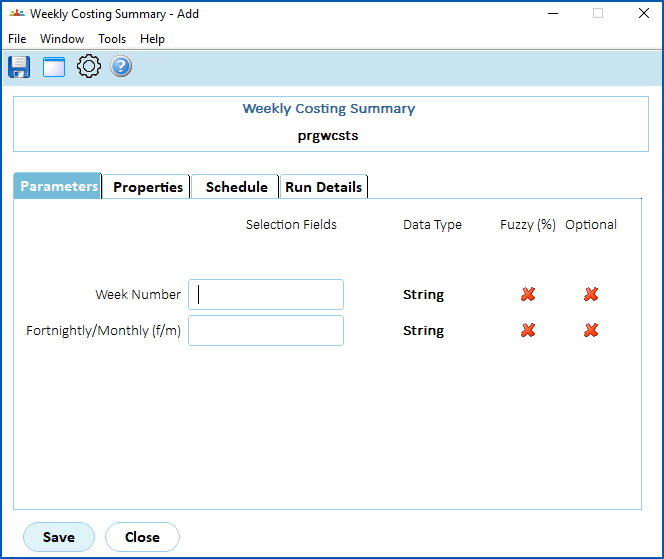
- changed the parameter to use Week Number instead of Week End Date
- added a new parameter called Fortnightly/Monthly (f/m) that requires a valid entry of either f (fortnightly) or m (monthly)
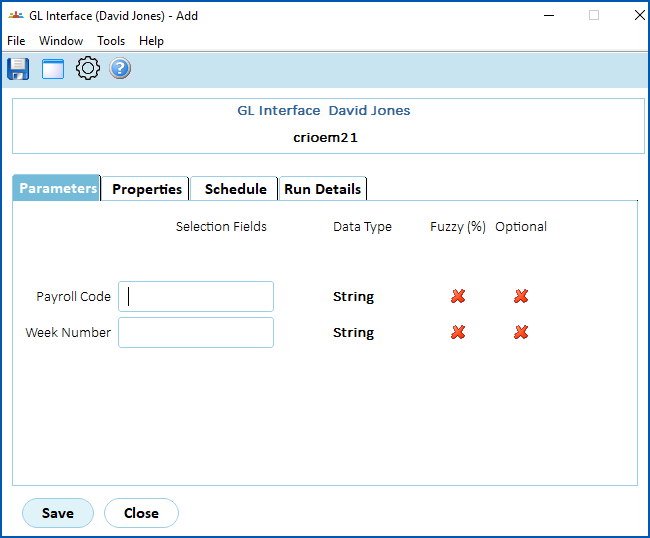
- added a new parameter called Payroll Code
- changed the parameter to use Week Number instead of Week End Date
Racing Victoria - general ledger output file format
project: 46945
EMP-9043
Requested by: Racing Victoria
Located at:
Background Jobs > Payroll Processing > Interfaces > GL Interface (Racing Victoria)
Racing Victoria has changed their finance system to NetSuite and to accommodate the change, EmpowerHR’s output file format has been modified.
|
|
Detailed release notes are provided to Racing Victoria as a PDF in the release package. |
Email validation improvement
iHelp: 387078 #13041 project:
EMP-6582
Requested by: Catholic Schools Office Diocese of Maitland-Newcastle (CSOMN)
Located at:
All screens containing an email address field
We've improved validation of the email address format to prevent users from entering and saving invalid email addresses to EmpowerHR.
Single logout functionality for sso - omitted from release 2024
EMP-9044
Requested internally (Fusion5)
This enhancement (first delivered in EmpowerHR release 2023.2) was omitted from EmpowerHR release 2024.
The initial implementation of Single Sign On (SSO) did not have Single Logout (SLO). When an employee used a shared setup for Self Service access and forget to manually sign out their network session, the remote network session that was created when signing on via SSO would not be signed out. This meant another user could potentially sign back into the previous user’s Self Service session without needing any credentials.
This EmpowerHR enhancement implements Security Assertion Markup Language (SAML) SLO functionality, used together with SSO. Now, when the user signs out of Self Service, the system automatically signs them out of the remote network session if the network session was generated when signing into Self Service via SSO.
See also:
EHR SAML (Security Assertion Markup Language) Configuration Manual in the Infusion Knowledge Base
Pay certification process - include a time delay
EMP-8967
Requested by: Department of Communities (DoC)
Located at:
Background Jobs > Payroll Processing > Payroll Output > Pay Certification Report (crrccpre)
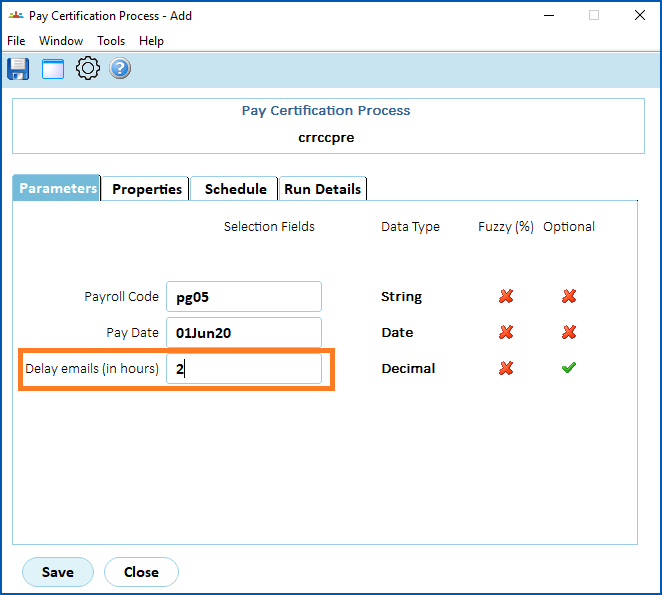
This enhancement to EmpowerHR adds a time delay feature to the pay certification process. The purpose is to provide a better user experience by helping to overcome locking issues (for example, if a user tries to perform an approval before the pay certification process is complete).
This enhancement adds an email delay parameter (delay in hours) to the pay certification process.
Information leakage (4.9) - addressing low risk vulnerability
EMP-7807
Requested: Internally (Fusion5)
Fusion5 found reports generated by Self Service displayed some sensitive document metadata such as library names and versions, which EmpowerHR uses behind the scenes when generating the reports. We've now programmatically hidden specific library names and versions from the document metadata, continuing our work to minimise the risk of any attacker compromising the system.
Standalone release summary
Here is a summary of standalone EmpowerHR releases that delivered particular features requested by a client.
| Reference | Description | Client | |
|---|---|---|---|
Project 46568 EMP-8985 | Customised SAFFE file | O'Brien | |
Resolved issues
Issues resolved in EmpowerHR 2024.2
© 2023 Fusion5. All rights reserved.