We are pleased to present EmpowerHR 2024 Build 1
Updated: 31 October 2024
What's new
New gender diversity feature 

Project 45675
EMP-8643
Requested by: Department of Premier & Cabinet (DPAC)
Located at:
Employee Information > Personal & Address Information (desktop)
Personal Details (ESS)
The Tasmanian State Service agreed to a framework for the collection of gender diversity statistics across several government systems. DPAC requested an enhancement to EmpowerHR to capture more details about Gender Diversity demographics.
We have created this new feature in EmpowerHR, adding a new tab with additional fields to the:
- Employee Information > Personal & Address Information screen in the desktop
- corresponding Personal Details screen in ESS
The new tab allows the user to enter a free text description depending on the option they select.
EmpowerHR provides a flexible solution, allowing DPAC to customise the:
- options they offer their users (via control tables)
- order in which they list the options in field selectors (via control tables)
- titles of fields (via screen painting)
- on-screen help and information messages in self service (via configuration and screen painting)
For more information and help on implementing this feature, see employee gender diversity information.
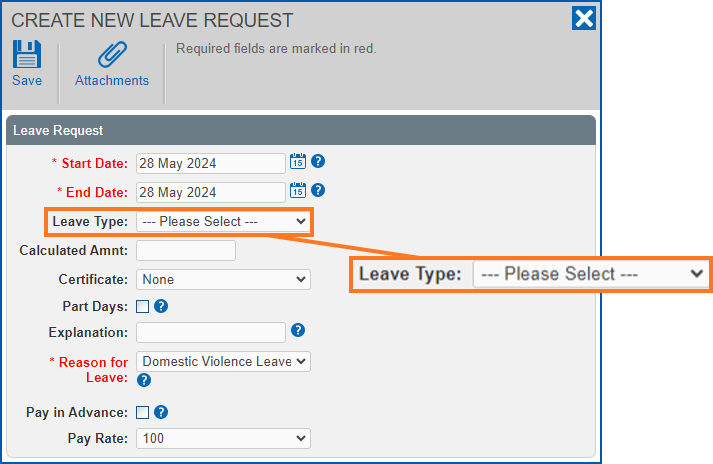
A new please select placeholder in the leave type field on leave requests
iHelp 410023, project 45761
EMP-8655
Requested by: Department of Communities (DoC)
Located at:
Leave Request screen
We've improved the user experience by adding a please select placeholder to the leave type field on the Leave Request screen. Previously, for anyone creating a leave request, it was easy to forget to change the leave type from the default and end up submitting the wrong leave request. Now, with the new placeholder, you must make a selection before the system will allow you to submit the request, reducing the likelihood of getting it wrong.
 |
You can access the Leave Request screen in several ways. If you are an employee, go to:
If you are a manager, go to:
|
Information to help you unlock a locked pay certification workflow
iHelp 480552
EMP-8639
Requested by: Department of Communities (DoC)
Located at:
Admin > System > Unlock Workflows
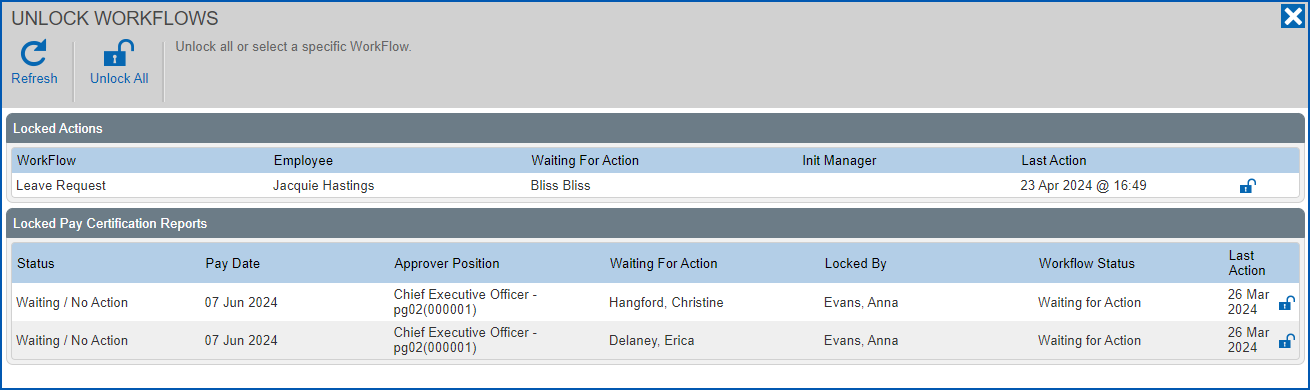
EmpowerHR now provides more information around a locked record. Previously, when the pay certification workflow was accidentally locked, your administrator did not have enough information about the current state. So we've added new columns to the Unlock Workflows screen, providing the information needed to troubleshoot a locked record:
| New column | Description |
|---|---|
| Approver Position | Position name and position number of the approver |
| Waiting for Action | Who is to action the record (workflow task) |
| Locked By | Who has locked the record |
|
Depending on how old a record is, either the cost code or approver position will be blank. When the self service installation setting, Get Approval from 'Reports To' position (pcr2), is set to:
Where the underlying data is blank, EmpowerHR displays a blank column.
|
A faster-performing pay certification summary screen
iHelp 480552
EMP-8638
Requested by: Department of Communities (DoC)
Located at:
Organisation > Pay Certification
We've improved the performance of the Pay Certification summary screen. Previously, the time it took to load this screen was significantly longer because the queries that fetch the summary data performed two separate checks:
- one for reports to approver, and
- the other for cost code manager
Now, depending on how the installation setting called Get Approval from 'Reports To' position (pcr2) is set, EmpowerHR uses one of two separate queries:
- one query when the installation setting is set to use reports to manager, or
- the other query when the installation setting is set to use cost code manager instead
Low balance warning for other timesheet leave
Project: 45064
EMP-8736
Requested by: RM Williams
Located at:
Requests > Leave (employee)
Actions To Do > Leave Request (manager)
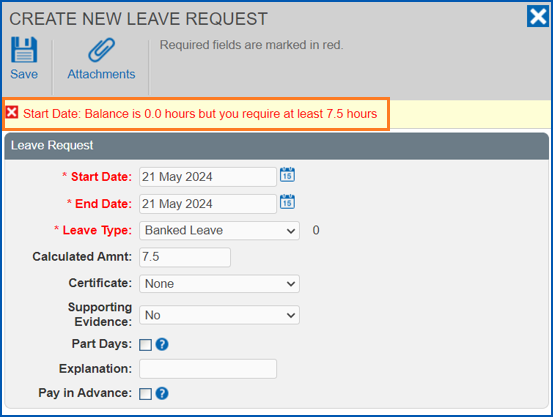
EmpowerHR has the option to approximate the forward accrual of timesheet leave so employees can see how much leave they would have at a future date. Until now, the approximation only applied to recreational and personal timesheet leave and did not include other timesheet leave.
We’ve enhanced this function to include other normal leave such as RDO (Rostered Day Off) in balance calculations. EmpowerHR uses this balance (any leave that is other timesheet leave) to display a low balance warning when the:
- employee enters the leave request
- manager approves the request
This change brings other leave into line with the rest of the leave types.
|
When the installation setting called Forward balance on timesheet L (fbta) is set to y, timesheet leave (annual and personal) future accruals are based on the hours per period value on the employee’s pay screen. Other timesheet leave, like RDO, no future accruals are estimated and instead the employee’s balance is used. |
See also:
EHR Self Service User Manual in the Infusion Knowledge Base
Faster-performing ingres databases for reports to employees
iHelp 486172
EMP-8586
Requested by: AMES
Located at: Self Service
On Ingres, we've improved the performance of the database view for clients using reports-to functionality with a lot of managers.
Super guarantee contribution (SGC) exception report enhancement
EMP-8592
Requested by: Fusion5 (internally)
Located at:
Background Jobs > Payroll Processing > Pay Calculations > Super Exception Report
The report shows the:
- superable hours
- OTE
 hours
hoursOTE = ordinary time earnings, the amount you pay employees for their ordinary hours of work, including things like commissions and shift loadings
You use OTE to work out the minimum super guarantee contribution for your employees
(Source: Australian Taxation Office)
- superable amount
- OTE earnings
It also shows what the super calculated using these figures, together with the super paid. If the calculated super doesn’t match the paid super, EmpowerHR provides a message saying why.
For more information and help on this report, see super guarantee exception report.
Multiple leave rules for timesheet-driven leave
iHelp: project 254460 #12827
EMP-5801, EMP-8606
Requested by: City of Greater Geelong (COGG)
Located at:
Task > Leave > Leave Accrual and Rules > Leave Rules
For more information, see:
- Set up leave rules > timesheet-driven leave rules
- Allocate leave to an employee > normal/timesheet-driven leave
Standalone release summary
Here is a summary of standalone EmpowerHR releases that delivered particular features requested by a client.
| Reference | Description | Client | |
|---|---|---|---|
Project 45641 EMP-8654 | New GL interface between EmpowerHR and client's finance system (M3) | Drake | |
Resolved issues
Issues resolved in EmpowerHR 2024.1
© 2023 Fusion5. All rights reserved.