- Overlapping employee name - position movement screens: ihelp 500782
- Email validation not properly applied: ihelp 412321
- Payment code accounts updates - lower case entries change to upper case: ihelp 385157
- Unpaid employees report - data sorts incorrectly: ihelp 468070, 490617
- Unable to update a label on the timesheet / payment catalogue: ihelp 303799
- NZ extra pay tax errors: ihelp 487517
- Leave pay rate incorrectly impacts leave record and flexi timesheet: emp-8657
- Unable to edit the % to accrue field - leave rules screen: ihelp 441075
- Release check fails and user logon fails: emp-8288
- Unable to change table label on timesheet action to do screen: ihelp 303799
- Backpay produces errors: emp-8979
Overlapping employee name - position movement screens: ihelp 500782
iHelp 500782
EMP-8834
Reported by: Catholic Education Archdiocese of Canberra and Goulburn (CECG)
Issue
Located at:
Tasks > Employees > Position Movements... (most position movement screens)
Text is overlapping on the employee name's field on most of the position movement screens.
Resolution
We've fixed this issue so text displays correctly.
Email validation not properly applied: ihelp 412321
iHelp 412321
EMP-8707
Reported by: Department of Premier and Cabinet (DPaC)
Issue
Located at:
Background Jobs > STP > STP Files Generation > STP Payroll Event - Phase 2
A warning message does not occur when you enter an invalid email address.
Resolution
We've made changes so EmpowerHR now displays a warning message when an invalid email address is entered.
Payment code accounts updates - lower case entries change to upper case: ihelp 385157
iHelp 385157 #13659
EMP-8207
Reported by: David Jones
Issue
Located at:
Control Tables > General Ledger > Payment Code Accounts, and
Background Jobs > Bulk Data Take-on > Control Table Data
When creating or updating details in the Payment Code Accounts control table, if you enter a lowercase value in the Interface field (g, c, d) and move to the next field, EmpowerHR changes your entry to uppercase (G, C, D). This can trigger a warning message.
This issue also occurs in a bulk upload.
Resolution
We've made changes so EmpowerHR no longer converts lowercase values entered in the Interface field to uppercase.
Unpaid employees report - data sorts incorrectly: ihelp 468070, 490617
iHelp 468070, 490617
EMP-8559
Reported by: BKI, Peerless Foods
Issue
Located at:
Background Jobs > Payroll Processing > Unpaid Employee Report (prrunpda)
The Unpaid Employee Report report incorrectly sorts data in Employee Code Number order instead of Condition Change Type order.
Resolution
We've restored the sort order to Condition Change Type.
Unable to update a label on the timesheet / payment catalogue: ihelp 303799
iHelp 303799 #12961
EMP-6217
Reported by: Department of Fire and Emergency Services (DFES)
Issue
Located at:
Actions To Do > Timesheet / Payment
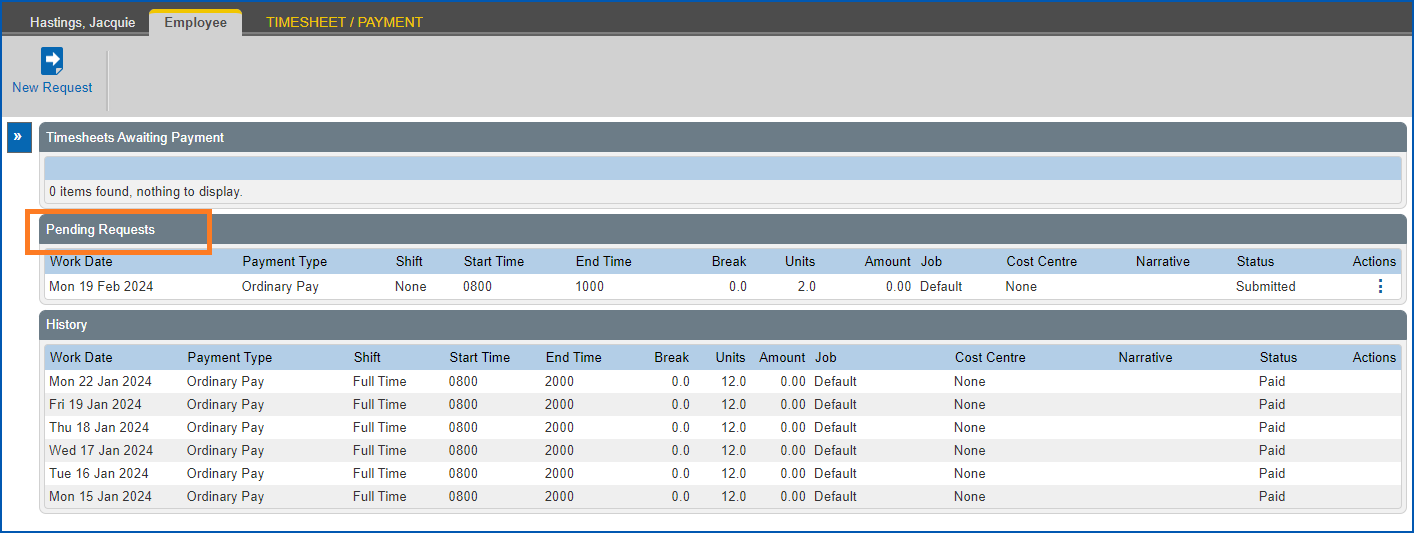
The catalogue that displays when someone actions a Timesheet / Payment request displays ???? as the label for the Pending Requests table. Administrators are unable to correct the label via configuration or screen painting.
Resolution
We've updated the label to the correct name, Pending Requests.
NZ extra pay tax errors: ihelp 487517
iHelp 487517
EMP-8716
Reported by: John Deere
Issue
Located at:
Tasks > Ad-Hoc Pay > Pay Run
Employees are overtaxed on bonuses when you run an ad hoc pay for your New Zealand employees. This is caused by the system not excluding any payments made after the bonus pay paid date.
Resolution
We've made program changes to exclude any payments made after the bonus pay paid date.
Leave pay rate incorrectly impacts leave record and flexi timesheet: emp-8657
EMP-8657
Reported by: Department of Communities (DoC)
Issue
Located at:
Requests > Leave
Requests > Flexi Timesheet
Actions To Do > Leave Request
The leave request pay rate displays an incorrect amount in the Hours column on the flexi timesheet. Depending on the pay rate, 200% or 50%, the underlying calculation doubles or halves the leave amount.
Resolution
We've updated the functionality so it does not use the pay rate when calculating leave amount for flexi timesheet hours.
Unable to edit the % to accrue field - leave rules screen: ihelp 441075
iHelp 441075
EMP-7865
Reported by: Brownes
Issue
Located at:
Tasks > Leave > Leave Accruals and Rules > Leave Rules
When creating a new leave rule, you can enter data in the % to accrue per hour field, however, you cannot edit the field later.
Resolution
You can now edit the % to accrue per hour field.
Release check fails and user logon fails: emp-8288
EMP-8288
Reported by: Fusion5
Issue
Located at: Self Service
The release check function fails regardless of whether the appserver images and self service version numbers match.
Resolution
We corrected the version number check function. We also simplified the functionality and included system admin notification (ww_admn_addr config.xml file property), when version numbers are incompatible..
Unable to change table label on timesheet action to do screen: ihelp 303799
iHelp 303799 #12961
EMP-6217
Reported by: Department of Fire and Emergency Services (DFES)
Issue
Located at: Manager Self Service
The client is unable to change the table label on the timesheet action to do screen using screen painting or configuration change.
Resolution
We updated the ESS.properties file with the correct label so it now displays as Pending Requests. The labels cannot be updated via the methods described above.
Backpay produces errors: emp-8979
EMP-8979
Reported by: Fusion5
Issue
Backpay hours are incorrectly calculated when LWOP  is booked within a pay period.
LWOP = leave without pay
Resolution
We've fixed the backpay program to include leave hours.
© 2023 Fusion5. All rights reserved.