When uploading work pattern codes in bulk to EmpowerHR, you use the option called Work Pattern Code Data Load from the Data Take-On Initiation screen. Here are the file formats to use.
What files do I need to prepare?
You need to create a tab-delimited (.txt) file for each type of required data.

|
Remember to exclude column headings from the files. |
Work pattern code file format
Here's the format to use. An asterisk (*) shows which data is mandatory.
| Column > | A* | B | C | D | E | F |
|---|---|---|---|---|---|---|
Work Pattern Code | Description | Abbreviation | Leave Hours Without Certificate | Leave Hours with Paramedical Certificate | Leave Hours with Carer's Certificate | |
Characters > | 4 | 30 | 10 | 8 including decimal point | 8 including decimal point | 8 including decimal point |
Work pattern detail file format
Here's the format to use. An asterisk (*) shows which data is mandatory.
| Column > | A* | B | C | D |
|---|---|---|---|---|
| Work Pattern Code | Pay Hours | Leave Hours | Shift Code | |
Characters > | 4 | 8 | 8 | 4 |
Examples of files
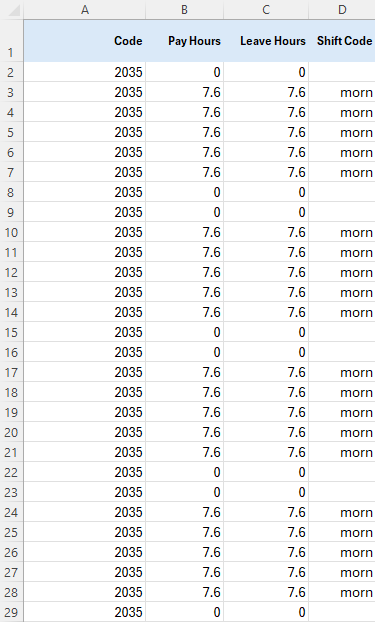
The following examples show Work Pattern Code and Work Pattern Details spreadsheets.
|
|
Things to note
|
Here we are loading only one work pattern which is for a standard 38 hour morning shift (and the payroll works on a 28 day calendar).
| Work Pattern Code | The Work Pattern Code spreadsheet has one line with the leave hours without certificate detail.
|
| Work Pattern Detail | The Work Pattern Detail spreadsheet has a line for each of the 28 days.
|

© 2023 Fusion5. All rights reserved.