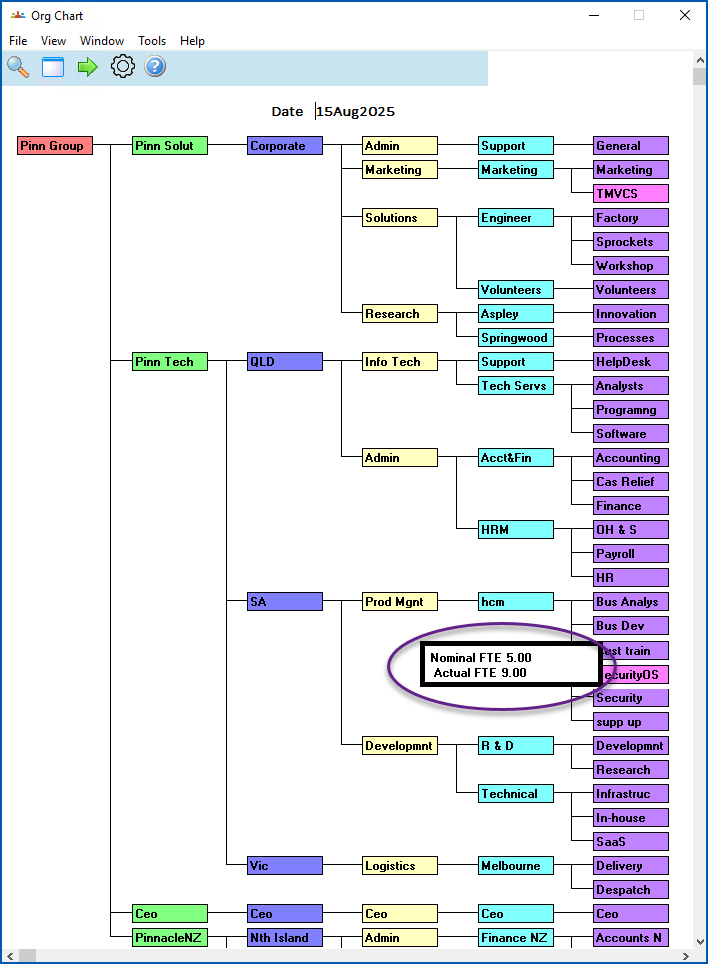
The desktop Org Chart is a visual display of the organisation structure.
The Chart provides a view of the structure as at a defined date, based on EmpowerHR records of structure changes and history.
To view the desktop Org Chart:
- Go to Tasks > Organisation > Org Chart.
- EmpowerHR displays the chart as at the current date.
- You can:
right-click a section to display the section's Nominal FTE figures (from the section code) and Actual FTE figures (from the employee). Right-click the section again to clear the display.
view projected future movements or see how your structure looked in the past, by simply entering the Date you want and pressing Enter.
© 2023 Fusion5. All rights reserved.