To update the agency record:
- Go to Administration > Agency Management > Agency Record.
- At the Agency Records screen, click Open.
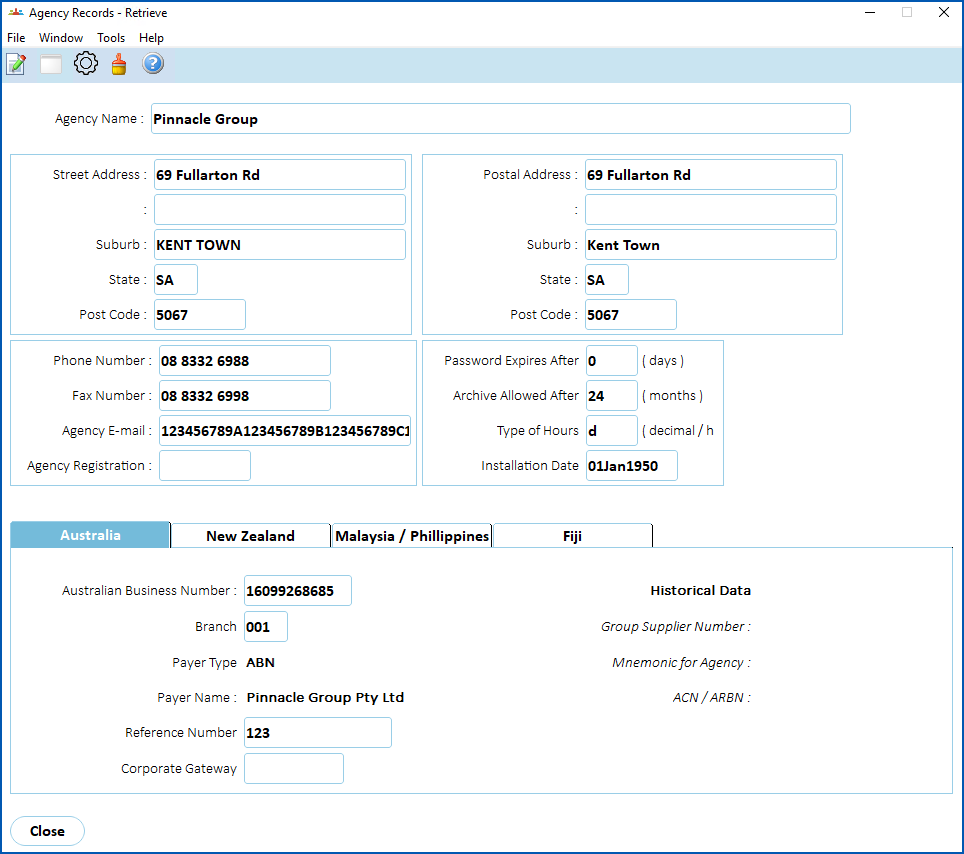
- Make your changes. See the following table for field descriptions.
| Field | Description |
|---|---|
Agency Name | Your agency's name |
Street Address | Your agency's address |
Postal Address | Your agency's postal address |
Phone Number Fax Number Agency E-mail | Your agency's contact details |
Agency Registration | Your agency's registration number |
Australian Business Number | Your agency's ABN used for taxation/payroll purposes - from the Supplier/Pay ABN record |
Branch | Your agency's ABN branch number - from the Supplier/Pay ABN record |
Payer Type Payer Name | Defaults from the Supplier/Pay ABN record |
Reference Number | Used for taxation/payroll purposes (optional) |
Corporate Gateway | Optional |
Group Supplier Number | Display only |
Mnemonic for Agency | Display only |
ACN/ARBN ACN = Australian Company Number. Every company in Australia is issued with a unique, nine-digit number when registered. ARBN = Australian Registered Body Number. A unique 9-digit identifying number issued to every registered Australian body upon registration. | Display only |
Password Expires After | Sets the number of days before forcing all user passwords to change |
Archive Allowed After | Sets the number of months transaction log data is retained - a minimum of 14 months and maximum of 99 months. |
Type of Hours | Sets your organisation's preferred way of expressing hours:
|
Installation Date | The date when EmpowerHR data is considered valid. Employee history will not be restored before this date. |

- Click Save.
© 2023 Fusion5. All rights reserved.