Periodically clearing old, unwanted job records from the Requested Jobs screen helps keep the system running efficiently. EmpowerHR's Delete Requested Jobs routine is a quick and easy way to do a cleanup.
And, if you want to retain some jobs for later review, no problem. You simply go to the Requested Jobs to Keep screen and flag those jobs so they are kept.
Maintain requested jobs
Keep the jobs you don't want to delete
To keep a job:
- Go to Background Jobs > Requested Jobs > Requested Jobs to Keep.
- At the Requested Jobs to Keep screen, click Find Now to list all existing background jobs.
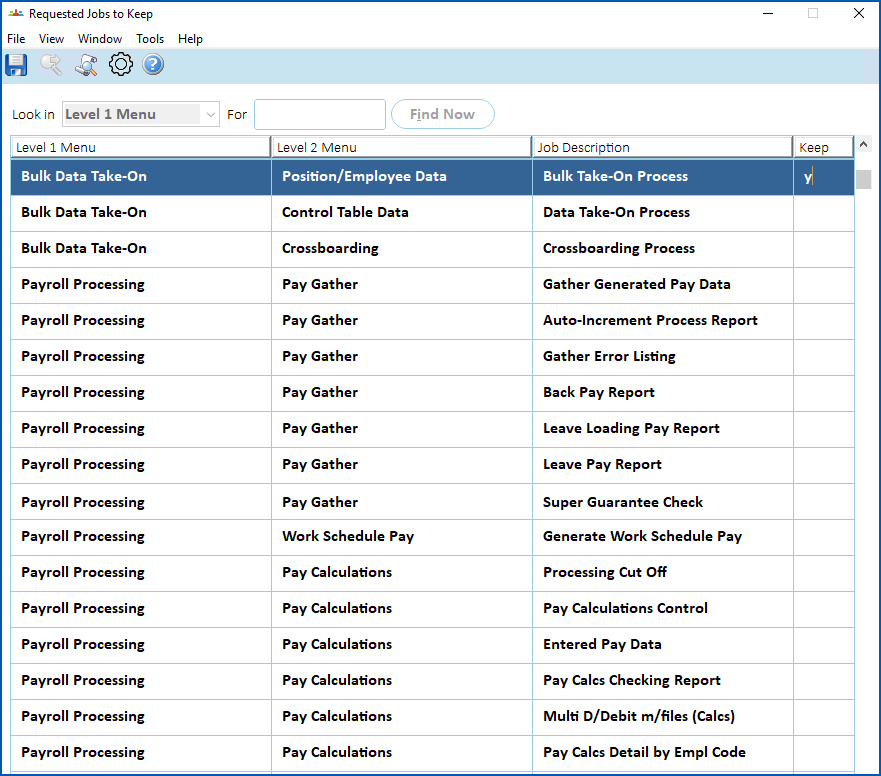
- Select a job you want to keep, and then enter y in the Keep column.
- Repeat this procedure, starting from step 3, until you've flagged all the jobs you want to keep.
- Click Save.
Delete the unwanted jobs
To delete unwanted jobs:
- Go to Background Jobs > Requested Jobs > Delete Requested Jobs.
- At the Delete Requested Jobs screen, in:
- Number of Months, enter how far back before today you want to clear the jobs
- Reports in Status, select the status of the jobs you want to clear (or select All Jobs) from the dropdown list
- By Operator, select yes from the dropdown list if you want to clear jobs you've run, or select no to clear jobs for all operators
- Delete Report Files, select yes from the dropdown list to clear report files, or select no to not clear them
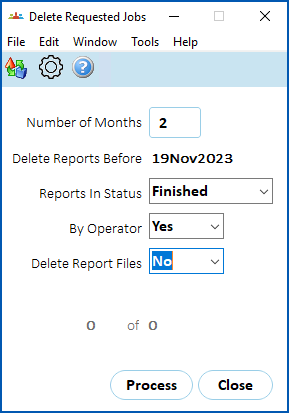
- Click Process. EmpowerHR clears (deletes) the jobs according to your selections/entries, and retains any jobs flagged to keep.
© 2023 Fusion5. All rights reserved.