To record an employee HDA  :

HDA = higher duties allowance, where when an employee is temporarily requested to perform all or some of the duties that normally form part of a higher-level position
- Go to Tasks > Employees > Temporary Movements > Higher Class Duties.
- At the Higher Class Duties summary screen, in Employee Code:
- enter the code if you know it, or
- click Window, find and double-click the code to add it to the field
- Press Tab. EmpowerHR displays the employee's temporary position movement records if any exist, otherwise the list is empty.
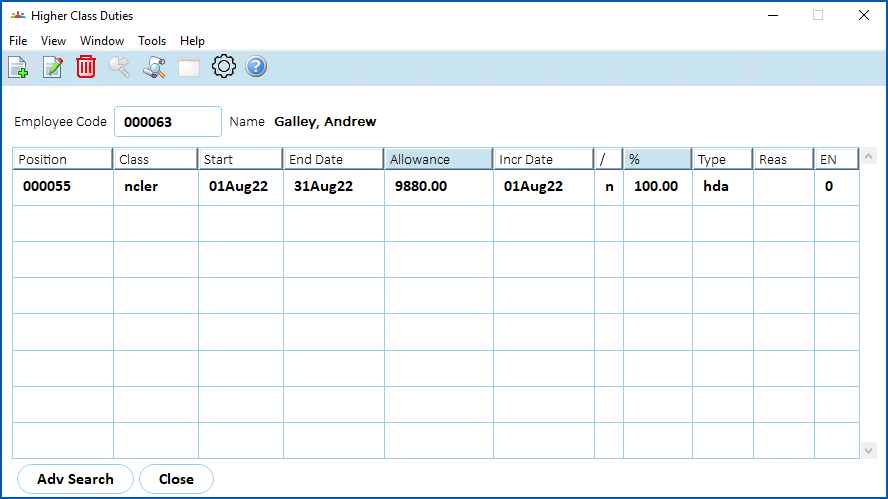
- Click New.
- At the Higher Class Duties (add) detail screen, complete the fields using the following table as a guide.
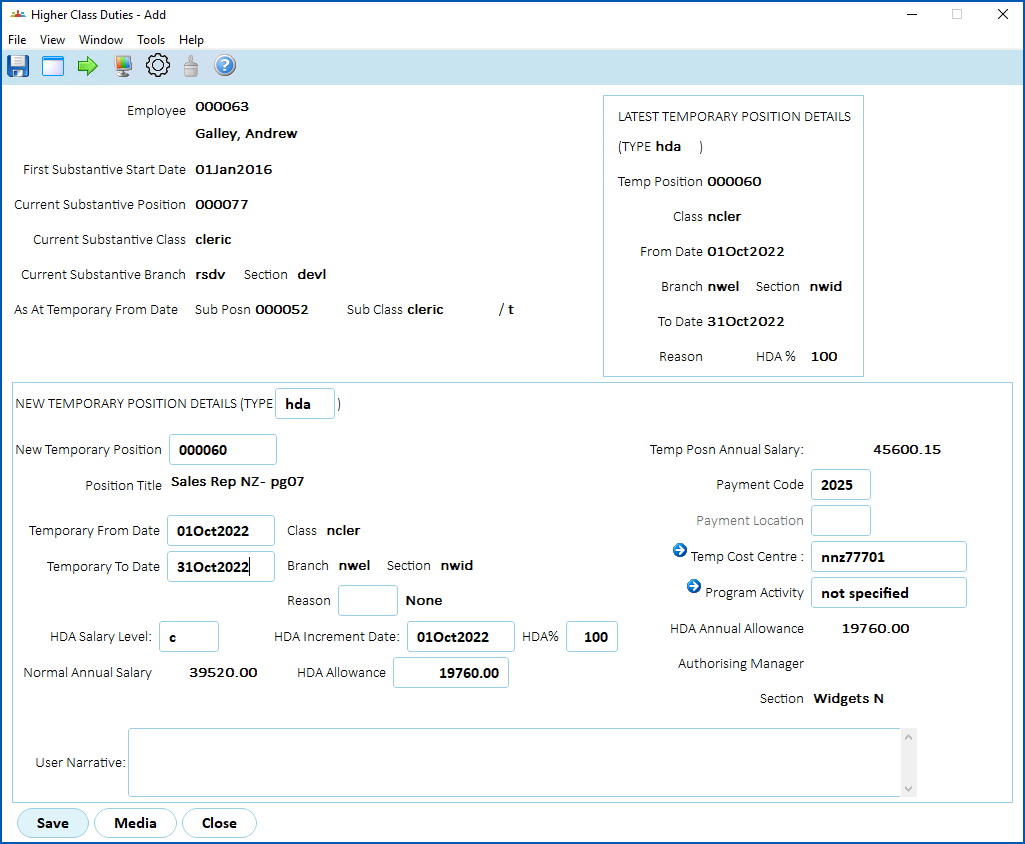
| Field | Description | ||
|---|---|---|---|
Employee | The employee number and, below it, the employee name. | ||
First Substantive Start Date | The date the employee commenced in their substantive position substantive position = the position to which an employee is permanently appointed | ||
Current Substantive Position | The number of the employee's current substantive position. | ||
Current Substantive Class | The employee's current substantive classification. | ||
Current Substantive Branch & Section | Where the employee's current substantive position resides in the org structure. | ||
Latest Temporary Position Details (several fields) | Details of the employee's most recent temporary movement. | ||
New Temporary Position | The position number of the temporary position. You can click Window, find and double-click the position number to add it to the field. EmpowerHR then displays the Position Title. | ||
Temporary From Date Temporary To Date | The start and end dates for the temporary movement.
| ||
Class Branch Section | When you press Tab after the Temporary To Date field, by default, EmpowerHR displays where the temporary position resides in the org structure. | ||
Reason | Does your organisation have a policy about whether it's compulsory for you to record a reason or not? EmpowerHR allows you to do any of the following:
| ||
HDA Salary Level | The incremental point within the temporary classification. This value defaults to the lowest level but allows you to override (change) it. See record a temporary movement for how higher duties are calculated. Leave the default value as is, or enter the correct level. | ||
HDA Increment Date | The expected date of the employee's increment at the temporary classification level. Enter the date, or leave the field blank. | ||
HDA% | The percentage of HDA to be paid. See record a temporary movement for how higher duties are calculated. Enter a value between 1 and 100. | ||
Normal Annual Salary | The employee's substantive salary. | ||
HDA Allowance | The annual HDA dollar amount. This field defaults with details in the higher duties calculation. See record a temporary movement for how higher duties are calculated. | ||
Temp Posn Annual Salary | The salary of the selected temporary classification and level. | ||
Payment Code | The default payment code for HDA. This is defined in on the establishment tab of installation constants. You can change the default payment code, if required. | ||
Payment Location | The employee's payment location. If it is different to the employee's substantive payment location, click Window, find and double-click the code to add it to the field. | ||
Acting Cost Centre | The cost centre the HDA is costed to. The field defaults to the temporary position's cost centre. Leave the default cost centre as is, or click Window, find and double-click a different cost centre code to add it to the field. | ||
Program Activity | This is an additional costing field, if required. Click Window, find and double-click a code to add it to the field, or leave the field blank. | ||
User Narrative | Enter explanatory notes about the movement in this field if you wish, or leave the field blank. |
- Click Save. The new HDA record is listed on the Higher Class Duties summary screen.
EmpowerHR creates a regular allowance record based on the information in the new HDA record. The regular allowance pays the employee HDA during the dates you specified, based on the trigger pay elements included in the trigger pay element code called Higher Duties Allowance (thda). You can view the allowance from the Employee Regular Allow/Dedn screen but can't change it from there.

|
The processing flag (/) column on the Higher Class Duties summary screen displays n whether the payment has been gathered or not. Gathering is an EmpowerHR process used to gather generated pay data; it's where the system flags the appropriate records to be processed/paid in a pay run. |
© 2023 Fusion5. All rights reserved.