When a recruitment system connects to EmpowerHR, it uses two web services to keep vacant positions and recruitment status in sync: GetVacantPositions and UpdateActivelyRecruitedPositions. This guide explains what happens at each step.
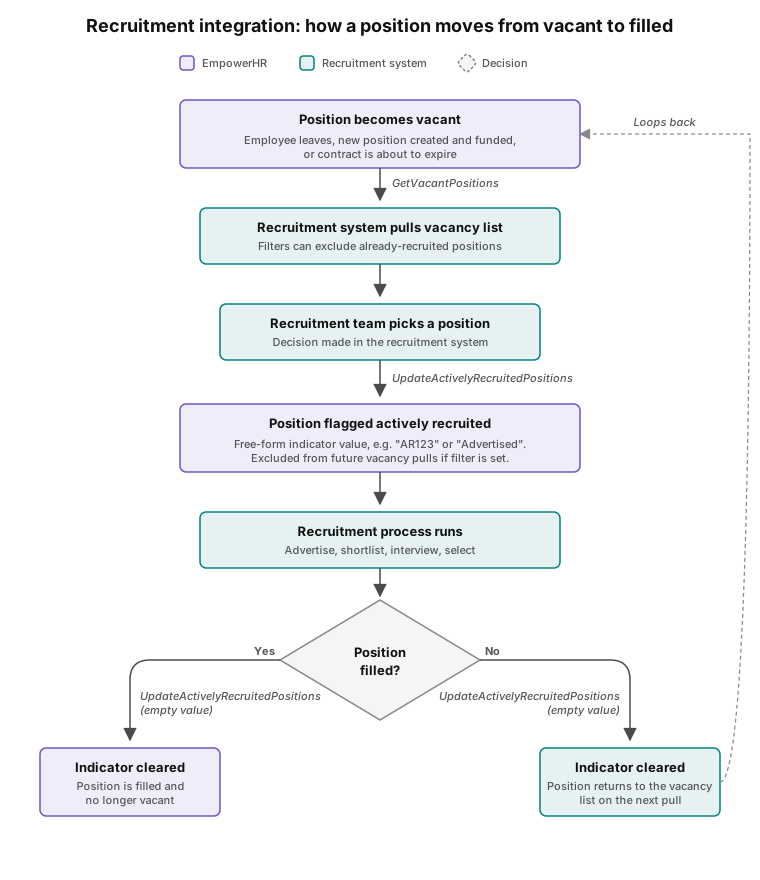
A position is vacant in EmpowerHR when no employee is assigned to it
Your recruitment system pulls the current vacancies from EmpowerHR through GetVacantPositions. EmpowerHR hides a position from the list when:
- The position has an active employee assignment.
- The position is abolished or made redundant.
- The position is marked as deleted.
- The position is non-funded and your recruitment system asks for funded positions only.
- The position is already being actively recruited and your recruitment system filters those out.
The "actively recruited" indicator marks positions your team is working on
Each position in EmpowerHR has an "actively recruited" indicator. When your team starts working on a position, your recruitment system writes a value to the indicator through UpdateActivelyRecruitedPositions. The value stays there until the recruitment system clears it.
The indicator accepts free-form text, so you can use any value that suits your process. A reference code like "AR123" or a status word like "Advertised" both work. Be consistent so EmpowerHR and your recruitment system read the same signals.
Your recruitment system clears the indicator when recruitment ends
When recruitment finishes, whether you filled the position or closed it unfilled, your recruitment system clears the indicator by sending an empty value through UpdateActivelyRecruitedPositions. EmpowerHR doesn't clear it automatically, so the clearing step needs to happen on your side.
Actively recruited positions can be filtered out of future vacancy pulls
When your recruitment system calls GetVacantPositions, it can pass in a value to exclude. Any position with that exact value in its indicator stays off the list. Mark positions with "AR123" while you're recruiting, then pass "AR123" on the next pull, and those positions won't reappear as new vacancies.
The indicator is visible on the Position screen in the EmpowerHR Desktop
The indicator lives in the User Field 1 column on the position maintenance screen, stored against the position in the hr_usr1_fild column. Recruitment teams don't usually need Desktop access - the value is set and read through the web service - but a payroll or HR administrator can check or clear it there if needed.
Positions with contracts about to expire can be included in the vacancy list
If your recruitment system asks for contract-expiring positions, EmpowerHR returns positions with a contract end date within your date range alongside the fully vacant ones. This lets your team start recruiting before the position becomes vacant.
You can update many positions in a single call
UpdateActivelyRecruitedPositions supports bulk updates, so a single call can set or clear the indicator on many positions at once. Larger recruitment rounds don't need a separate call per position.
Errors on one position don't stop the others in the same request
If your recruitment system tries to update a position that doesn't exist, is deleted, or is outside the valid date range, EmpowerHR returns an error for that position and the update doesn't apply. The other positions in the same request still update as usual.
For help, log an iHelp request
Fusion5's customer support team can help with setup, authentication, connectivity, position data issues, and unexpected behaviour in the vacancy list. Contact us by logging an iHelp request.
Next topic |
|---|
© 2023 Fusion5. All rights reserved.