Adjust flexi time balances
You can adjust flexi time balances for an employee's most recent approved timesheet.
To adjust flexi time balances:
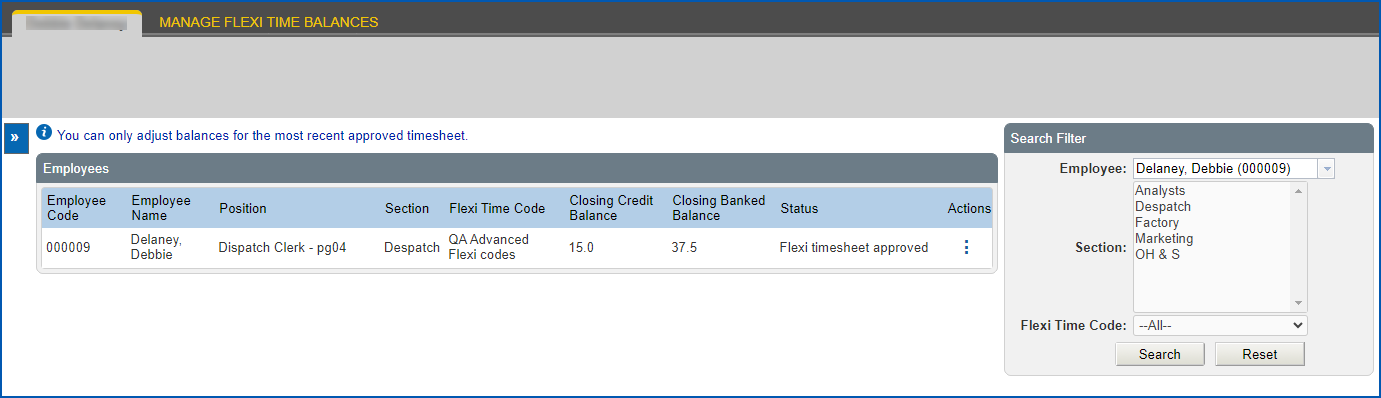
- Go to Flexi Time > Administration > Manage Flexi Time Balances.
- At the Employees catalogue, go to the Search Filter and
at Employee, enter the employee’s surname (as you type, any names that match your entry display in a dropdown list to choose from), and then click Search. EmpowerHR retrieves the employee's last submitted timesheet.

|
If the employee does not have:
|
- Click Actions, and then select Edit from the menu.
- At Flexi Balances, enter the adjusted hours in one or both of the following fields:
- Closing Credit Balance
- Closing Banked Balance
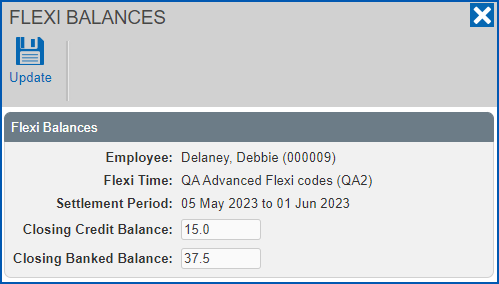
- Click Update. Your changes will update the opening balance of the employee's next timesheet in the next settlement period.
© 2023 Fusion5. All rights reserved.