You need to create leave elements for:
- flexi credit leave
- flexi banked leave
To create a new leave element:
- Go to Control Tables > Leave > Leave Element Codes.
- At the Leave Element Codes summary screen, click Find Now to see a list of existing leave element codes.
- Click New.
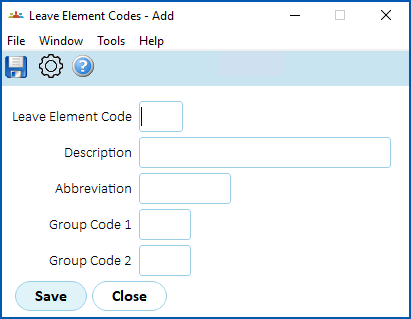
- At the Leave Element Codes detail screen, complete the fields using the following table as a guide.
| At this field... | Do this... | ||
|---|---|---|---|
Leave Element Code | Enter the code for the leave element, While you can make up your own code, we recommend you use the following codes. For:
| ||
| Description | Enter a descriptive name for the leave element (up to 30 characters), for example, Flexi Banked Leave | ||
| Abbreviation | Enter a meaningful abbreviation of the leave element (up to 10 characters), for example, Flexi Bank | ||
| Group Code 1 - Group Code 2 | N/A |

- Click Save.
- At the Leave Element Codes summary screen, the new element is added to the top of the list. Click Next Level.
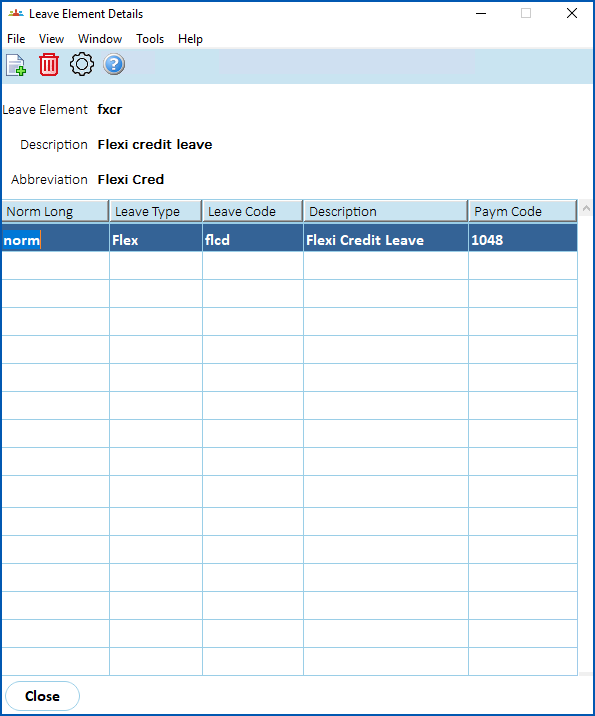
- The Leave Element Details screen displays.
- Repeat this procedure, starting from step 3, to set up the second, remaining leave element.
© 2023 Fusion5. All rights reserved.