Can I create an RDO payment (days taken) request?
As a manager, you can create an RDO payment (days taken) request on your employee's behalf. This type of request is only available in MSS.
There is no payment related to the request, it's simply a way to record RDOs taken.
Once you create and save a request, EmpowerHR finalises the request and updates the YTD days taken and balance amounts in the RDO Register. There is no further action required.
Create an RDO payment (days taken) request in MSS
To create an RDO payment (days taken) request in MSS: 
- Go to Requests > Relief and One-off Payments.
- At the Relief and One-off Payments catalogue, click New Request.
- At the initial Create New Relief and Payments Request screen, in:
- Employee Category, select Rostered Day Off from the dropdown list
- Payment Category, select a payment category from the dropdown list
- Date Worked, click Date Lookup and, at the calendar, select the date worked
- Employee, enter the employee's surname and then wait until the system responds with a list of employees with that surname. Select one from the dropdown list.
- Click Next.
- At the Create New Relief and Payments Request detail screen, enter the full (or partial) number of days in the Amount (Days) field.
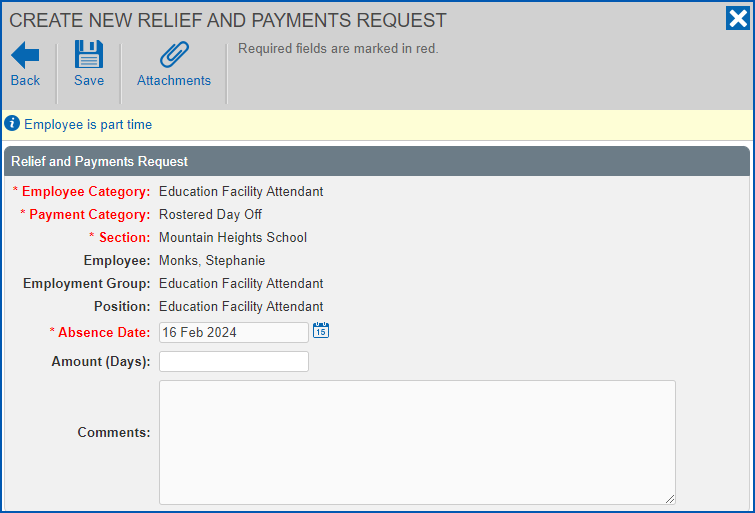
- Click Save. How the approval workflow is set up in your organisation determines whether the Workflow :: Addressee dialog box displays, or the request is automatically finalised.
- If the Workflow :: Addressee dialog box:
- does display, then go to step 8
- does not display, then finalise the request when EmpowerHR prompts you. No further action is required.
- In:
- Send To, select an approver from the dropdown list
- Comments, add a message (optional)
- Click Send To to submit the request for approval.
© 2023 Fusion5. All rights reserved.