When an employee’s ABN changes, the effective date is the current processing pay period start date in the:
- employee’s current payroll, or
- employee's new payroll code if it is changing. If the payroll code is changing, the date must be after the last completed date from the old payroll code so no overlap occurs.
You need to perform a pay calcs to pick up the ABN change. In the pay run, EmpowerHR determines if an employee's ABN has changed and the payroll has not been re-calculated. You cannot change a payroll code to that of a different country - you must terminate and re-employ the employee.
Make a retrospective payment
If you have any retrospective pay that needs to pick up an old ABN, enter a manual payment via a pre-paid batch with a back-dated payment date. To help with retrospective payments, go to Enquiries > Payroll > Pay Journal Enquiry. Here you'll see the employee's ABN that was current for the period.
View history of ABN changes
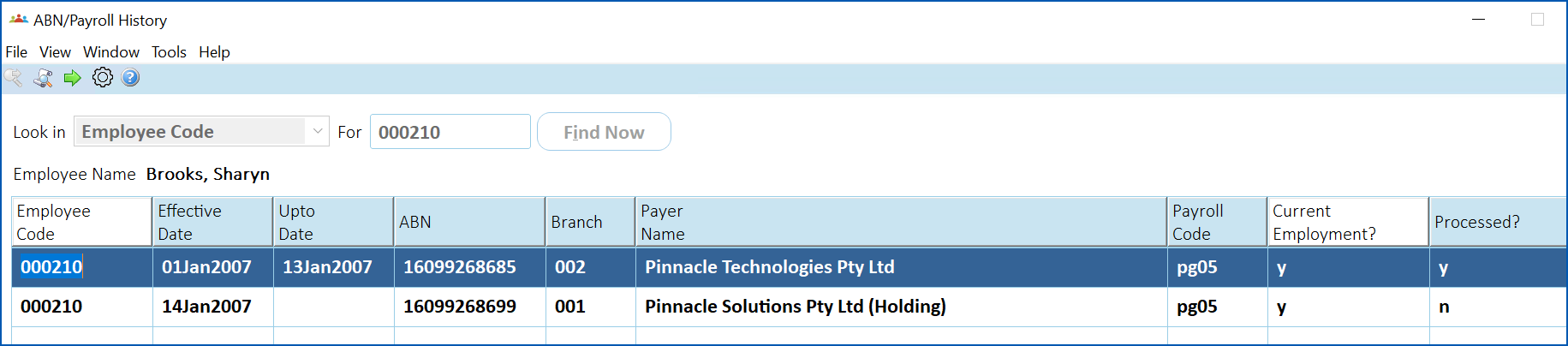
To view the history of an employee’s ABN changes:
- Go to Enquiries > Employee > ABN/Payroll History.
- At the ABN/Payroll History screen:
- select Employee Code from the Look in dropdown list
- enter the employee code in the For field
- click Find Now
- EmpowerHR displays the employee's ABN/payroll history.
© 2023 Fusion5. All rights reserved.