Run this report at the Pay Calculations stage to check for pay variances between the current and previous pay periods.
To run the catholic educ pay variation  report (xsch004k):

A variation occurs when an employee meets conditions for Formula 1 or Formula 2.
Go to Background Jobs > School > Schools Reporting > Catholic Educ Pay Variation.
- At the Catholic Educ Pay Variation screen, complete the fields using the following table as a guide.
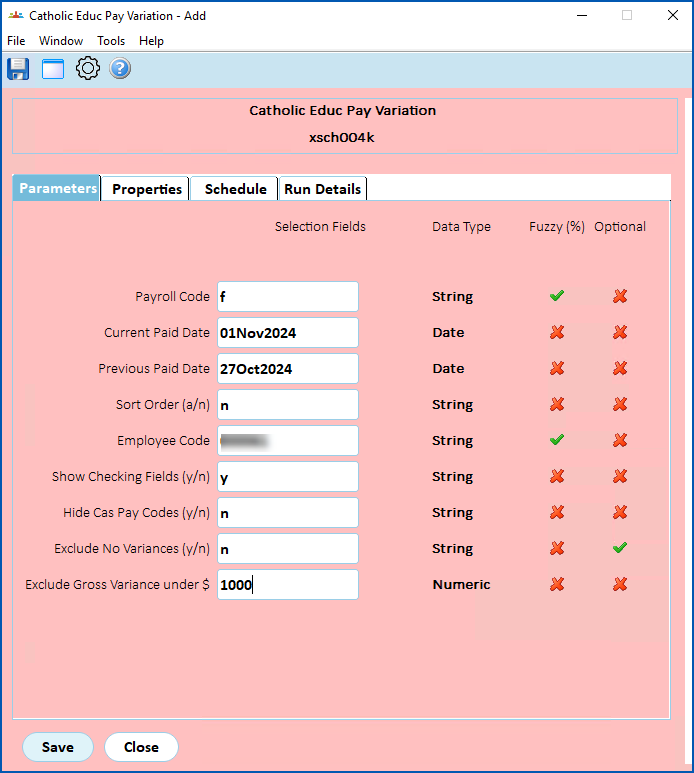
| At this field... | Do this... |
|---|---|
Payroll Code | Enter:
|
Current Paid Date | Enter the current paid date |
Previous Paid Date | Enter previous paid date |
Sort Code | Enter:
|
Employee Code | Enter:
|
Show Checking Fields (y/n) | Enter:
|
Hide Cas Pay Codes (y/n) | Enter:
|
Exclude No Variances flag (y/n) | Enter:
|
Exclude Gross Variance $ | Enter a dollar amount below which gross variances will be excluded from the report. |
- Click Save. EmpowerHR runs the report.
- Go to Background Jobs > Requested Jobs > Requested Jobs to see the report.
© 2023 Fusion5. All rights reserved.