EmpowerHR allows you to update regular transactions in bulk to update all current regular transaction records for a specified payment code. For example, you could use this function to update the super contribution amount in bulk.

|
If you need to apply an effective date and specified payroll, see bulk update date-effective regular transactions. |
To bulk update regular transactions (no effective date):
- Go to Tasks > Employees > Bulk Updates > Regular Transactions Update
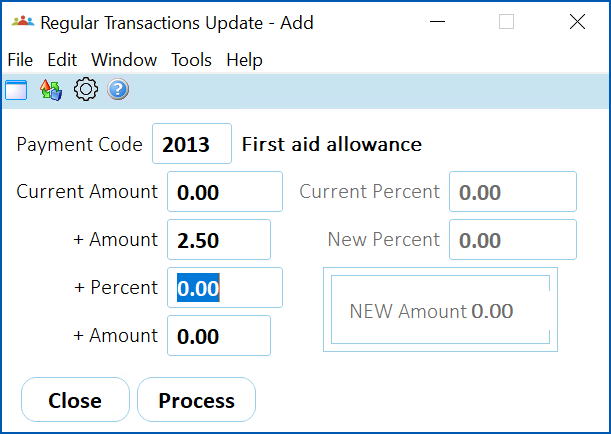
. - At the Regular Transactions Update - Add screen, complete the fields using the following table as a guide.
| At this field... | Do this... |
|---|---|
Payment Code | Click Window, find and double-click the code to add it to the field. |
Current Amount Current Percent | When you have selected a Payment Code and pressed Tab, EmpowerHR moves your cursor to either the Current Amount or Current Percent field. This depends on how the Percentage Calculation field on the payment code is set. If it's set to:
|
+ Amount + Percent + Amount New Percent | Enter the new dollar amount or new percentage amount. |
New Amount | Nothing. This is a display only field. |
- Click Process. EmpowerHR overrides all current regular transaction records that match the details you specified.
© 2023 Fusion5. All rights reserved.