
Would you like to take advantage of EmpowerHR's feature for adjusting leave balances? Start a discussion now - contact us by logging an iHelp request.
Run this report provided you've:
- set the Proportion flag to y (yes) on the leave rules sequence screen
- run leave accruals
Case study: when leave balances need to be adjusted XYZ Australia give their workforce 150 hours leave up front on 1 January each year. Of course, any employee might experience changes throughout the year. For example:
XYZ can, as often as needed, run leave accruals and then run the adjust leave balances report so leave balances are proportioned correctly for employees like Shivani, Maaz, and Will. |
To run the adjust leave balances report (legpleav):

Go to Background Jobs > Leave > Adjust Leave Balances.
- At the Adjust Leave Balances based on Movements screen, enter the report parameters using the following table as a guide.
| At this field... | Do this... |
|---|---|
Leave Start Year | Enter the leave start date based on the specific entitlement date on the leave rule. For example, 01Jan2022 |
Payroll Code | To run the report for:
|
Employee | To run the report for:
|
Leave Type | Enter a valid leave type code if you know it, or Click Window, find and double-click the code to add it to the field. |
| Leave Code | Nothing. This field is populated based on the Leave Type you selected. |
| How it works | When:
|
| Example |
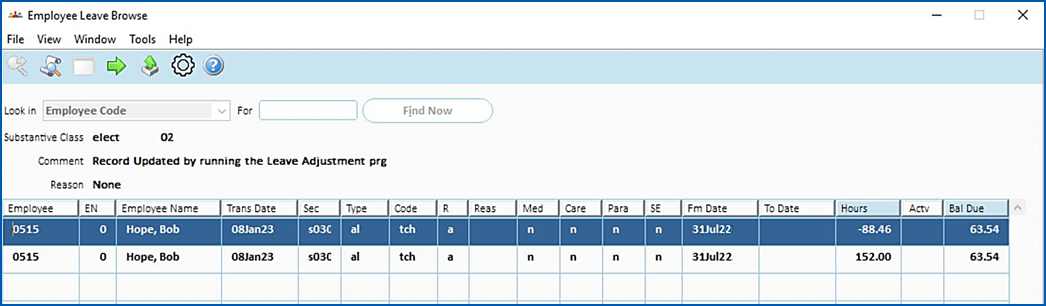
Bob Hope started on 1 August 2022. The accruals are run and he receives 152 hours on this date. Once the Adjust Leave Balance report is run, EmpowerHR recalculates and proportions the leave balance using the employee’s start date. The report creates the adjusting accrual and updates the employee’s entitlement.
|
© 2023 Fusion5. All rights reserved.