You can assign specific training requirements and qualifications to a position. Specifying these requirements is useful for both the recruitment process and identifying the training an employee needs.
To add skills requirements:
- At the Create Positions summary screen, select the position, and then click Skills Requirements.
- EmpowerHR displays the Skills Requirements summary screen.
- Click New.
- EmpowerHR displays the Skills Requirements - Add details screen.
- In File Code, click Window, find and double-click a code to add it to the field.
- Tab to the Comments field. EmpowerHR populates the Skill Code field based on the file code you selected.
- Enter a Comment, if you wish, and then press Tab.
- In Proficiency Level, click Window, find and double-click a code to add it to the field. Press Tab.
- In Critical Level, enter a value (as determined by your organisation), or leave this field blank.
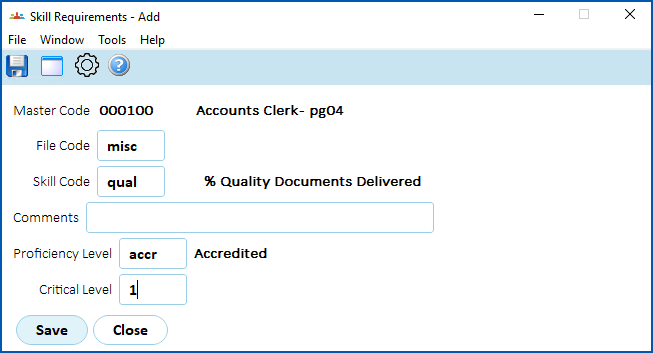
- Click Save.
- EmpowerHR displays the Skills Requirements summary screen, listing the requirements you added.
- Repeat this procedure, starting at step 3, until you have added all the relevant requirements to the position.
- When you're finished, click Close.
© 2023 Fusion5. All rights reserved.