In ESS, you can view the assignments you are offered and respond (accept or decline).
To accept or decline a casual relief assignment:
- Go to Casual Relief > Assignments.
- EmpowerHR displays the Assignments screen.
- The Status field shows whether a vacancy has already been filled or is still vacant.
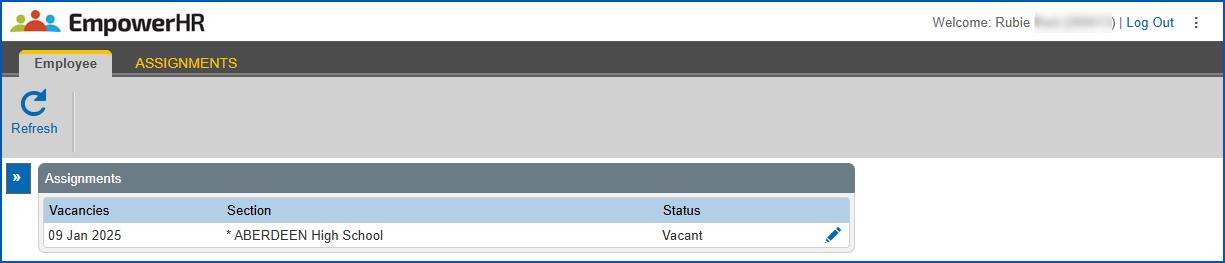
- At the row showing the vacancy (assignment) you want to respond to, click Change.
- EmpowerHR displays the Update Assignments screen.
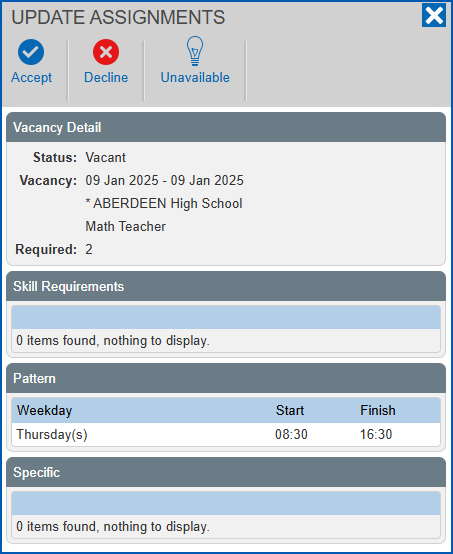
- Click one of the following to respond to the offer:
- Accept to accept the offer (alternatively, you can contact the school directly about the offer)
- Decline to turn down the offer
- Unavailable to show you are unavailable at the time of the assignment and unable to accept the offer
- EmpowerHR changes the vacancy status on the Assignments screen.
© 2023 Fusion5. All rights reserved.