- Work pattern matching rows not visible: ihelp 288668 #12025
- User interface - SAASU file maintenance screen over-extended: emp-5659
- Leave bookings - error message displays when it shouldn't: ihelp 288668 #12025
- Leave rules screen - black band displays on right-hand side: emp-5944
- Screen painting - help text to flowing through to screens: emp-790
- Relief and payments - report columns not aligned: emp-7051
- Conditions change screen - CTRL+T doesn't clear employee number: ihelp 393244, 396779 #13104
- Auto event definition screen - CTRL+T doesn't clear employee number: emp-8046
- Truncated position type: ihelp 374627 #128222
- Work pattern enquiry screen shows multiple records with same start and end dates: ihelp 368705
- Employment & salary enquiry screen shows former positions with same start and end dates: ihelp 331928
- Additional information screen - details not loading (global variable not initialised): ihelp 390862
- Blank square displays at top right of screens: emp-7214
- Tax scale - loading new staff: ihelp 435098 #13452, 442476
- Higher class duties screen - active temporary position annual salary displays as 0: ihelp 276027
- Back-paying super not paid to current fund: ihelp 388880
- Event processing - unable to differentiate messages: ihelp 415962
- STP 2 - PDE after termination - unable to select income stream and process termination payment: ihelp 437132
- Extract program output - not picking up terminated employees, employees with future start dates: ihelp 453100
- Self service leave requests defaulting to double (200%) pay rate: ihelp 478547
- Position-based forms workflow stream - does not use selected position number on form: emp-1057
- Employee self service - cannot view records for current employees: ihelp 354049 #12864, 3504073 #12877
- Employee self service - future movement staff not showing: ihelp 372683 #12955
- Employee self service - security job performance issues: emp-8133
- Email address fields limited to 30 character: ihelp 362017
- Compliance registrations - selecting compliance registration in workflow audit
- Multiple employments - reports to addressee doesn't work when progressing workflow: ihelp 397551
- Position-based forms - appears in dropdown list of employee-based fields: emp-7477
- STP 2 - ambiguous tax treatment error message - employee termination payments (ETP): emp-7501
- STP 2 - STP payment type does not clear: ihelp 442135 #13491
- Pay master enquiry - unable to filter by classification: ihelp 443250 #13505
- STP 2 - running pay history reconciliation checking report sticks: emp-8049
- Paid certification - paid date not showing on expanded workflow: emp-8085
- STP 2 - checking report not balancing: ihelp 463015
- Leave loading for multiple employees - incorrect allowances: emp-8096
- STP 2 - unable to run submit event after the end of the financial year: ihelp 465952
- Date effective regular trans screen - new amount field maximum value: ihelp 467155
- Flexi timesheets - unable to find take-on balance (employee's first settlement period): emp-8156
- STP 2 - unable to run update event for specific employees and include terminated employees: emp-8185
- Pay certification - pre-process fails: ihelp 470887
- Template access - turning off access does not cascade to child functions: emp-8220
- Payment codes - active extra units: ihelp 390969 #13072
- Pay certification - workflow to wrong approver: ihelp 480194
- Flexi timesheets - unable to create a flexi timesheet for the first time: emp-8503
- Compliance registrations - NESA labels for different proficiencies: emp-6916
- Super calculation incorrect when balance deduction ends: ihelp 380851
- Missing employees: ihelp 481575
- Desktop alerter - change parent code to prevent potential crashes: emp-7877
- Desktop alerter - change expiry date (future date) error to warning: emp-6952
- Compliance - status changed on column does not update: emp-7908
- Compliance - employees with end-dated lowest employment cannot raise requests: emp-7954
- Compliance registration dashboard - performance issues, chart behaviour, reset changes: emp-7956. emp-7976
- Compliance manager report export - merged cells: emp-7834
- Demographics - screen painting - field duplication: emp-7862
- Demographics - screen painting - help text path failure: emp-7864
- Demographics - screen painting - last update date field not set to read only: emp-7866
- Demographics - implemented date and date last reviewed fields validation: emp-7870
- Demographics - onboarding imported carer's responsibility value failure: emp-7881
- Demographics - query manager - demographics information issue: emp-7920
- Demographics - incorrect field location and default section title: ihelp 455058
- Demographics (oracle installations) - blank main language spoken at home field can cause errors: ihelp 457414
- Flexi time - validation error/warning messages incorrectly contain database column names: emp-7497
- Flexi time - define settlement periods screen - reset: emp-7552
- Flexi timesheets - no warning when submitting timesheet with less than minimum flexi hours: emp-7590
- Flexi time - define settlement periods screen - unexpected change in settlement period status: emp-7601
- Flexi time - inconsistent label names: emp-7658
- Flexi timesheets - cannot create timesheets for future open settlement periods: emp-7670
- Flexi timesheets - work pattern hours duplicated: emp-7766
- Flexi timesheets - approved timesheets remain on pending requests list: emp-7810
- Flexi timesheets - flexi credit and flexi banked balances display 0.00 on approved timesheet: emp-7868
- Flexi timesheets - incorrect flexi accrued value in last timesheet row: emp-7880
- Flexi timesheets - flexi credit and flexi banked closing balances carry forward incorrect values: emp-7891
- Flexi time - define settlement periods screen - incorrect screen header change: emp-7428
- Flexi time - define settlement periods screen - incorrect search result when year has no data: emp-7434
- Flexi time - define settlement periods screen - calendar year column required: emp-7440
- Flexi time - define settlement periods screen - invalid label in warning message: emp-7449
- Flexi time - define settlement periods screen - delete settlement period error: emp-7602
- Flexi time - define settlement periods screen - unable to use period other than four weeks: emp-7836
- Flexi time - define settlement periods screen - calendar year defaults incorrectly: emp-7937
- Flexi time - define settlement periods screen - calendar year search field has unwanted space: emp-7525
- Tax details - selecting a tax scale with STSL and setting the STSL flag doubles up on tax: emp-7174
- STP 2 - payment type p payment codes (non taxable) not included in payer period totals: emp-7450
- STP 2 - reporting super liability values missing true SGC values in STP file: ihelp 447372
- Scheduled jobs and dynamic dates - error occurs: ihelp 443228 #13504
- Unidentified operator in employee/pay code browse: ihelp 338034 #12828
- Unable to crossboard (via a spreadsheet) if the old position has been end-dated: ihelp 447062
- When onboarding via bulk take-on (or API), tax treatment code is incorrect: emp-7928
- RBF mercer spectrum process crashes (crirbfms): ihelp 461441
- Compliance dashboard - missing registrations search displays employee code instead of name: emp-8076
- Saved report output format does not default to the selected value: emp-8051
- Pay certification - temporary approver column not displaying with pagination: emp-8252
- Pay certification - export button error: emp-8253
- Compliance registrations - issue 16 - windows disappear when opening an attachment: emp-7610
- Compliance registrations - screen painting data missing and unknown field: emp-7697
- Compliance registrations - duplicate certificates in bulk upload: emp-7832
- Flexi time - define settlement periods - can't create new settlement period for fresh flexi code: emp-7942
- STP 2 - paid dates id incorrectly compared to submission id: emp-7360
- STP 2 - unable to update income stream: emp-8084
- STP 2 - warning messages for income stream rules not printing in the log: emp-8106
- Leave - incorrect leave pay percentage after submitting leave request: ihelp 449720
- EmpowerHR database view (MSSQL only): emp-8041
- Self service reports do not return any data: ihelp 479877
- Post-2023 release qmvecost view - does not return all information: emp-8607
- Payslip displays in ESS while pay is running: ihelp 456158 #13738
- Email address validation not optional: ihelp 412321
- Resolved integration issues
- TimeFiler - part-time employee shows as full-time: ihelp 254618 #13377
- EmpowerHR and MyWorkplace - leave request integration problematic: emp-7980
- EmpowerHR-MyWorkplace integration - future leave requests not displaying after pay run: ihelp 32085
- Upgrade error message occurs when running SAFFE super file: ihelp 463557
- AECOM oracle interface - incorrect user name assigned for some employees: emp-8117
Work pattern matching rows not visible: ihelp 288668 #12025
iHelp: 288668 #12025
EMP-3830
Reported by: Department of Health and Human Services (DHHS)
Issue
Located at:
Control Tables > Calendars > Work Pattern Codes
When performing Work Pattern Matching, if the number of work pattern codes matching the hours worked selection criteria is more than four (rows), the user is unable to see all the rows.
Resolution
The error has been corrected so all rows resulting from work pattern matching are visible.
User interface - SAASU file maintenance screen over-extended: emp-5659
EMP-5659
Reported internally (Fusion 5)
Issue
Located at:
Administration > Agency Management > SAASU Files Management
When the user clicks Find Now to populate the screen, and then clicks  (next) to view details, the next screen displays over-extended on the right-hand side.
Resolution
The code has been corrected so the screen displays as it should.
Leave bookings - error message displays when it shouldn't: ihelp 288668 #12025
iHelp: 408148 #13261
EMP-7122
Reported by: Department of Fire and Emergency Services (DFES)
Issue
Located at:
Tasks > Leave > Leave Bookings > Employee Leave Bookings
When trying to enter another leave booking from the same screen as a previous booking that was changed, the following error message displays when it shouldn't:
Leave reason is invalid
Resolution
The code has been corrected so the error message appears in the correct instance.
Leave rules screen - black band displays on right-hand side: emp-5944
EMP-5944
Reported internally (Fusion 5)
Issue
Located at:
Tasks > Leave > Leave Rules
The Leave Rules detail screen displays a black band down the right-hand side of the screen.
Resolution
The black band no longer appears and the screen has been made wider and taller to accommodate more fields.
Screen painting - help text to flowing through to screens: emp-790
EMP-790
Reported internally (Fusion 5)
Issue
Located at:
Administration > Screen Management > Screen Painting
Help text defined in screen painting is not flowing through to fields in the relevant screens.
 | Self service forms are missing the paint help tag which actually generates the help text. |
Resolution
Functionality has been added to automatically attach the help tag to a field where field help is available. Help text defined in screen painting now displays for all required fields.
Relief and payments - report columns not aligned: emp-7051
EMP-7051
Reported internally (Fusion 5)
Issue
Located at:
Administration > Relief and Payments > Reports
The Relief listing report columns do not align properly. The alignment was affected with the addition of the Absence Date column.
| In report building, the width of one column is the starting x coordinator of another column. This was not changed when the Absence Date column was added. |
Resolution
A change has been made to make sure, for each column in the report building code, the width of the preceding column is starting x coordinate of the following one.
Conditions change screen - CTRL+T doesn't clear employee number: ihelp 393244, 396779 #13104
iHelp: 393244, 396779 #13104
EMP-6744
Reported by: Department of Fire and Emergency Services (DFES), and Telethon Kids Institute
Issue
Located at:
Tasks > Employees > Position Movement > Conditions Change
When the user:
- opens the Conditions Change screen, the cursor is not positioned in the Employee Code field
- clicks Ctrl +T to clear data from the Conditions Change screen, the screen refreshes but the Employee Code field does not clear
Resolution
Changes have been made so the:
- Employee Code now clears when the user clears the table (Ctrl +T), and the cursor is positioned in the field
- cursor is positioned in the Employee Code field when the user opens the screen
Auto event definition screen - CTRL+T doesn't clear employee number: emp-8046
EMP-8046
Reported internally (Fusion5)
Issue
Located at:
Administration > Automatic Event Management > Automatic Event Definition
The user is allowed to enter and save an invalid or incomplete symbolic name in the Send Notification To and Escalate To fields on the Auto Event Definition detail screen.
For example, validation:
- considers $ Manager to be a valid symbolic name even though there is a space between $ and Manager
- does not check symbolic name is ended with a semi-colon
- does not check for missing @ sign in the entered email address, for example, test.gmail.com
Resolution
The validation program has been rectified to perform the correct validation.
|
If incorrect data has been previously saved, when users do any updates now, the system will require them to fix the incorrect data. |
Truncated position type: ihelp 374627 #128222
iHelp: 374627 #128222
EMP-6114
Reported by: Department of Communities (DoC)
Issue
Located at:
Tasks > Establishment > Positions > Create Positions
The Position Type column details are truncated.
Resolution
The Position Type column has been adjusted to match with the data it displays.
Work pattern enquiry screen shows multiple records with same start and end dates: ihelp 368705
iHelp: 368705
EMP-6081
Reported by: Catholic Schools Office Diocese of Maitland-Newcastle (CSOMN)
Issue
Located at:
Enquiries > Employee > Work Patterns
Where an employee has multiple movements with the same effective date, the Work Patterns enquiry screen should only display the last record for the Employment Effective Date. Instead, multiple movement records are showing for the same Employment Effective Date.
Resolution
Selection criteria have been changed to include only active records for the given employee.
Employment & salary enquiry screen shows former positions with same start and end dates: ihelp 331928
iHelp: 331928
EMP-5864
Reported by: Catholic Schools Office Diocese of Maitland-Newcastle (CSOMN)
Issue
Located at:
Enquiries > Employee > Employment & Salary
The Employments & Salary screen shows condition movement record which has the same Start and End dates. These records should not appear as they are inactive.
Resolution
Selection criteria have been changed to include only active records for display in the Former Positions table.
Additional information screen - details not loading (global variable not initialised): ihelp 390862
iHelp: 390862
EMP-6701
Reported by: Department of Communities (DoC)
Issue
Located at:
Tasks > Establishment > Positions > Create Positions
When creating a new position, the Position No and attached position name-related details are not loading into the Additional Information screen.
Resolution
The global variables are now set from group menu tables, fixing this issue.
Blank square displays at top right of screens: emp-7214
EMP-7214
Reported internally (Fusion 5)
Issue
Located at:
Control Tables > Terminations > Termination Reasons
Background Jobs > STP > STP Files Generation > STP Payroll Event - Phase 2
Background Jobs > STP > STP Files Generation > STP Update Event - Phase 2
Toolbar background does not cover the width of the screen. A blank square displays at the top right of the screen. In one screen it also cuts off the Find button and icon bar.
Resolution
Code has been added to extend the toolbar background.Tax scale - loading new staff: ihelp 435098 #13452, 442476
iHelp: 435098 #13452, 442476
EMP-7521
Reported by: Department of Premier and Cabinet, and Drake
Issue
Located at:
Employment Information > Tax Information
When assigning the tax scale Tax Free Thrsh Claim LL + STSL (b) to a new employee, the tax scale changes to Tax Free Thrsh Claim LL + HECS (b)
The Tax Scale dropdown displays all the different descriptions of tax scale b as it has changed through the years. When the user saves their entries, the description displays the first name given to tax scale b.
Resolution
Changes have been made to ensure EmpowerHR displays the latest description for each distinct tax scale in the Tax Scale dropdown list.
Higher class duties screen - active temporary position annual salary displays as 0: ihelp 276027
iHelp: 276027
EMP-3703
Reported by: University of South Australia (UniSA)
Issue
Located at:
Tasks > Employees > Temporary Movements > Higher Class Duties
The Temp Posn Annual Salary field on the Higher Class Duties screen may display a zero value when opening the existing HDA records.
Resolution
A change has been made to stop the system from doing a re-calculation if the weekly hours are zero.Back-paying super not paid to current fund: ihelp 388880
iHelp: 388880
EMP-7806
Reported by: Department of Communities (DoC)
Issue
Located at:
Agency Management > Installation Options
Back paying Super pays into current fund (subp) - set to y (yes)
When this installation option was first implemented, EmpowerHR correctly generated super paid in a previous pay period (during the tenure of the employee’s old super fund) into their current super fund.
This is no longer the case and the system is trying to pay under the employee's old super fund code.
|
In pay calcs, when the installation option subp is set to y (yes), EHR only checks the backpay batch pebp. This was to make sure performance of the pay calcs remains. In this case, the generating transaction that caused the super payment was for a Higher Duties backpay. |
Resolution
In addition to backpay batch, pebp, EmpowerHR now also checks the following batches:
- fpr1 Retrospective payment for fixed amount (regular allowances)
- spr1 Retrospective payments which do not combine with trigger (regular allowances)
- spr2 Retrospective payments which would have combined with trigger, the original batch number is transferred to another field (regular allowances)
- spr3 As for spr2 but split into work days (regular allowances)
Event processing - unable to differentiate messages: ihelp 415962
iHelp: 415962
EMP-7235
Reported by: Department of Education, Children and Young People (DECYP), Tasmania
Issue
Located at:
Background Jobs > Daily Processing > Auto Event Processing (mspevent)
The error/status messages from the notification count update process are too similar to the auto complete process, making it very difficult to trace which process has generated the messages.
Event processing has the same message for notification count update and auto complete processes.
Resolution
Messages from the notification count update process are now prefixed with Notification Count, making them easy to identify.
STP 2 - PDE after termination - unable to select income stream and process termination payment: ihelp 437132
iHelp: 437132
EMP-7617, EMP-7699
Reported by: JWH Group, and O'Brien Glass
Issue
Located at:
Tasks > Payroll > Pay Data Entry > Pay Data Entry After Termin
The clients report the Income Stream dropdown (selector) list is blank and subsequently they are unable to process payment to a terminated employee.
Resolution
The standard include scripts have been added to the program and global variable properly set so user can now set Income Stream and complete processing successfully.
Extract program output - not picking up terminated employees, employees with future start dates: ihelp 453100
iHelp: 453100, project 42989
EMP-8239
Reported by: RM Williams
Issue
Located at:
Background Jobs > Extracts > RM Williams Extracts >RMW Employee Details
The RM Williams Employee Data Extract to StoreForce is not picking up:
- terminated employees
- employees with future start dates
|
|
Resolution
The selection of terminated employees has been separated from non-terminated employees so a terminated employee’s position will be based on the last position.
- Employees with a future start date are also picked up.
Self service leave requests defaulting to double (200%) pay rate: ihelp 478547
iHelp: 478547
EMP-8378
Reported by: Catholic Education Diocese of Bathurst (CEDB)
Issue
When creating a new leave request, the pay rate defaults to an incorrect option of double pay (200%). Since the pay rate selector field is hidden for most leave types, the incorrect default value of double pay, which is set behind the scenes, parses in every time a leave request is submitted. The correct default value for pay rate should be normal pay unless some other pay rate is selected from the list.
Resolution
The line of code that caused the system to re-sort the pay rate selector list has been removed.
Position-based forms workflow stream - does not use selected position number on form: emp-1057
EMP-1057
Reported internally (Fusion5)
Issue
Located at:
Administration > Forms
The workflow stream for position-based forms uses the position number and not the selected position number on the form. Also, it does not use the position establishment history record which it should.
Resolution
When getting the element, the workflow now also allows position establishment history to be used in case of position-based forms.
Employee self service - cannot view records for current employees: ihelp 354049 #12864, 3504073 #12877
iHelp: 354049 #12864, 3504073 #12877
EMP-5735
Reported by: Bendigo Kangan Institute (BKI)
Issue
Located at:
Employment > Employee History
Users are unable to view records in ESS.
Resolution
This issue is the same as EMP-6202. For more information, see the following issue, employee self service - future staff not showing.
Employee self service - future movement staff not showing: ihelp 372683 #12955
iHelp: 372683 #12955
EMP-6202
Reported internally (Fusion5)
Issue
Located at:
Staff > Staff Management
Employees with a future movement processed as part of the pay gather are not accessible from the Staff Management screen.
Resolution
The refactor of the ESS security job done under issue EMP-8133 removed the reference to the Employee/Position Master table so the employees now display. For more information, see the following issue, employee self service - security job performance issues.Employee self service - security job performance issues: emp-8133
EMP-8133
Reported internally (Fusion5)
Issue
The ESS operator security job prevents access to Self Service while the job is running. In the case of large clients, the time taken to finish the job is significant, preventing access during core business hours and in some cases the job not completing.
Resolution
The job has been refactored to use new security tables and a new view to improve performance. The new physical tables are ESS Operator Security Info and ESS Employee List Security Inf. The new view name is ESS Operator Security. The actual database table and view names can be obtained from the Fusion5 help desk if needed.Email address fields limited to 30 character: ihelp 362017
iHelp: 362017 #12901
EMP-6076
Reported by: Catholic Education Diocese of Wollongong (CEDoW)
Issue
Located at:
Agency Management > SAASU Files Maintenance
The following fields on the SAASU Files Maintenance screen only allow 30 characters so the client’s long email addresses don’t fit:
- Email Address for Failure
- Email Address for Success
Resolution
The email address fields now allow entry of up to 50 characters.Compliance registrations - selecting compliance registration in workflow audit
: emp-6747
EMP-6747
Reported internally (Fusion5)
Issues
Located at:
Administration > Workflow > Workflow Audit
Issue 1
The Request Type dropdown list does not list the options alphabetically.
Issue 2
The option field for querying the Status column is wider than the column, pushing the next option field for querying the Action column out of alignment with its column.
Resolution
Issue 1: The program has been fixed so the options in the Request Type dropdown list now display alphabetically.
Issue 2: The Status query field has been adjusted to a size similar to the Status column so alignment is now correct.
Multiple employments - reports to addressee doesn't work when progressing workflow: ihelp 397551
iHelp: 397551
EMP-6990
Reported by: AMES Australia
Issue
This issue occurs in the workflow Actions To Do.
Sometimes the incorrect workflow reports to addressee list is displayed when the person currently actioning the request has multiple employments. This can occur when:
- the request is initially returned to the employee, they are progressing it, and they have multiple employments
- a manager is creating a request on behalf of an employee, or a manager is approving a request, and they have multiple employments
Resolution
Now, when the current person actioning the request has multiple employments, a check is done to determine which employment/position should be used. This is done by checking the reports to hierarchy structure for the employee/employment/position related to the request.
Position-based forms - appears in dropdown list of employee-based fields: emp-7477
EMP-7477
Reported by: Department of Fire and Emergency Services (DFES)
Issue
Located at:
Manager > Staff Management
When the client switches on a position-based form, it appears in the dropdown list if you select a position, however it also appears when you select an employee.
The client is unable to stop managers from creating position type forms on behalf of employees via Staff Management.
Resolution
A new installation option called Allow creation and access of ‘position’ type forms from Staff Management (smpf) has been added to allow the client to exclude position-based forms from Staff Management. The default is to allow managers to access and create-position type forms on behalf of employees.
Here is how to switch on the new installation option:
- Go to Administration > Configuration > All Configuration.
- At the Configuration Items screen, expand the Self Service list, then expand Forms.
- Click Allow creation and access of ‘position’ type forms from Staff Management (smpf) and the selections display in the right-hand pane.
- Click y (yes), and then click Update.
For this procedure, see also:
EHR Self Service Forms Administration Manual in the Infusion Knowledge Base
STP 2 - ambiguous tax treatment error message - employee termination payments (ETP): emp-7501
EMP-7501
Reported by: Telethon
Issue
This issue occurs in the desktop when running the Single Touch Payroll (STP) phase 2 process in the desktop.
When an employee is terminated due to death, the STP phase 2 process is expected to give a warning in the log file, for example:
Employee e10105: When the Tax Treatment code is DBXXXX, a Cessation Type code of D and an ETP Type code of D, B, N, or T must be provided
…only ifthe employee has the following setup (based on the current STP rule #292):
| Tax treatment code | DBXXXX | |
Any of these listed Income Streams | SAW CHP IAA WHM SWP FEI | Salary and Wages Closely Held Payees Inbound Assignees to Australia Working Holiday Makers Seasonal Worker Program Foreign Employment |
Termination Reason - Cessation Type | D | Deceased |
Not any of these listed ETP type codes | B D M T | Split ETP Type N – death Dependent - death Non-dependent - death Trustee of Deceased Estate |
However, the warning is still included in the log file even though the Tax Treatment code is notDBXXXX.
Resolution
The warning message for STP rule #292 now only displays when the conditions (as described in the table above) are satisfied.STP 2 - STP payment type does not clear: ihelp 442135 #13491
iHelp: 442135 #13491
EMP-7684
Reported by: Peerless Foods
Issue
Located at:
Tasks > Payroll > Payment Codes
When the user changes the Include in STP? field to set it to n (no), where it was previously is set to y (yes), the system does not clear the STP Payment Type and Income Stream values.
Resolution
The program has been modified so now, when a user changes the Include in STP? field to n (no), the STP Payment Type and Income Stream values default to blank.
Pay master enquiry - unable to filter by classification: ihelp 443250 #13505
iHelp: 443259 #13505
EMP-7752
Reported by: Victorian Health Promotion Foundation (VicHealth)
Issue
Located at:
Enquiries > Payroll > Pay Master Enquiry
The Look in dropdown list on the Pay Master Enquiry screen doesn’t allow the user to select classification code or level for a filter item.
Resolution
The Classification Code and Classification Level filter options have been added to the Look in dropdown, and also appear as fields on the Advanced Search window.
STP 2 - running pay history reconciliation checking report sticks: emp-8049
EMP-8049
Reported internally (Fusion5)
Issue
Located at:
Background Jobs > STP > STP Pay Hist Rec Check Phase 2
The Crystal report, STP Pay Hist Rec Check Phase 2 (xstp006k), sticks when running it.
Resolution
A new build of the database upgrader has been provided to fix the wrong field type (Submission ID). The report now runs correctly.
Paid certification - paid date not showing on expanded workflow: emp-8085
EMP-8085
Reported by: Department of Communities (DoC)
Issue
Located at:
Organisation > Pay Certification
Organisation > Pay Certification Admin
Organisation > Pay Certification Audit
When the user opens the Pay Certification detail screen from any of the summary screens listed above, the paid date does not display.
|
The paid date was removed from the Pay Certification detail screens when the change to using the reports to structure was introduced. |
Resolution
The paid date is now displayed alongside the position title and number on the Pay Certification detail screens.
STP 2 - checking report not balancing: ihelp 463015
iHelp: 463015
EMP-8094
Reported by: Peerless Foods
Issue
Located at:
Background Jobs > STP > STP Reconciliation Reports > STP Checking Report - Phase 2
When employees have two legitimate Employment Termination Payment (ETP) payments (one type O and one type R), these values are not added together in the STP Checking Report – Phase 2 (crrstpck). This causes balancing issues for clients.
Resolution
The following now total for all ETP codes:
- ETP taxable
- EST tax free
- ETP PAYGW
Leave loading for multiple employees - incorrect allowances: emp-8096
EMP-8096
Reported internally (Fusion5)
Issue
When processing employees for leave loading payout, the allowances calculated as part of the leave loading payout include allowances from previous employees.
Resolution
The allowances amount for each employee has now been fixed for scenarios involving employees with and without Higher Duties Allowance for the leave loading payout period.
STP 2 - unable to run submit event after the end of the financial year: ihelp 465952
iHelp: 465952
EMP-8114
Reported by: Department of Fire and Emergency Services (DFES)
Issue
Located at:
Background Jobs > STP > STP Files Generation > STP Payroll Event - Phase 2
Background Jobs > STP > STP Files Generation > STP Update Event - Phase 2
An error occurs when running a STP 2 submit event when already in the next financial year and the Paid Date (STP Payroll Event) or As at Date is in the previous financial year. Here’s an example of the error:

|
The STP 2 process does not allow the user to run the:
|
Resolution
EmpowerHR now allows the STP payroll event or update event to be run for the previous financial year after that financial year has ended.
Date effective regular trans screen - new amount field maximum value: ihelp 467155
iHelp: 467155
EMP-8129
Reported by: A. A. Company Ltd
Issue
Located at:
Tasks > Employees >Bulk Updates > Date Effective Regular Trans
The New Amount field on the Date Effective Regular Trans screen needs to cater for values up to and including 9999.99.
Resolution
Changes have been made so the New Amount field now accepts values up to and including 9999.99.
Flexi timesheets - unable to find take-on balance (employee's first settlement period): emp-8156
EMP-8156
Reported internally (Fusion5)
Issue
Located at:
Requests > Flexi Timesheet
When fetching a take-on balance for a new flexi timesheet, the from date is always set to the day before the settlement period start date which is the end date of the previous settlement period.
Where an employee is using their first flexi timesheet, their take-on balance is for the date before the end date of the previous settlement period.
Resolution
The query has been changed to look for dates before the end of the previous settlement period if there is no take-on balance on that date.STP 2 - unable to run update event for specific employees and include terminated employees: emp-8185
EMP-8185
Reported internally (Fusion5)
Issue
Located at:
Background Jobs > STP > STP Files Generation > STP Update Event - Phase 2
When running the STP Update Event – Phase 2, the only way the user can capture terminated employees is by setting the All Employees parameter to y (yes). EmpowerHR should allow the user to run the STP Update Event – Phase 2 for specific employees including terminated employees, and provide clearer warning messages.
Resolution
EmpowerHR now allows terminated employees to be included in the process, and provides clearer warning messages to guide the user when entering parameters.
See also:
Pay certification - pre-process fails: ihelp 470887
iHelp: 470887
EMP-8209
Reported by: Department of Communities (DoC)
Issue
The pay certification pre-process fails.
|
There is an update statement that needs to be separated between Ingres and non-Ingres databases as the syntax for Ingres is different from Microsoft SQL Server (MSSQL) and Oracle. |
Resolution
The executable has been modified to cater for Ingres.
Template access - turning off access does not cascade to child functions: emp-8220
EMP-8220
Reported internally (Fusion5)
Issue
Located at:
Administration > Security > Templates
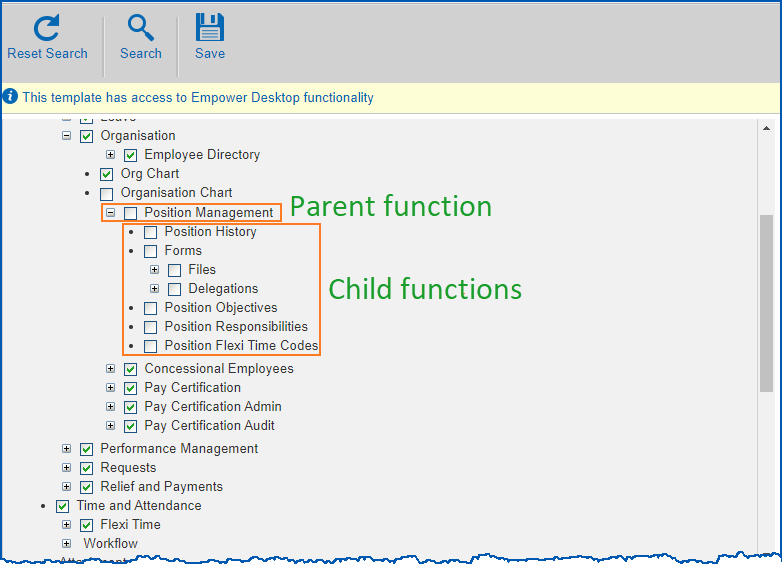
When turning off access to a function via the Template security access screen (clearing the checkbox beside the parent), the child functions remain on (checkboxes remain selected) when the function does not have any dependent security functions.
Resolution
Now, the system turns all child functions off when the parent function is turned off.
Payment codes - active extra units: ihelp 390969 #13072
iHelp: 390969 #13072
EMP-6690
Reported by: Department of Education (DoE)
Issue
Located at:
Tasks > Payroll > Payment Codes
When adding a new payment code, the system expects the user to enter a value in the Extra Units field.
Resolution
A change has been made to only validate/display Extra Units where the payment code is linked to a pay element.Pay certification - workflow to wrong approver: ihelp 480194
iHelp: 480194
EMP-8425
Reported by: Department of Communities (DoC)
Issue
Located at:
Desktop
Background Jobs > Payroll Processing > Payroll Output > Pay Certification Process
Self service
Organisation > Pay Certification
Processing of workflow happens when the pay certification process is run. When run before a new employee’s start date, the workflow directs the pay certification report to the wrong position for approval.
Resolution
This system has been changed to obtain the latest acting/substantive position from the position history. When the pay certification process is run, the workflow sends the approval request to the approver in the fallback position.
Flexi timesheets - unable to create a flexi timesheet for the first time: emp-8503
EMP-8503
Reported by: Department of Communities (DoC)
Issue
Located at:
Requests > Extracts > Flexi Timesheet
When an employee clicks New Request to create a flexi timesheet for the first time, even though there are open settlement periods for the assigned flexi codes, the employee cannot access the create screen. The following error occurs:

| Part of the query which gets the previous settlement period date checks for position history employee code and position history employment, constraints that did not belong to that particular part of the query. Instead, it check for flexi timesheet employee code and flexi timesheet employment. |
Resolution
A change has been made to the part of the query to check for flexi timesheet employee code and flexi timesheet employment instead of position history employee code and position history employment (which did not belong to that part of the select query).
Compliance registrations - NESA labels for different proficiencies: emp-6916
EMP-6916
Reported internally (Fusion5)
Issue
Located at:
Tasks > Compliance Management > Employee Registrations
Users may find the Valid From and Expiry Date labels for NSW Education Standards Authority (NESA) registrations (when the selected Accreditation Level is Conditional or Provisional) too generic, making it difficult to know exactly what to enter.
Resolution
The labels are changed as follows:
- Valid From is now called Maintenance Period Commenced
- Expiry Date is now called Maintenance Period Ends
Super calculation incorrect when balance deduction ends: ihelp 380851
iHelp: 380851 #12993
EMP-6384
Reported by: Catholic Schools Office Maitland-Newcastle (CSOMN)
Issue
Super calculation is incorrect when balance deduction ends.
|
Pay Calcs processing has a step to adjust the repayment amount after processing standard payments, which are based on the percentage deductions. |
Resolution
The process for adjusting the repayment amount has been moved to before processing standard payments. This now produces the correct result.
Missing employees: ihelp 481575
iHelp: 481575
EMP-8501
Reported by: Anglicare
Issue
Located at:
Staff > Staff Management
Several employees who recently finished Higher duties Allowance (HDA) do not appear.
Resolution
An error in the SQL statements has been corrected.
Desktop alerter - change parent code to prevent potential crashes: emp-7877
EMP-7877
Reported internally (Fusion5)
Issue
This issue originated from the desktop Alerter causing the application to crash.
Resolution
The code reference was corrected to prevent future application crashes.
Desktop alerter - change expiry date (future date) error to warning: emp-6952
EMP-6852
Reported internally (Fusion5)
Issue
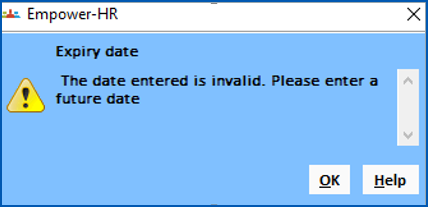
When accepting a new compliance request on the desktop Alerter, the Expiry Date error message should be a warning message to accommodate short expiry durations.
Resolution
The message has been changed from an error to a warning, resulting in a better user experience.
Compliance - status changed on column does not update: emp-7908
EMP-7908
Reported internally (Fusion5)
Issue
Located at:
Compliance Registration summary screen
After a new compliance registration has been approved, when the employee views the registration request in the Current Registrations list, the Status Changed On does not show the correct date and time.
Resolution
All functions that capture registrations have been changed to update the status date and status time.
Compliance - employees with end-dated lowest employment cannot raise requests: emp-7954
EMP-7954
Reported by: Catholic Education Canberra Goulburn (CECG)
Issue
When an employee has an end dated lowest employment before the creation of a compliance request, an error occurs.
Resolution
The error no longer occurs.Compliance registration dashboard - performance issues, chart behaviour, reset changes: emp-7956. emp-7976
EMP-7956, EMP-7976
Reported by: Catholic Education Canberra Goulburn (CECG)
Issue
Located at:
Compliance Registration > Compliance at a Glance tab / Reports tab
When managers with global access use the Compliance at a Glance screen, the data is slow to load and errors occur when re-ordering data.
Resolution
Page loading performance has improved. Ordering and pagination is performed on the server side to improve performance.
See the following description of other changes made in this EmpowerHR release.
On the Compliance at a Glance tab:
- the Registered status has been removed from the bar chart.
- when the user selects a registration type in the pie chart, the bar chart updates to show the status counts for the selected registration type, and now, the data in the current registrations table also updates to only show data for the selected registration type.
On both the Compliance at a Glance tab, and Reports tab:
- a new button called Reset is available to reset the screen to its initial loading state, that is, what users see when they open the tab.
Compliance manager report export - merged cells: emp-7834
EMP-7834
Reported internally (Fusion5)
Issue
Located at:
Compliance Registration > Reports tab
When exporting data from the Reports screen (or from the history), long employee names result in merged cells in Excel.
Resolution
The size of the column has been increased to display the employee name without the need to merge. The employee name has also been modified to ensure it is the same format as the screen’s.
Demographics - screen painting - field duplication: emp-7862
EMP-7862
Reported internally (Fusion5)
Issue
Located at:
Administration > Screen Management > Screen Painting
The configuration screen (Screen Painting) contains some items that are no longer used and may cause confusion to the Admin user.
Resolution
The old configuration items have been removed from Screen Painting.
|
The tab where the Gender field displays is dynamic. If the Demographics tab is set to:
|
Demographics - screen painting - help text path failure: emp-7864
EMP-7864
Reported internally (Fusion5)
Issue
Located at:
Administration > Screen Management > Screen Painting
On the configuration screen (Screen Painting), the help text path for demographics fields fails to retrieve any valid help content from source file.
Resolution
Help message has been corrected.
Demographics - screen painting - last update date field not set to read only: emp-7866
EMP-7866
Reported internally (Fusion5)
Issue
Located at:
Administration > Screen Management > Screen Painting
On the configuration screen (Screen Painting), the Last Update Date field is set to Enterable when it should be Read Only.
Resolution
The Last Update Date field is now corrected to Read Only.
Demographics - implemented date and date last reviewed fields validation: emp-7870
EMP-7870
Reported internally (Fusion5)
Issue
Located at:
Personal > Personal Details
On the Demographics tab, under Disability, the workplace modification Implemented Date and Date Last Reviewed fields do not follow defined User Interface (UI) design or business rules.
Resolution
Now the workplace modification Implemented Date and DateLast Reviewed are validated.
Demographics - onboarding imported carer's responsibility value failure: emp-7881
EMP-7881
Reported internally (Fusion5)
Issue
When onboarding employees, if the value supplied for the Carer’s Responsibility field is longer than four characters (and the database environment is either MSSQL or Oracle), the employee data insert fails.
Resolution
The incoming Carer’s Responsibility value is now truncated to a maximum of four characters so the database accepts it.
Demographics - query manager - demographics information issue: emp-7920
EMP-7920
Reported internally (Fusion5)
Issue
Located at:
Enquiries > Query Manager
In the Query Manager Catalogue pane:
- the Demographics Information node is located outside the Personal Information node
- when the user adds Demographics Information from the Catalogue to the Query data pane, the rest of the nodes under Employees > Personal Information disappear
Resolution
The folder code numbering has been changed in Query Manager system tables so the Demographic Information node is correctly located in the Catalogue pane and, when the user adds the Demographics Information to the Query data pane, the other nodes no longer disappear.Demographics - incorrect field location and default section title: ihelp 455058
iHelp: 455058
EMP-7964, EMP-7965
Reported by: Department of Fire and Emergency Services (DFES)
Issue
In self service and the desktop:
- the Carer’s Responsibility field should be located in the Demographics section of the Demographics tab (Personal Details screen), and not in the Disability section
- the default title for the Generic section should be Additional and not Generic
Resolution
The Carer’s Responsibility field has been moved to the Demographics section, and the default title of the Generic section changed to Additional.Demographics (oracle installations) - blank main language spoken at home field can cause errors: ihelp 457414
iHelp: 457414
EMP-7978
Reported by: Department of Premier and Cabinet (DPAC)
Issue
In Oracle installations
The client is unable to use Forgot Password or Update Personal Details functions when the demographics Main Language Spoken at Home field is blank.
Resolution
The system ensures the Main Language Spoken at Home value contains an empty space when the field is blank.Flexi time - validation error/warning messages incorrectly contain database column names: emp-7497
EMP-7497
Reported internally (Fusion5)
Issue
Located at:
Requests > Flexi Timesheet
At the Enter Flexi Timesheet Information screen, some warning and error messages contain database column names instead of field names displayed elsewhere on the screen.
Resolution
Warning and error messages now display field names instead of database column names.Flexi time - define settlement periods screen - reset: emp-7552
EMP-7552
Reported internally (Fusion5)
Issue
Located at:
Flexi Time > Administration > Define Settlement Periods
The system does not provide a warning message when an employee submits a timesheet with fewer flexi hours than the given minimum flexi credit amount.
At the Define Settlement Periods screen, when the user:
- filters settlement periods by year
- then selects an option from the Actions menu
…it causes a reset, removing the filtered year and displaying all settlement periods regardless of the year.
Resolution
The selected filter option (Calendar Year) now continues to display as expected.Flexi timesheets - no warning when submitting timesheet with less than minimum flexi hours: emp-7590
EMP-7590
Reported internally (Fusion5)
Issue
Located at:
Requests > Flexi Timesheet
Resolution
A warning message now displays when the user clicks on Submit (and not on Save). The warning message alerts when flexi hours accrued is lower than minimum required flexi hours.Flexi time - define settlement periods screen - unexpected change in settlement period status: emp-7601
EMP-7601
Reported internally (Fusion5)
Issue
Located at:
Flexi Time > Administration > Define Settlement Periods
When the user:
- changes the status of a settlement period and then deletes the last available settlement period, the status of the previously changed settlement period resets.
- adds a new period, the status of the last available period changes from Closed to Open.
Resolution
Changing status of settlement periods has been fixed.Flexi time - inconsistent label names: emp-7658
EMP-7658
Reported internally (Fusion5)
Issue
Label names show as Flexi Code in self service screens and Flexi Time Codes in the desktop.
Resolution
Flexi Code field labels have been corrected to Flexi Time Codes to be consistent across self service and desktop.Flexi timesheets - cannot create timesheets for future open settlement periods: emp-7670
EMP-7670
Reported internally (Fusion5)
Issue
Located at:
Requests > Flexi Timesheet
Resolution
Flexi timesheets - work pattern hours duplicated: emp-7766
EMP-7766
Reported internally (Fusion5)
Issue
Located at:
Requests > Flexi Timesheet
Resolution
Flexi timesheets - approved timesheets remain on pending requests list: emp-7810
EMP-7810
Reported internally (Fusion5)
Issue
Located at:
Employee Self Service home page
Approved timesheet related records are not removed from the Pending Requests list on the ESS home page. Once a timesheet is approved, it should be removed from the list.
Resolution
The Pending Requests section on the employee’s ESS home page now displays the correct number of items.
Flexi timesheets - flexi credit and flexi banked balances display 0.00 on approved timesheet: emp-7868
EMP-7868
Reported internally (Fusion5)
Issue
Located at:
Requests > Flexi Timesheet
When an employee submits a timesheet with closing balances and their manager approves that timesheet, it appears in the Flexi Timesheet catalogue under Approved Timesheets, but shows 0.00 as the flexi credit and flexi banked closing balances.
Resolution
Now, when viewing an approved flexi timesheet from the Flexi Timesheet catalogue, the correct flexi credit and flexi banked closing balances display on that timesheet.Flexi timesheets - incorrect flexi accrued value in last timesheet row: emp-7880
EMP-7880
Reported internally (Fusion5)
Issue
Located at:
Requests > Flexi Timesheet
At the Enter Flexi Timesheet Information screen, the Flexi Accrued value in the last row of the timesheet is incorrect.
Resolution
Calculation of Flexi Accrued value in last row of the timesheet is now correct.
Flexi timesheets - flexi credit and flexi banked closing balances carry forward incorrect values: emp-7891
EMP-7891
Reported internally (Fusion5)
Issue
Located at:
Requests > Flexi Timesheet
The system does not carry forward the same amounts generated as closing balances for flexi credit and flexi banked leave. These closing balances (previous approved timesheet) and opening balances (new timesheet) should match.
Resolution
Closing balances are now saved correctly during flexi timesheet approval.Flexi time - define settlement periods screen - incorrect screen header change: emp-7428
EMP-7428
Reported internally (Fusion5)
Issue
Located at:
Flexi Time > Administration > Define Settlement Periods
When a user opens a settlement period at the Define Settlement Periods screen, the screen header changes from Define Settlement Periods to Reopen Period, which is incorrect.
Resolution
The screen header now displays correctly after the user changes the period’s status.
Flexi time - define settlement periods screen - incorrect search result when year has no data: emp-7434
EMP-7434
Reported internally (Fusion5)
Issue
Located at:
Flexi Time > Administration > Define Settlement Periods
When a user searches by Calendar Year and Flexi Time Code, and there’s no data for the selected year, the search results show data that matches the selected flexi time code but ignores the selected year.
Search results should be a combination of both the selected criteria, Calendar Year and Flexi Time Code.
Resolution
Users can now successfully filter by Calendar Year when searching.
Flexi time - define settlement periods screen - calendar year column required: emp-7440
EMP-7440
Reported internally (Fusion5)
Issue
Located at:
Flexi Time > Administration > Define Settlement Periods
Another column (at the beginning of the settlement period table) is needed to display the Calendar Year. This would help users when, for example, searching without selecting a specific year, or where a settlement period crosses a start or end of a year.
Resolution
The settlement period table on the Define Settlement Periods screen now has a Calendar Year column.Flexi time - define settlement periods screen - invalid label in warning message: emp-7449
EMP-7449
Reported internally (Fusion5)
Issue
Located at:
Flexi Time > Administration > Define Settlement Periods
When the user adds a settlement period outside of the current calendar year, a warning message displays but the message contains an invalid label.
Resolution
Warning messages now display the (valid and meaningful) Field Label names rather than code names.
Flexi time - define settlement periods screen - delete settlement period error: emp-7602
EMP-7602
Reported internally (Fusion5)
Issue
Located at:
Flexi Time > Administration > Define Settlement Periods
When the user tries to delete the last settlement period that’s in an Open state, an unexpected error message displays.
Resolution
Error message no longer occurs when deleting a settlement period.
Flexi time - define settlement periods screen - unable to use period other than four weeks: emp-7836
EMP-7836
Reported internally (Fusion5)
Issue
Located at:
Flexi Time > Administration > Define Settlement Periods
The user is unable to define a settlement period for any length of time other than four weeks, for example, fortnightly settlement periods.
Resolution
Users can now create settlement periods of lengths other than four weeks.Flexi time - define settlement periods screen - calendar year defaults incorrectly: emp-7937
EMP-7937
Reported internally (Fusion5)
Issue
Located at:
Flexi Time > Administration > Define Settlement Periods
When the user opens the Define Settlement Periods screen for the first time, the Calendar Year search field defaults differently to when the page is opened again later in the session.
Whenever a user opens the Define Settlement Periods screen from the menu, the Calendar Year should always default to the current year.
Resolution
Now when the user opens the Define Settlement Periods page, the Calendar Year defaults the same on the first time and at later times.
Flexi time - define settlement periods screen - calendar year search field has unwanted space: emp-7525
EMP-7525
Reported internally (Fusion5)
Issue
Located at:
Flexi Time > Administration > Define Settlement Periods
The Calendar Year search field contains a space so when a user clicks on the field, the cursor is positioned one character space to the right.
This issue means users cannot enter the four-digit year unless they first click at the very beginning of the field.
Resolution
The Calendar Year search field no longer contains a space character.
Tax details - selecting a tax scale with STSL and setting the STSL flag doubles up on tax: emp-7174
EMP-7174
Reported internally (Fusion5)
Issue
Located at:
Tasks > Employees > Employee Information > Tax Information
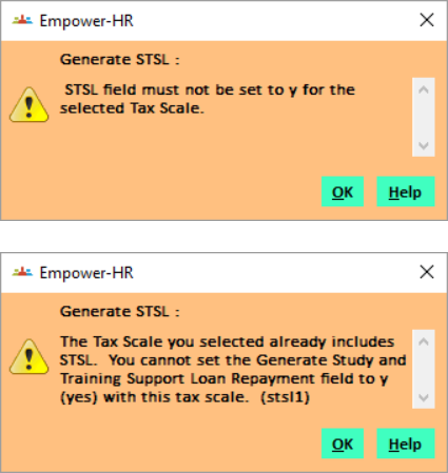
On an employee’s tax details, if you select a Study Training Support Loans (STSL) tax scale and also set the STSL flag, when processing the pay, double the tax is calculated (includes both ZTAX and ZHEC).
Resolution
Now, when you select a Tax Scale with the Study and Training flag set to y (yes) and the Generate Study and Training Support Load Repayment flag set to y (yes), then an error message displays.
STP 2 - payment type p payment codes (non taxable) not included in payer period totals: emp-7450
EMP-7450
Reported internally (Fusion5)
Issue
Located at:
Background Jobs > STP > STP Payroll Event - Phase 2
Payment codes of type p (payment) with the Pay after tax is calculated? field set to y (i.e. non-taxable payments) are not included in the Payer Period Totals (TotalGrossPaymentsWithholdingA) in the STP 2 file.
Resolution
The STP 2 process has been changed to include non-taxable payment codes with pay type p (payment).
STP 2 - reporting super liability values missing true SGC values in STP file: ihelp 447372
iHelp: 447372
EMP-7847
Reported by: John Deere
Issue
When employees have Defined Benefit Super Funds and also Non Defined Benefit Super Funds which record normal Superannuation Guarantee Contributions (SGC) amounts, then their true SGC values are missing from the Single Touch Payroll (STP) Phase 2 file.
Resolution
This issue is fixed. See the following results.
Both defined benefit and non-defined benefit super funds
When an employees has multiple super funds, where one is a Non Defined Benefit fund and the other a Defined Benefit Super fund:
- a super Ordinary Time Earnings (OTE) record is written to the STP 2 file (type O) with a zero value (this is optional so zero can be reported)
- a super liability record is written to the STP 2 file (type L) with the accumulated super value for the Non Defined benefit fund only
No super liability values are accumulated in the STP 2 file for Defined Benefit super funds.
Only defined benefit super fund
When an employee has only a Defined Benefit Super fund(s):
- a super OTE record is written to the STP 2 file (Type O) with a zero value
- a super liability record is not written to the STP 2 file (Type L) as Defined benefit Super liability is not reported
Only non-defined benefit super fund
When an employee has only a Non Defined benefit Super fund(s):
- a super Liability record is written (Type L) for the accumulated Super value for the Non Defined Benefit funds
- a super OTE record is written to the STP 2 file (Type O) with the OTE value
Scheduled jobs and dynamic dates - error occurs: ihelp 443228 #13504
iHelp: 443228 #13504
EMP-7751
Reported by: Penrith City Council
Issue
Located at:
Background Jobs > Leave
Scheduling the Calculate Accruals and Generate Leave Provisions background jobs fails when using certain dynamic dates, for example, $ITODAY, $IMORROW.
|
The program to replace a dynamic date with the real date (e.g. 19Jan23) fails to assign it back to the parameter that holds the dynamic date (e.g. $ITODAY). Data validation fails because the dynamic date (in this example, $TODAY) is not a valid date. |
Resolution
The real date is now assigned back to the parameter and the background jobs run successfully.Unidentified operator in employee/pay code browse: ihelp 338034 #12828
iHelp: 338034 #12828
EMP-5958
Reported by: Catholic Schools Office, Diocese of Maitland-Newcastle (CSOMN)
Issue
Located at:
Tasks > External Adhoc PDE
Tasks > Employee Pay Data Entry
Pay data entry done via External Adhoc PDE, Employee Pay Data Entry (flat file), and Employee Self Service, is not saved into the Pay Data Entry (PDE) audit table so users are unable to track who originally uploaded the data.
Resolution
PDE data entered via External Adhoc PDE, Employee Pay Data Entry (flat file), and Employee Self Service is now saved into the PDE audit table for auditing purposes.
Unable to crossboard (via a spreadsheet) if the old position has been end-dated: ihelp 447062
iHelp: 447062
EMP-7906
Reported by: Diocese of Lismore Catholic Schools Limited (DLCSL)
Issue
Unable to crossboard employees to EHR if the old position number has been end-dated on the employee’s position screen. An error occurs:
Old Position Not Found
Resolution
Selection of old positions with an end date greater than, or equal to, the starting date has been removed.
When onboarding via bulk take-on (or API), tax treatment code is incorrect: emp-7928
EMP-7928
Reported by: Department of Fire and Emergency Services (DFES)
Issue
When onboarding employees:
- manually via the desktop with the Tax Scale set to 2 and the HECS flag set to y (yes), the Tax Treatment code correctly defaults to RTSXXX
- via bulk take-on (or API) and you have not provided the Tax Treatment code, the code incorrectly defaults to RTXXXX
Resolution
The background onboarding process has been fixed so that the Tax Treatment code will default correctly.
As a result of fixing this issue, providing Tax Treatment data in the bulk take-on file is no longer mandatory (now optional).
RBF mercer spectrum process crashes (crirbfms): ihelp 461441
iHelp: 461441
EMP-8038
Reported by: Department of Premier and Cabinet (DPAC), Tasmania
Issue
When DPAC runs the fortnightly RBF Mercer Spectrum Background Job (c-report crirbfms) following the pay run, the program crashes with an invalid identifier error. So the Relief Listing report does not display data.
Resolution
The program has been modified so that it no longer references the invalid field on the pay history table.
Compliance dashboard - missing registrations search displays employee code instead of name: emp-8076
EMP-8076
Reported by: Catholic Education Archdiocese of Canberra and Goulburn (CECG)
Issue
On the Compliance dashboard in self service, when searching for missing compliance registrations, the results show the employee code instead of the employee name – on the screen and in exported data.
Resolution
The employee name now displays in the missing registration search and export.
Saved report output format does not default to the selected value: emp-8051
EMP-8051
Reported internally (Fusion5)
Issue
Located at:
Background Jobs > Requested Jobs > Requested Jobs
When the user selects a job with a prefix of x, then selects View > Retrieve Details, the Output Format field is blank where it should default to the format the user selected.
Resolution
The Output Format drop-down list now correctly displays the selected value.
Pay certification - temporary approver column not displaying with pagination: emp-8252
EMP-8252
Reported by: Department of Communities (DoC)
Issue
Located at:
Organisation > Pay Certification Admin (HR)
Organisation > Pay Certification Audit
The Temporary Approver column hides on pagination in Pay Certification Admin screen and Pay Certification Audit screen.
On first opening the screen, the user can see the Temporary Approver column in the displayed data. Where there are multiple pages of data and the user navigates to next pages, the Temporary Approver column no longer displays.
|
EmpowerHR checks if any of the rows has a temporary approver. In the case of pagination, the system follows a slightly different path compared to a normal search. The system does not set the has temporary approver flag to true because it never passes through that part of the function |
Resolution
The functionality to check for has temporary approver flag in the view has been removed. Regardless of temporary approver or not, the column displays unless the client chooses to hide it using the screen paint feature.
Pay certification - export button error: emp-8253
EMP-8253
Reported by: Department of Communities (DoC)
Issue
Located at:
Organisation > Pay Certification Audit
The Export all pages and Export functions are not working on the Pay Certification Audit screen when a user first filters data on the Pay Certification Admin screen and then opens the Pay Certification Audit screen directly from the that screen.
Resolution
The Pay Certification Audit screen has been fixed so it only uses data stored in the session scope during pagination.
Compliance registrations - issue 16 - windows disappear when opening an attachment: emp-7610
EMP-7610
Reported by: Catholic Education Archdiocese of Canberra and Goulburn (CECG)
Issue
Located at:
Compliance Registrations
When the client actions a compliance registration request and opens an attachment provided with the request, the parent attachment window hides behind the main browser window (as the attachment opens up a new tab).
Resolution
The attachments now open up in a new window so the parent attachment window is still stacked on top of the main window and is not hidden.
Compliance registrations - screen painting data missing and unknown field: emp-7697
EMP-7697
Reported by: Catholic Education Archdiocese of Canberra and Goulburn (CECG)
Issue
Located at:
Control Tables > Compliance Management > NESA Accreditation Level
Issue 1
When the user tries to apply screen painting to the NESA Accreditation Level control table, the screen painting data is missing from the Painting NESA Accreditation Level screen - for both summary and detail screens.
Issue 2
The Classification flag on the NESA Accreditation Level detail screen is unclear.
Resolution
Issue 1: Screen painting has been enabled for both NESA Accreditation Level summary and detail screens.
Issue 2: The Classification field on the NESA Accreditation Level detail screen is now a dropdown list to choose from. The options in the list are c (conditional) and p (proficient).
Compliance registrations - duplicate certificates in bulk upload: emp-7832
EMP-7832
Reported internally (Fusion5)
Issue
Located at:
Tasks > Compliance Management > Bulk Upload Wizard
When doing a bulk upload of compliance certificates, the system allows a record with the same certificate type, employee code, and expiry date to be re-uploaded even when the same record exists in the database.
Resolution
The process now checks the database for records with the same certificate type, employee code, and expiry date before inserting a new record. If a record does exist, the system no longer uploads the new record but simply writes an error.
Flexi time - define settlement periods - can't create new settlement period for fresh flexi code: emp-7942
EMP-7942
Reported internally (Fusion5)
Issue
Located at:
Flexi Time > Administration > Define Settlement Periods
When the user clicks Add period to add a new settlement period for a fresh flexi code (which doesn’t have any records), then enters the Calendar Year and Start Date:
- the End Date field does not auto-populate (as expected)
- an error message displays
Resolution
The End Date field now auto-populates and no error occurs.
STP 2 - paid dates id incorrectly compared to submission id: emp-7360
EMP-7360
Reported internally (Fusion5)
Issue
Located at:
Background Jobs > STP > STP Files Generation > STP Payroll Event - Phase 2
When running the STP Payroll Event – Phase 2 (prgstp21) report, an error can occur in certain scenarios, such as when:
- the installation option called Process Termination in Pay Run (term) is set to n (no)
- employees are set for termination where the last payment date is the same as the STP 2 process pay date
- the STP 2 process is run before Process Terminations
- report parameters are set in the following ways:
- Final Event for Fin. Year (y/n) is set to y (yes)
- All employees (y/n) is set to y (yes)
or
- All employees (y/n) is set to n (no) with the Adhoc Code field blank
The issue results in the XML output file:
- missing EmployeeEnd and CessationType elements
- producing RemunerationPayrollEventFinal as false when it should be true
Resolution
The STP2 XML file now:
- prints the EmploymentEnd and CessationType elements
- sets the RemunerationPayrollEventFinal to true for terminated employees
STP 2 - unable to update income stream: emp-8084
EMP-8084
Reported by: Catholic Schools Office Maitland-Newcastle (CSOMN)
Issue
Located at:
Tasks > Payroll > Payroll Processing > STP Income Stream Adjustment
At the STP Income Stream Adjustment screen, when updating a record that has a non-zero employment number (for example, e19116), the data is not saved and the following error displays:
The current record not found for change
Resolution
The employment number is now passed to the STP Income Stream Adjustment detail screen. Updates are saved and no error message occurs.
STP 2 - warning messages for income stream rules not printing in the log: emp-8106
EMP-8106
Reported internally (Fusion5)
Issue
Warning messages for STP Income Stream rules (274, 294, 295, 296, 292) can fail to print in the log file even though the conditions to print them are satisfied.
Resolution
The bug has been fixed so that the warning messages for the rules (274, 294, 295, 296, 292) now print when conditions trigger the warnings.
Leave - incorrect leave pay percentage after submitting leave request: ihelp 449720
iHelp: 449720
EMP-7968
Reported by: University of South Australia (UniSA)
Issue
Located at:
Leave > Leave Details (LSL leave requests)
When viewing Long Service Leave (LSL) request details from employee self service, the pay rate shows as 100% even though it is 50%.
Resolution
A change has been made to use the set pay rate from the actual leave so the correct pay rate is now shown to the employee.
EmpowerHR database view (MSSQL only): emp-8041
EMP-8041
Reported internally (Fusion5)
Issue
This issue occurs with one of the Microsoft SQL Server (MSSQL) views that some clients use for reporting. The view is called RWVLVBAL and has a wrong field as a join, resulting in retrieval of incorrect data.
Resolution
The wrong join has been removed from the view.
This fix is for MSSQL only.
Self service reports do not return any data: ihelp 479877
iHelp: 479877
EMP-8404
Reported by: Catholic Education Diocese of Bathurst (CEDB)
Issue
Located at:
Staff > Staff Reports
When a user runs a Staff Report for Leave Details, no data is returned in the report results.
Resolution
Changes have been made and the report now returns data as expected.Post-2023 release qmvecost view - does not return all information: emp-8607
EMP-8607
Reported by: Catholic Diocese of Maitland-Newcastle (CDME)
Issue
Located at:
Enquiries
The qmvecost view in Query Manager returns only one record per employee when it should return multiple records based on employee position history.
| For release 2023, the view was changed to select active records relative to only the current date. |
Resolution
The view has now reverted to before release 2023. Records selected will not be subjected to the current date.Payslip displays in ESS while pay is running: ihelp 456158 #13738
iHelp: 456158 #13738
EMP-8012
Reported by: Department of Health (DoH)
Issue
Employees can access their payslip in ESS where the pay run for the pay period is still processing. This results in inconsistent data.
Resolution
A fixed has been added to only retrieve payslips for finalised pays.Email address validation not optional: ihelp 412321
iHelp: 412321
EMP-7200
Reported by: Department of Premier and Cabinet (DPAC)
Issue
Located at:
On desktop screens where email validation occurs
The client is unable to change field severity level for email address validation to stop a hard warning from occurring.
EmpowerHR forces the user to enter a valid email address.
Resolution
Validation of a valid email address is now optional.Resolved integration issues
TimeFiler - part-time employee shows as full-time: ihelp 254618 #13377
iHelp: 254618 #13377
EMP-7317
Reported by: Department of Communities (DoC)
Issue
Located at:
Employee Position Information
TimeFiler sometimes displays an incorrect condition code against an employee when they are acting in another position.
Resolution
This issue is fixed.EmpowerHR and MyWorkplace - leave request integration problematic: emp-7980
EMP-7980
Reported by: Vitasoy
Issue
Integration of leave requests between EmpowerHR (EHR) and MyWorkplace (MWP) has been problematic.
Resolution
The following changes have been made to allow MWP to correctly display leave data sent to/from EHR:
- EHR Workflow monitor polls leave workflow requests entered in EHR Self Service and writes the leave category and leave reason to the MWP integration table
- MWP maps the EHR leave category to MWP leave type, and EHR leave reason to a MWP absence reason
- MWP does additional interpretation as needed
- MWP populates the external pay file with leave mapping pay code and leave reason code
See also:
EHR and MyWorkplace Leave Integration Manual in the Infusion Knowledge Base
EmpowerHR-MyWorkplace integration - future leave requests not displaying after pay run: ihelp 32085
iHelp: 32085
EMP-8610
Reported by: RM Williams
Issue
Located at:
Leave Details
Future leave requests sent to MyWorkplace are disappearing from EmpowerHR’s self service view when the current pay period is completed.
|
|
The pay process finalises (accepts) all requests sent to MyWorkplace, not just requests that fall into the current pay period, causing requests dated on or after the pay period start date to disappear from EmpowerHR self service. |
Resolution
The pay process now correctly finalises only leave requests that fall within the current pay period. EmpowerHR self service users can view requests that fall into a future pay period on their Leave Details catalogue (in the Pending Requests table).
Upgrade error message occurs when running SAFFE super file: ihelp 463557
iHelp: 463557
EMP-8083
Reported by: John Deere
Issue
Located at:
Background Jobs > Payroll Processing > Interfaces > SAFFE Super File
When running the SAFFE Super File (criosafe), the following error occurs:
Error Running Report: The Build No of current report is 10. You previously ran the report with Build No 13. Current report is now out of date. Please contact Fusion5 for the latest report version.
|
|
The client is running a version of the report not officially released. |
Resolution
The official release version of the report has been provided (under build 13).
AECOM oracle interface - incorrect user name assigned for some employees: emp-8117
EMP-8117
Reported by: AECOM
Issue
Located at:
Background Jobs > Interfaces from ORACLE-HR > Personal Interface > Personal Data Update
This issue occurs when running the Personal Data Update process (updating EmpowerHR data from ORACLE-HR). In some cases, an employee’s user name is incorrectly assigned with another employee’s user name.
Resolution
The employee take-on process has been fixed so if a critical error is found while processing an employee, then no further processing is performed on that employee and the system displays an error in the Personal Data Transfer Errors screen.
© 2023 Fusion5. All rights reserved.