---
title: "Workplace reason codes"
id: "workplace-reason-codes"
project: "EHR User Guide"
url: "https://help.cloud5.com.au/articles/ehr-user-guide/workplace-reason-codes"
updated: 2026-10-19T00:53:33Z
---
# Workplace reason codes
## Create a workplace reason code
You can only create workplace reason codes for the sections you manage.
To create a workplace reason code: 
1. Go to **Relief and Payments** > **Workplace Reasons**.
2. At the **Workplace Reasons** catalogue, click **Add**.
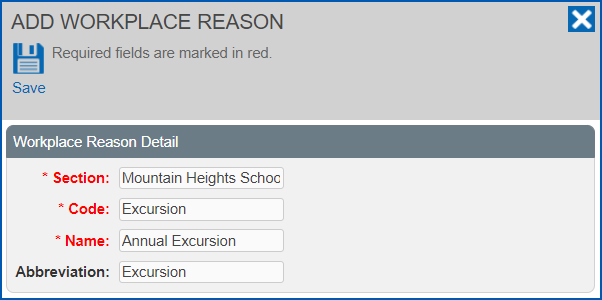
3. The **Add Workplace Reason** screen displays.
4. If you manage:
1. one section, the **Section** field displays that section's name
2. more than one section, select a section from the **Section** field dropdown list
5. At:
1. **Code**, enter a code for the workplace reason, making sure the code is unique and not the same as other codes like official relief reasons, etc
2. **Name**, enter a name for the workplace reason
3. **Abbreviation**, enter an abbreviation for the workplace reason
1. Click **Save**.
2. Repeat this procedure, starting at step 2, to add more workplace reasons.
| Next topic
[Remuneration element codes](/articles/ehr-user-guide/remuneration-element-codes) |
| --- |
© 2023 Fusion5. All rights reserved.