---
title: "When to alert the ATO about changes"
id: "when-to-alert-the-ato-about-changes"
project: "EHR User Guide"
url: "https://help.cloud5.com.au/articles/ehr-user-guide/when-to-alert-the-ato-about-changes"
updated: 2026-10-19T00:54:05Z
---
# When to alert the ATO about changes
 When am I required to alert the ATO about a change?
## ABN change
Generally, your regular STP reporting indicates where you have changed an incorrect ABN on an employee record.
|  | If you change an ABN and also want to transfer the YTD amount, contact Fusion5 Customer Success Team by logging an[iHelp](https://infusion.fusion5.com/) request. |
| --- | --- |
## Payroll solution change
When changing your payroll solution to/from EmpowerHR, if you choose to transfer YTD amounts to the new system (change the identifiers called BMS ID ****and/or Payroll ID ****), you must alert the ATO.
**BMS ID** is a business management software identifier that uniquely identifies the source of employee data sent to the ATO. It's like a serial number, used to identify which instance of the business's payroll software created the data in a pay event. This assists any business with more than one payroll system, or where a business changes from one payroll system to another.**Payroll ID** is a key identifier that represents each employee in the payroll that, together with payee details and tax file number (TFN), enables the ATO to uniquely identify the taxpayer. It captures the individual's personal information, records their payroll data, and maintains their YTD amounts against the record.
###
### Change *to* EmpowerHR from another payroll solution
When changing *to* EmpowerHR, if you:
* are *not* transferring YTD amounts, then it's business as usual and no further action is necessary
* *are* transferring YTD amounts, then there are two methods to choose from. You can either:
* zero out YTD amounts, *or*
* replace key identifiers
| Zero out YTD amounts | If you choose to zero out YTD amounts:
Before you run your first pay event in EmpowerHR, send a zeroing out update event from your legacy system. This action sets all the employees' YTD values on the legacy system to zero. It also indicates to the ATO you no longer use the system.
In EmpowerHR, run an [STP payroll event](/articles/ehr-user-guide/run-an-stp-payroll-event) or [STP update event](/articles/ehr-user-guide/run-an-stp-update-event). Running the event continues to report the YTD for employees. |
| --- | --- |
| Replace key identifiers | To replace key identifiers (if you're *not* zeroing out YTD amounts):
Find out your previous solution's key identifiers, **BMS ID** and employees' **Payroll ID**.

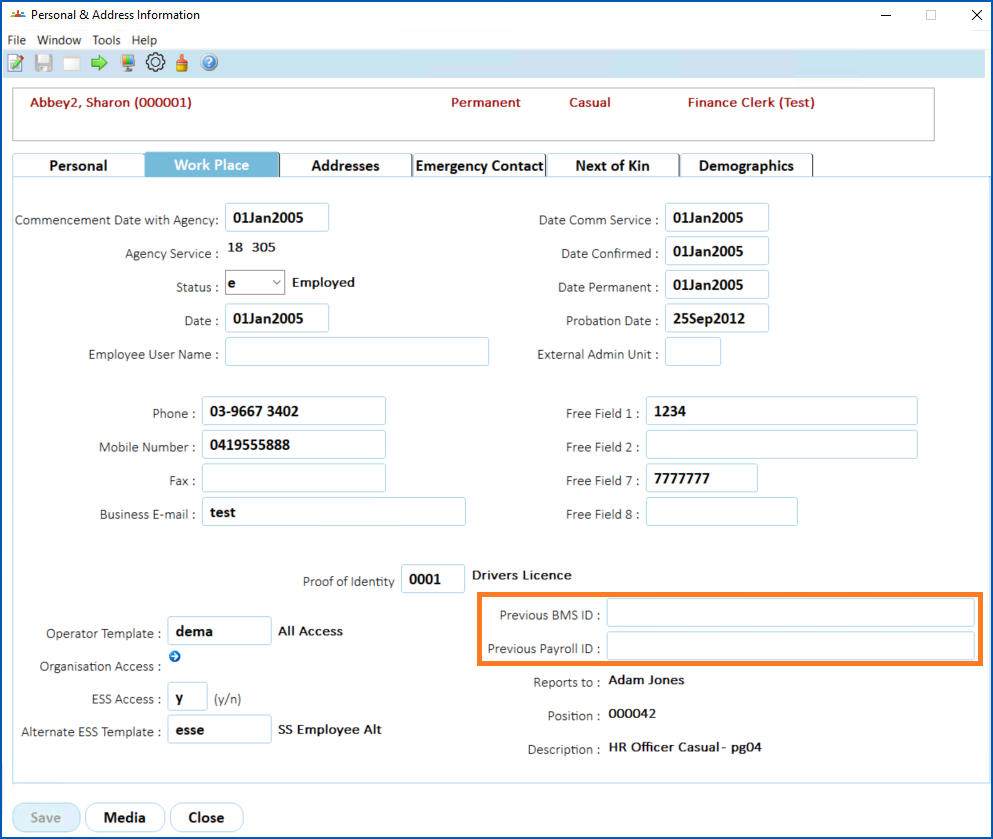
In EmpowerHR, for each employee, update the **Previous BMS ID** and **Previous Payroll ID** fields to change the legacy identifiers to the new ones. You can do this:
- as part of your standard take-on process, or
- by entering the data in the Previous BMS ID and Previous Payroll ID fields located on the Work Place tab of the employee's Personal and Address Information screen

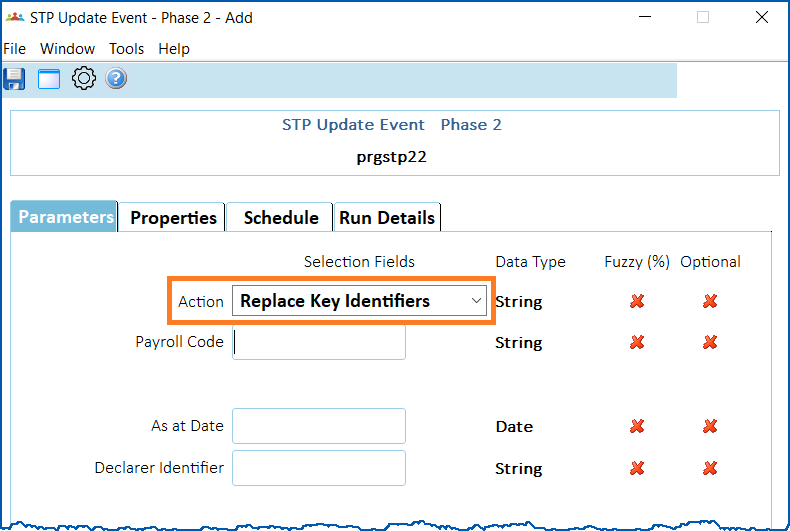
In EmpowerHR, run an [STP update event](/articles/ehr-user-guide/run-an-stp-update-event), selecting the action called **Replace Key Identifiers**. Running the update event reports the latest YTD amounts with the new key identifiers and informs the ATO about the old identifiers.
 |
### Change *from*EmpowerHR to another payroll solution
When changing *from*EmpowerHR to another payroll solution, if you:
* are *not* transferring YTD amounts, then it's business as usual and no further action is necessary
* *are* transferring YTD amounts, then there are two methods to choose from. You can either:
* zero out YTD amounts, *or*
* replace key identifiers
| Zero out YTD amounts | If you choose to zero out YTD amounts:

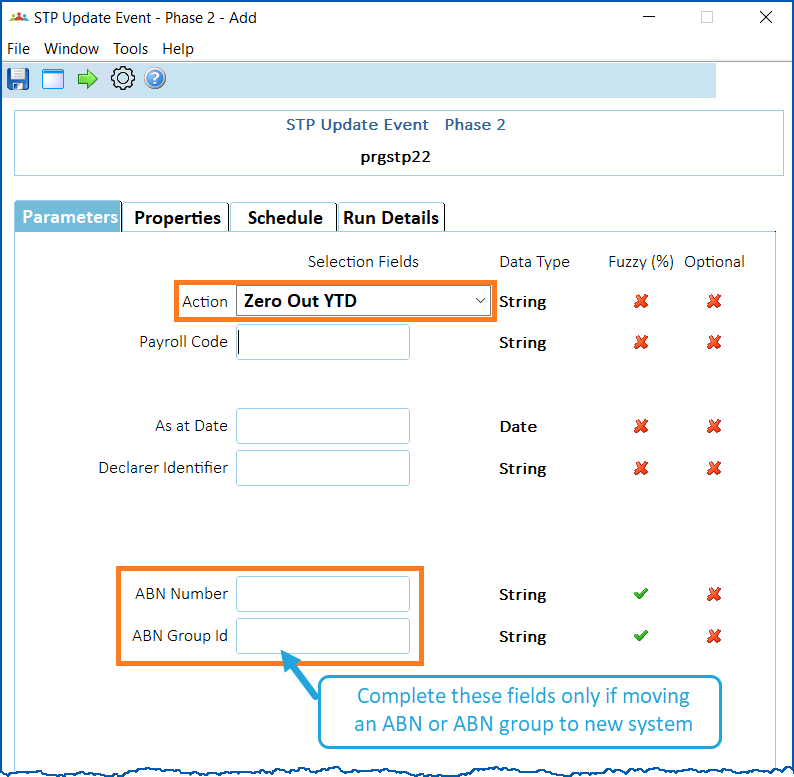
In EmpowerHR, run an [STP update event****](/articles/ehr-user-guide/run-an-stp-update-event)selecting the action called **Zero Out YTD**. If you want to move only a specific ABN or ABN Group to another payroll system, remember to complete the **ABN Number** or **ABN Group Id** field.
Now run the STP payroll event in your new payroll system. |
| --- | --- |
| Replace key identifiers | To replace key identifiers (if you're *not* zeroing out YTD amounts):

In EmpowerHR, find out the EmpowerHR key identifier, **BMS ID**, by checking a pre-existing STP output file.
In your new payroll system:
- for each employee, update the Previous BMS ID and Previous Payroll ID fields to change the legacy identifiers to the new ones.
- run an STP payroll event to replace key identifiers in the new system.
|
| Next topic
[Compliance registration management](/articles/ehr-user-guide/compliance-registration-management) |
| --- |
© 2023 Fusion5. All rights reserved.